1. Uvod
The Aduro Amplify LED Wireless Speaker, model BSP15, is a portable audio device designed for wireless music playback and hands-free calling. It features integrated LED lighting with multiple settings to enhance the audio experience. This manual provides instructions for the proper setup, operation, and maintenance of your speaker.
Šta je u kutiji:
- Aduro Amplify LED Wireless Speaker (BSP15)
- Kabel za punjenje
2. Sigurnosne informacije
- Do not expose the speaker to water or moisture. This product is not water-resistant.
- Avoid extreme temperatures. Do not place near heat sources or in direct sunlight for extended periods.
- Ne pokušavajte rastavljati ili modificirati zvučnik. To može poništiti garanciju i uzrokovati oštećenje.
- Koristite samo priloženi kabel za punjenje ili njegov certificirani ekvivalent.
- Čuvati van domašaja djece.
3. Značajke proizvoda
- Bežična povezanost: Connects to smartphones, tablets, and other Bluetooth-enabled devices.
- Easy-Touch Pairing: Simplifies the process of connecting to your device.
- Integrisani mikrofon: Allows for hands-free phone calls.
- Izlaz zvuka visokog kvaliteta: Pruža jasan i glasan zvuk.
- Multiple LED Settings: Offers various light modes to complement your audio experience.
4. Kontrole nadview
The Aduro Amplify speaker features intuitive controls located on the top panel for easy access to functions.
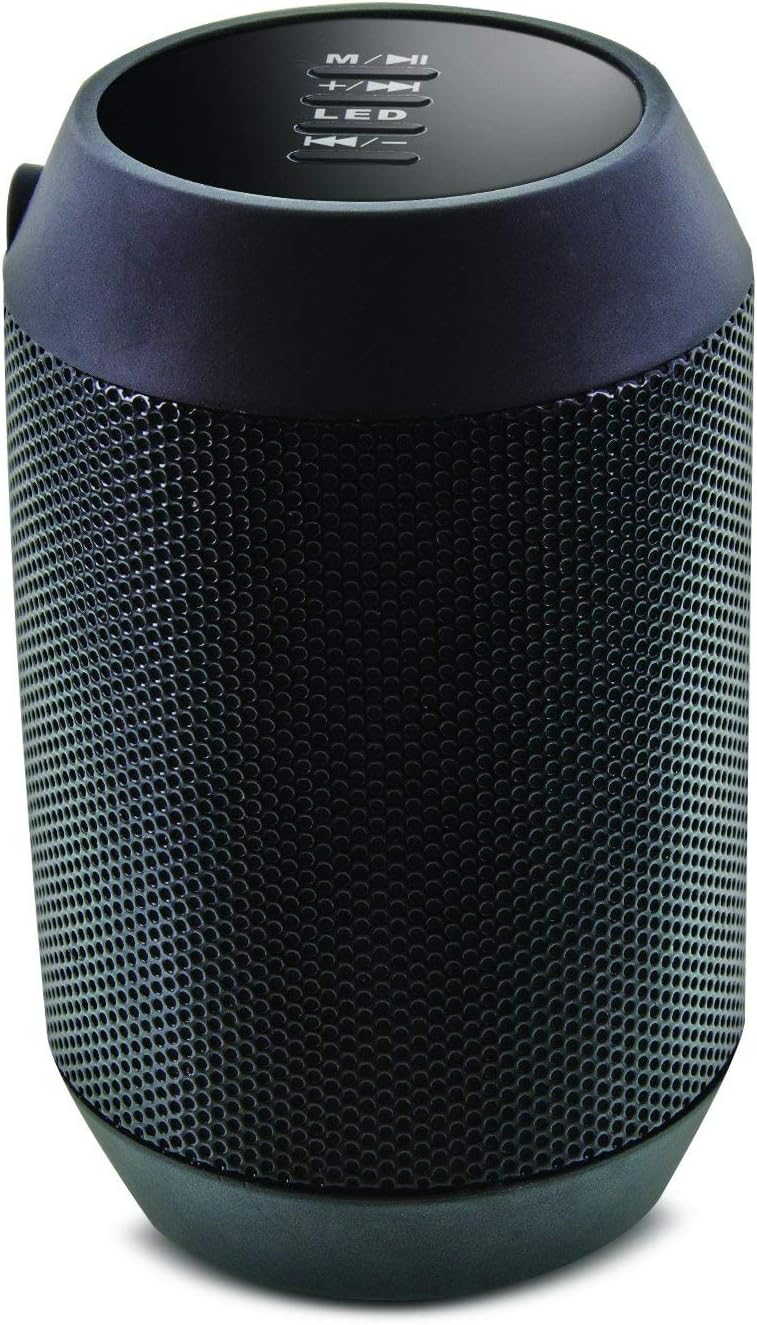
Slika: Vrh view of the Aduro Amplify speaker, highlighting the control panel. From top to bottom, buttons include: M/▶█ (Mode/Play/Pause), +/▶▶ (Volume Up/Next Track), LED (LED Mode Control), ◀◀/- (Volume Down/Previous Track).
- M/▶█ Button: Press to switch between modes (e.g., Bluetooth, AUX). Press and hold to power on/off. Short press to Play/Pause music.
- +/▶▶ Button: Short press to increase volume. Press and hold to skip to the next track.
- LED dugme: Press to cycle through different LED light modes.
- ◀◀/- Button: Kratko pritisnite za smanjenje jačine zvuka. Pritisnite i držite za prelazak na prethodnu pjesmu.
5. Upute za postavljanje
5.1 Punjenje zvučnika
Before first use, fully charge the speaker. Connect the provided charging cable to the speaker's charging port and the other end to a USB power source (e.g., computer USB port, USB wall adapter). The LED indicator will show charging status and turn off or change color when fully charged.
5.2 Uključivanje/isključivanje
- Za uključivanje: Pritisnite i držite M/▶█ button for approximately 3 seconds until you hear an audible prompt or see the LED indicator light up.
- Za isključivanje: Pritisnite i držite M/▶█ button for approximately 3 seconds until you hear an audible prompt or the LED indicator turns off.
5.3 Bluetooth uparivanje
Da biste povezali zvučnik s uređajem koji podržava Bluetooth:
- Ensure the speaker is powered on and in Bluetooth pairing mode. The LED indicator will typically flash rapidly, indicating it is ready to pair.
- On your smartphone, tablet, or other device, navigate to the Bluetooth settings.
- Omogućite Bluetooth i potražite dostupne uređaje.
- Select "Aduro BSP15" (or similar name) from the list of found devices.
- Once paired, the speaker will emit an audible confirmation, and the LED indicator will typically stop flashing and remain solid.
- Zvučnik će automatski pokušati ponovo da se poveže sa poslednjim uparenim uređajem kada se uključi.
5.4 Žičana veza (AUX)
For devices without Bluetooth, you can use a 3.5mm audio cable (not included) to connect to the speaker's AUX input port. Once connected, the speaker should automatically switch to AUX mode. If not, press the M/▶█ button to cycle to AUX mode.
6. Uputstvo za upotrebu
6.1 Reprodukcija zvuka
- Pusti/pauza: Kratko pritisnite M/▶█ dugme.
- Povećavanje glasnoće: Kratko pritisnite +/▶▶ dugme.
- Smanjivanje jačine zvuka: Kratko pritisnite ◀◀/- dugme.
- Sljedeća pjesma: Pritisnite i držite +/▶▶ dugme.
- Prethodni zapis: Pritisnite i držite ◀◀/- dugme.
6.2 Pozivi bez upotrebe ruku
When connected via Bluetooth, the speaker's built-in microphone allows for hands-free calling.
- Odgovori na poziv: Kratko pritisnite M/▶█ dugme kada zazvoni dolazni poziv.
- Završi poziv: Kratko pritisnite M/▶█ dugme tokom poziva.
- odbiti poziv: Pritisnite i držite M/▶█ dugme kada zazvoni dolazni poziv.
6.3 LED Light Settings
Pritisnite LED button to cycle through the available light modes. The speaker offers various visual effects, including pulsating lights that react to music.
7. Održavanje
7.1 Čišćenje
Obrišite zvučnik mekom, suhom krpom. Nemojte koristiti abrazivna sredstva za čišćenje, alkohol ili druge hemijske rastvarače, jer mogu oštetiti površinu.
7.2 Skladištenje
Kada se ne koristi duži period, zvučnik čuvajte na hladnom i suhom mjestu, dalje od direktne sunčeve svjetlosti i ekstremnih temperatura. Preporučuje se periodično punjenje baterije kako bi se produžio njen vijek trajanja.
8. Otkrivanje problema
- Zvučnik se ne uključuje:
Ensure the battery is charged. Connect the charging cable and try again after a few minutes. - Nije moguće uparivanje sa Bluetooth uređajem:
Ensure the speaker is in pairing mode (LED flashing). Make sure Bluetooth is enabled on your device and it is within range (typically 10 meters/30 feet). Turn both devices off and on again, then try pairing. Ensure no other devices are currently connected to the speaker. - Nema zvuka ili je jačina zvuka niska:
Check the volume levels on both the speaker and your connected device. Ensure the speaker is correctly paired or the AUX cable is fully inserted. If using AUX, ensure the correct mode is selected. - LED svjetla ne rade:
Press the LED button to cycle through modes. If still unresponsive, power cycle the speaker.
9. Specifikacije

Slika: Sa strane view of the Aduro Amplify LED Wireless Speaker, showing its cylindrical design and speaker grille.
| Naziv modela | BSP15 |
| Broj modela stavke | LU4-01-BSP15 |
| Brand | Aduro |
| Materijal | Plastika |
| Vrsta zvučnika | Subwoofer |
| Posebne karakteristike | Built-in Microphone, Portable |
| Tehnologija povezivanja | bežični (Bluetooth) |
| Bežična komunikacija | Bluetooth |
| Način audio izlaza | Stereo |
| Maksimalna izlazna snaga zvučnika | 5 Watts |
| Kontrolni metod | Dodirnite |
| Dimenzije proizvoda | 6"D x 3.8"Š x 3.5"H |
| Težina artikla | 6.7 unce |
| Nivo vodootpornosti | Nije vodootporan |
| Izvor napajanja | Električni sa kablom (za punjenje) |
10. Garancija i podrška
10.1 Ograničena garancija
This Aduro product is covered by a limited warranty against defects in materials and workmanship under normal use. The duration and terms of the warranty may vary. Please refer to the warranty card included with your purchase or contact Aduro customer support for specific details.
10.2 Korisnička podrška
For technical assistance, warranty claims, or product inquiries, please contact Aduro customer support. Contact information can typically be found on the manufacturer's official webweb-mjestu ili na ambalaži proizvoda.
Manufacturer: Aduro


