1. Uvod
This manual provides detailed instructions for the installation, operation, and maintenance of your Zmodo Outdoor Security Camera System, Model ZM-W0002-4. This system offers 1080p Full HD surveillance for your property, featuring night vision, motion detection, and weatherproof construction.
2. Sadržaj paketa
Provjerite da li se sve stavke nalaze u vašem paketu:
- 4 x Zmodo Outdoor Security Cameras
- 4 x napajanja
- 1 x Kratki vodič
3. Postavljanje i instalacija
Follow these steps to set up your Zmodo security cameras:
3.1. Postavljanje kamere
Select optimal locations for your cameras. Consider areas that provide a clear view of entry points or critical zones. Ensure the chosen location is within range of your Wi-Fi network and has access to a power outlet.

Image: Zmodo outdoor security camera mounted on a wall, illustrating its weatherproof design and typical installation scenario.
3.2. Priključak za napajanje
Connect each camera to its respective power supply and plug it into a standard electrical outlet. The camera will power on automatically.
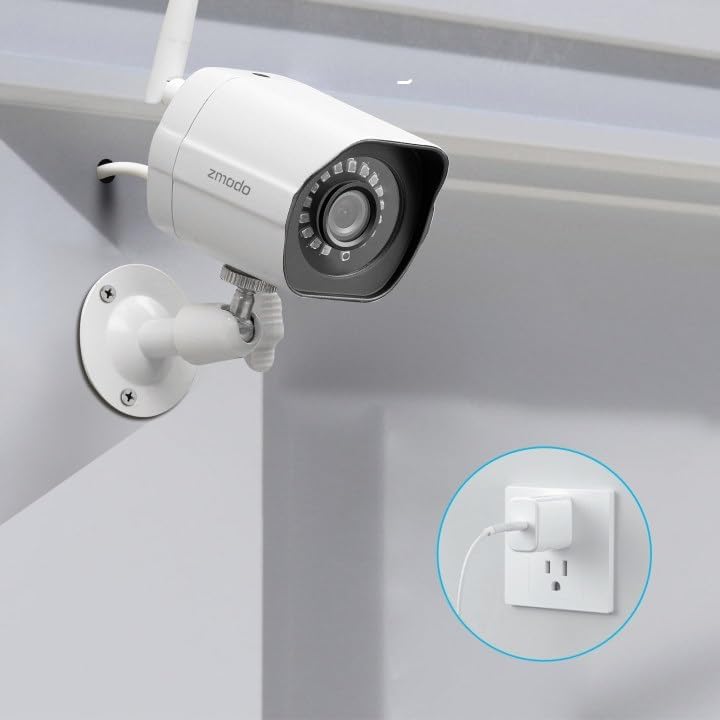
Image: A Zmodo outdoor security camera with its power cable plugged into a wall outlet, demonstrating the power connection process.
3.3. Preuzimanje aplikacije i kreiranje računa
Download the Zmodo app from your smartphone's app store (iOS or Android). Create a new account or log in if you already have one.
3.4. Uparivanje kamere
Follow the in-app instructions to add your cameras. Zmodo cameras typically use QR code pairing technology for straightforward setup. Ensure your smartphone is connected to the 2.4GHz Wi-Fi network that the cameras will use.

Image: A set of four Zmodo outdoor security cameras, illustrating the product's appearance and external antenna design for enhanced Wi-Fi signal.
4. Operacija
Once your cameras are set up, you can access and manage them through the Zmodo app.
4.1. Uživo View
Open the Zmodo app to view live 1080p Full HD video streams from your cameras. You can monitor up to four camera feeds simultaneously on one screen.

Image: A smartphone screen showing a four-panel live video feed from multiple Zmodo cameras, demonstrating the multi-camera viewing karakteristika.
4.2. Detekcija pokreta i upozorenja
The cameras are equipped with motion detection. When motion is detected, you will receive instant alerts on your smartphone. Review recorded clips via the app.

Image: A smartphone displaying a push notification for motion detected by a Zmodo camera, indicating the alert system.

Image: A Zmodo camera with an illustration of AI-powered motion detection, highlighting its ability to accurately detect and identify humans, pets, and vehicles.
4.3. Noćni vid
The cameras feature adjustable night vision with built-in IR lights, providing clear images up to 65 feet in low-light conditions.
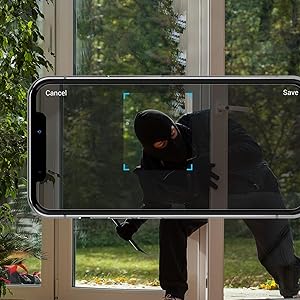
Image: A Zmodo camera mounted outdoors at night, with its red IR lights active, demonstrating its night vision capability.
4.4. Cloud Storage
Zmodo offers a cloud service for secure storage of your video footage. A subscription plan is required for this feature. This ensures continuous recording and access to past events.
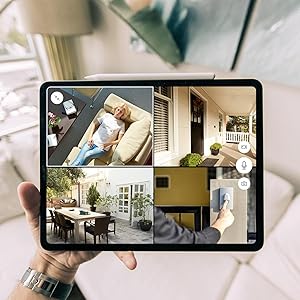
Image: An abstract graphic depicting a secure cloud with a padlock icon, symbolizing the bank-level encryption used for Zmodo's cloud storage service.
4.5. Integracija s Alexom
The cameras are compatible with Amazon Alexa. Use voice commands like "Alexa, show me the front door" to view live streams on compatible Alexa-enabled devices.

Image: An Amazon Echo Show device displaying a live feed from a Zmodo camera, illustrating the Alexa integration feature.
5. Održavanje
Regular maintenance helps ensure optimal performance and longevity of your cameras.
- Čišćenje sočiva: Povremeno čistite objektiv kamere mekom,amp krpom uklonite prašinu, prljavštinu ili mrlje od vode koje mogu utjecati na jasnoću slike. Izbjegavajte abrazivna sredstva za čišćenje.
- Provjera napajanja: Ensure power cables are securely connected and free from damage.
- Stabilnost montaže: Verify that the cameras remain securely mounted to prevent accidental dislodgement.
- Ažuriranja softvera: Keep the Zmodo app updated to the latest version for new features and security enhancements.
6. Otkrivanje problema
If you encounter issues with your Zmodo cameras, refer to the following common solutions:
- Kamera van mreže:
- Check the power connection to ensure the camera is receiving power.
- Verify your Wi-Fi network is operational and the camera is within range.
- Restart the camera by unplugging and replugging its power supply.
- Ensure your router's 2.4GHz Wi-Fi band is enabled and the camera is connected to it.
- Loš kvalitet slike:
- Očistite sočivo kamere.
- Provjerite da nema prepreka u vidnom polju kamere view.
- Provjerite jačinu Wi-Fi signala; slab signal može utjecati na kvalitetu video streaminga.
- Detekcija pokreta ne radi:
- Verify motion detection settings are enabled in the Zmodo app.
- Adjust motion sensitivity settings if necessary.
- Osigurajte da je kamera view nije ometano.
- Nema primljenih upozorenja:
- Check your smartphone's notification settings for the Zmodo app.
- Provjerite da li vaš telefon ima aktivnu internetsku vezu.
7. Specifikacije
Key technical specifications for the Zmodo Outdoor Security Camera System (Model ZM-W0002-4):
| Feature | Detalj |
|---|---|
| Naziv modela | ZM-W0002-4 |
| Rezolucija video snimanja | 1080p full HD |
| Unutrašnja/vanjska upotreba | Na otvorenom |
| Tehnologija povezivanja | Wi-Fi (2.4GHz) |
| Noćni vid | Do 65 stopa |
| Weather Resistance | IP66 (otporan na vremenske uvjete) |
| Detekcija pokreta | Yes (Motion Only, AI-powered) |
| Kompatibilni uređaji | Pametni telefon, Amazon Alexa, Google asistent |
| Izvor napajanja | Električni uređaj sa kablom (12 volti, 5 vata) |
| Dimenzije (D x Š x V) | 2.2 x 2.1 x 3.4 inča |
| Težina artikla | 3.04 funti (po kameri) |
| Frame Rate | 25 fps |
| Materijal | Plastika |
8. Informacije o garanciji
For specific warranty details regarding your Zmodo Outdoor Security Camera System, please refer to the warranty card included in your product packaging or visit the official Zmodo weblokacija. Planovi zaštite mogu biti dostupni i za prošireno pokriće.
9. Korisnička podrška
If you require further assistance or have questions not covered in this manual, please contact Zmodo customer support through their official website or the Zmodo app. Support resources, including FAQs and troubleshooting guides, are often available online.
Zmodo Official Webstranica: www.zmodo.com


