Uvod
This manual provides comprehensive instructions for the installation, operation, and maintenance of your Channel Vision NVR-04N-1000 Network Video Recorder. This NVR is designed to be a flexible recording solution for surveillance systems, supporting up to four IP cameras, each up to 5 megapixels. It features automatic networking for simplified setup and integrates with HDMI and ONVIF protocols, including RTSP stream input for third-party camera compatibility.
Za optimalne performanse i dugotrajnost vašeg uređaja, molimo vas da prije upotrebe pažljivo pročitate ovaj priručnik i sačuvate ga za buduću upotrebu.
Product Overview
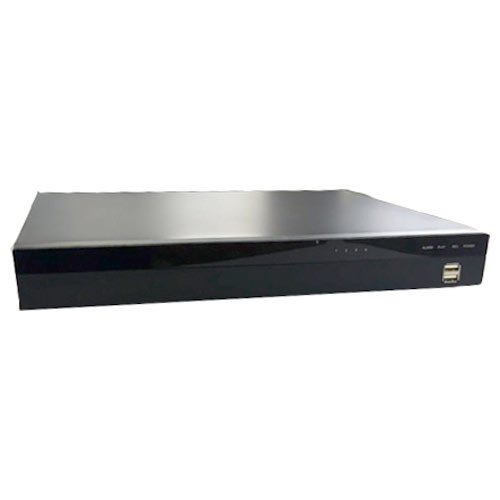
Slika: Front view of the Channel Vision NVR-04N-1000 Network Video Recorder. The device is a black rectangular unit with a silver top panel. The front panel features indicator lights and two USB ports on the right side.
The Channel Vision NVR-04N-1000 is a 4-channel Network Video Recorder equipped with a 1000GB (1TB) hard drive. It offers advanced features for reliable surveillance recording and management.
Ključne karakteristike:
- Supports up to four 5-megapixel IP cameras per channel.
- HDMI video interface for high-quality recording output.
- Real-time 1080p video viewing via Internet browser or mobile application.
- Three distinct recording modes: Manual, Scheduled, and Alarm (Event-Triggered).
- Integrated time and event search functions for efficient footage-preuzimanje.
- Supports up to two 4TB HDDs (Hard Disk Drives).
- CMS (Central Management System) control compatibility.
- Audio backup for all channels.
- Time-point backup function under Ethernet remote control.
- Watchdog monitoring for continuous recording reliability.
- Daylight Saving Time support, Watermark, Privacy Mask, PTZ Control, Digital Zoom.
- Motion Detection, Video Loss Detection, Alarm Recording, Pre-Alarm Recording, Buzzer.
Postavljanje i instalacija
Automatsko umrežavanje:
The NVR-04N-1000 simplifies initial setup with its automatic networking feature. Upon powering on and connecting to your network, the NVR will automatically detect and add compatible IP cameras to the system. Ensure all IP cameras are properly connected to the network before powering on the NVR.
Fizičke veze:
- Snaga: Connect the DC48V 12V power adapter to the NVR's power input.
- mreža: Connect the NVR to your network router or switch using an Ethernet cable via the WAN Ethernet port (RJ-45 x1). The LAN Ethernet ports (RJ-45 x4) provide PoE 802.3at for direct camera connections.
- Video izlaz: Povežite monitor na NVR koristeći HDMI ili VGA izlazni port.
- USB uređaji: Connect a mouse or other USB devices to the USB 2.0 ports (two on the front, one on the back).
- audio: If required, connect audio input/output devices to the 3.5mm phone jacks on the back.
After all connections are made, power on the NVR. Follow the on-screen prompts for any initial configuration, such as setting date, time, and administrator passwords.
Radni režimi
The NVR-04N-1000 offers three primary recording modes to accommodate various surveillance needs:
- Ručni način rada: This mode allows you to manually initiate and stop recording at any time. It is suitable for situations where specific events need to be recorded on demand.
- Planirani način rada: In Scheduled mode, recording begins and ends based on predefined time intervals. You can configure daily, weekly, or custom schedules to ensure continuous or periodic recording during specific hours.
- Alarm (Event-Triggered) Mode: This mode activates recording automatically when specific events occur. Configurable triggers include motion detection, video loss, external alarm inputs, and digital inputs from connected cameras. This conserves storage space by recording only when an event is detected.
You can configure these modes through the NVR's on-screen interface or via the remote access options (Internet browser or mobile app).
Održavanje
Watchdog Monitoring:
The Channel Vision NVR-04N-1000 incorporates watchdog monitoring technology to ensure uninterrupted recording. In the event of a system error or malfunction, the NVR will automatically restart to restore normal operation and maintain continuous surveillance recording. This feature minimizes downtime and ensures the reliability of your security system.
Sigurnosna kopija podataka:
Redovno pravite sigurnosne kopije važnih datotekatage. The NVR supports USB backup for local storage and time-point backup functions under Ethernet remote control mode, allowing users to select specific time periods for remote backup.
Ažuriranja firmvera:
Periodically check the Channel Vision website for firmware updates to ensure your NVR operates with the latest features and security enhancements. Follow the provided instructions carefully when performing firmware updates.
Rješavanje problema
If you encounter issues with your NVR, consider the following general troubleshooting steps:
- Nema video izlaza:
- Ensure the monitor is correctly connected to the HDMI or VGA port and is powered on.
- Verify the NVR is powered on and its indicator lights are active.
- Check the video input source on your monitor.
- Kamere ne snimaju:
- Confirm that cameras are properly connected to the network and are powered.
- Check the recording schedule and event triggers in the NVR settings.
- Verify that the hard drive has sufficient free space.
- Problemi s mrežnom vezom:
- Ensure the Ethernet cable is securely connected to the NVR's WAN port and your router/switch.
- Check your network router for proper operation.
- Restart the NVR and your network equipment.
- Sistem ne reaguje:
- Perform a hard reboot by disconnecting and reconnecting the power adapter.
- If the issue persists, consult the Channel Vision support resources.
For more detailed troubleshooting or technical assistance, please refer to the support section or contact Channel Vision customer service.
Specifikacije
| Feature | Detalj |
|---|---|
| Broj modela | NVR-04N-1000 |
| Kanali | 4 (supports up to 5MP IP cameras) |
| Veličina tvrdog diska | 1000 GB (1TB) |
| Internal HDD Support | SATA HDD x 2 (each up to 4TB) |
| Power Input | DC48V 12V, 4.16 Amps |
| Power Output (PoE) | RJ-45 x4, PoE 802.3at |
| Max. Power Supply | 60W |
| WAN Ethernet | RJ-45 x1, 10/100/1000 Mbps |
| LAN Ethernet | RJ-45 x4, 10/100 Mbps |
| Video izlaz | HDMI x1 / VGA x1 |
| USB 2.0 portovi | Front: 2 ports / Back: 1 port |
| Audio ulaz | Back: 3.5mm phone jack |
| Audio izlaz | Back: 3.5mm phone jack |
| Načini snimanja | Manual / Schedule / Alarm |
| Search Method | Date / Time / Event |
| Backup Type | USB |
| Monitoring | Watchdog |
| Težina | 2 kg (4.4 lbs) |
| Dimenzije (Š x V x D) | 360 mm x 44 mm x 301 mm (14.17" x 1.73" x 11.85") |
| Odobrenja | FCC |
| Podržani jezici | English, Traditional Chinese, Simplified Chinese, Russian, Italian, Japanese, Czech, French, German, Spanish, Portuguese, Dutch, Slovak, Finnish, Thai, Turkish, Vietnamese, Greek, Hungarian, Slovene |
Garancija i podrška
Informacije o garanciji:
The Channel Vision NVR-04N-1000 comes with a 3 godine garancije od datuma kupovine. Ova garancija pokriva nedostatke u materijalu i izradi pri normalnoj upotrebi. Molimo sačuvajte dokaz o kupovini za reklamacije.
Korisnička podrška:
For technical support, warranty service, or any questions regarding your Channel Vision NVR, please visit the official Channel Vision webweb-mjesto ili kontaktirajte njihovu službu za korisnike. Kontakt informacije se obično mogu pronaći na pakovanju proizvoda ili na proizvođačevim website.
Napomena: Neovlaštene popravke ili modifikacije mogu poništiti vašu garanciju.


