Uvod
Welcome to your new Casio AE-2100W-4AV digital watch. This manual provides detailed instructions for setup, operation, and maintenance to ensure optimal performance and longevity of your timepiece. Please read this manual thoroughly to understand all functions and proper usage.
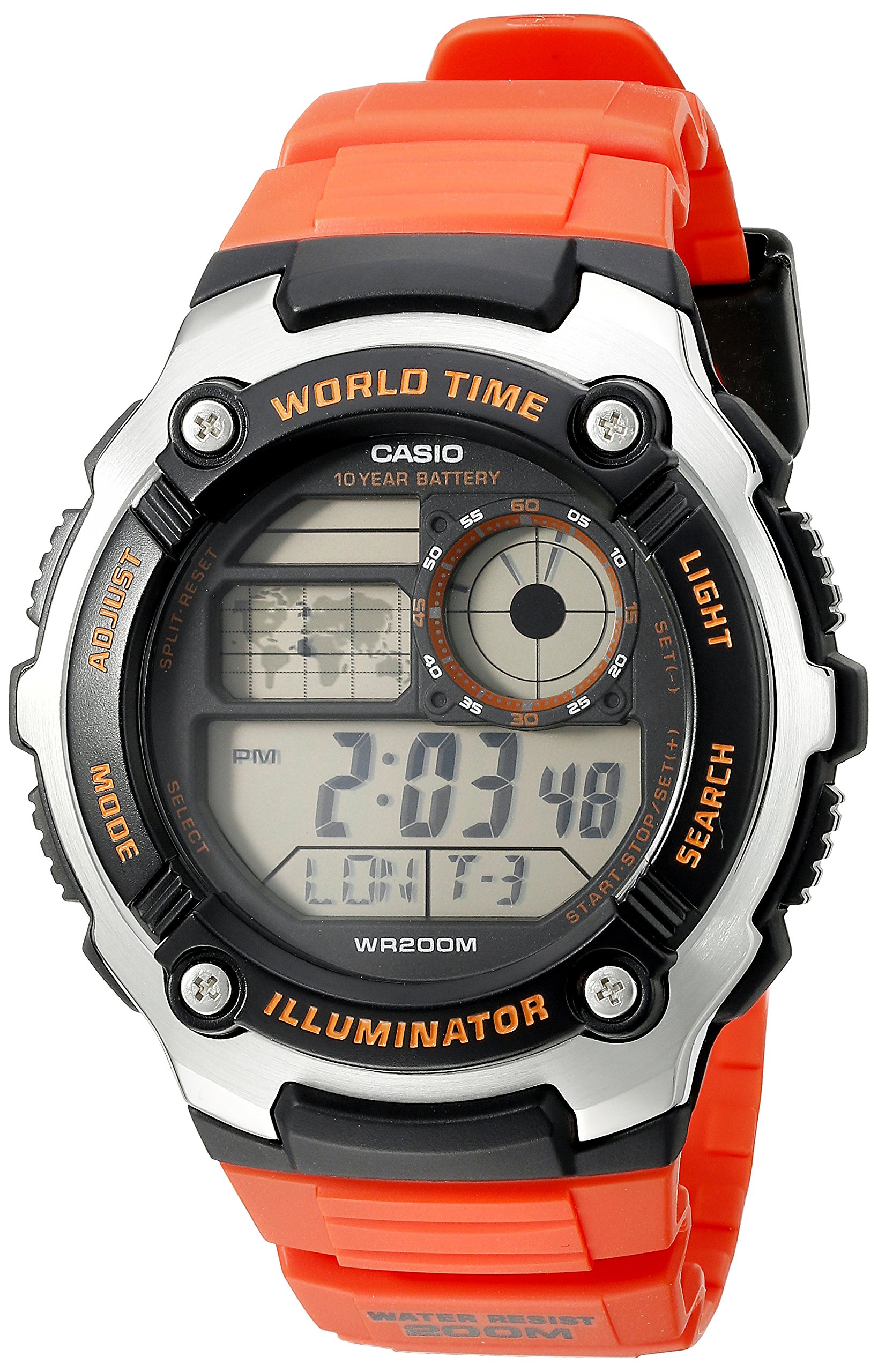
Slika: Front view of the Casio AE-2100W-4AV digital watch, showcasinnjegov prikaz i raspored dugmadi.
Ključne karakteristike
- Digital 10-Year Battery: Extended battery life for long-term use.
- World Map & LC Analog Display: Visual representation of world time zones and an analog-style display.
- Mineralno staklo: Izdržljiv i otporan na ogrebotine brojčanik sata.
- Vodootpornost do 200 metara: Suitable for swimming and diving (not for deep sea diving).
- Materijal kućišta / okvira: Resin / Stainless Steel construction for durability.
- Traka od smole: Comfortable and durable strap.
- Multi Time (4 Different Cities): Track time in up to four different cities simultaneously.
- Svjetsko vrijeme: 31 time zones (48 cities + Coordinated Universal Time).
- Štoperica od 1/100 sekunde: Precise time measurement.
- Tajmer odbrojavanja: Postavite tajmer za određena trajanja.
- 5 Daily Alarms or One-Time Alarms: Multiple alarm settings for daily reminders or single events.
- HourlVremenski signal: Zvona zvone svakog sata.
- Potpuni automatski kalendar (do 2099. godine): Automatically adjusts for month lengths and leap years.
- 12/24-satni format: Izaberite između standardnog i vojnog prikaza vremena.
- Ton rada tipke Uključivanje/Isključivanje: Mogućnost isključivanja zvuka dugmadi.
- Redovno mjerenje vremena: Digital display of hour, minute, second, PM, month, date, day.
Initial Setup
Podešavanje vremena i datuma
To set the current time and date on your watch, follow these general steps. Specific button labels are usually found on the watch case itself (e.g., ADJUST, MODE, LIGHT, SEARCH).
- U načinu rada za mjerenje vremena, pritisnite i držite ADJUST dugme dok gradski kod ne počne treptati, što ukazuje na ekran za podešavanje.
- Koristite MODE button to cycle through the settings: City Code, DST (Daylight Saving Time), 12/24-hour format, Seconds, Hour, Minute, Year, Month, Day.
- Koristite TRAŽI or LIGHT dugmad za promjenu trepćuće vrijednosti.
- Kada su sva podešavanja tačna, pritisnite dugme ADJUST button again to exit the setting screen.

Image: The Casio AE-2100W-4AV watch on a wrist, demonstrating its appearance when worn.
Radni režimi
Your watch features several modes accessible via the MODE dugme. Pritiskom MODE cycles through Timekeeping, World Time, Stopwatch, Countdown Timer, and Alarm modes.
Način mjerenja vremena
This is the default mode, displaying the current time, date, and day of the week for your home city. In this mode, you can press the LIGHT dugme za osvjetljavanje displeja.
Način svjetskog vremena
Iz režima mjerenja vremena pritisnite MODE to enter World Time Mode. Use the TRAŽI button to scroll through different city codes and view their current times. The watch can store up to four different city times.
Štoperica
Da biste koristili štopericu:
- Idite u način rada štoperice pomoću MODE dugme.
- Pritisnite TRAŽI dugme za pokretanje štoperice.
- Pritisnite TRAŽI ponovo da se zaustavi.
- Pritisnite ADJUST dugme za resetovanje štoperice na nulu.
Način odbrojavanja vremena
Da biste postavili i koristili tajmer za odbrojavanje:
- Idite na način rada tajmera za odbrojavanje pomoću MODE dugme.
- Pritisnite i držite ADJUST button until the timer setting starts to flash.
- Koristite MODE dugme za odabir sati, minuta ili sekundi.
- Koristite TRAŽI or LIGHT tipke za podešavanje vrijednosti.
- Pritisnite ADJUST da potvrdite postavku.
- Pritisnite TRAŽI za pokretanje ili zaustavljanje odbrojavanja.
Alarm Mode
Your watch supports up to five daily alarms and an hourly vremenski signal.
- Idite na način rada alarma pomoću MODE dugme.
- Koristite TRAŽI button to cycle through the different alarm numbers (AL1, AL2, etc.) and the Hourly Vremenski signal (SIG).
- Da biste podesili alarm, pritisnite i držite ADJUST button when the desired alarm number is displayed.
- Koristi MODE to select hours or minutes, and TRAŽI or LIGHT za podešavanje vrednosti.
- Pritisnite ADJUST za potvrdu.
- To turn an alarm or the hourlDa biste uključili/isključili vremenski signal, odaberite ga i pritisnite TRAŽI dugme.
Illuminator Light
Pritisnite LIGHT dugme za osvjetljavanje lica sata radi lakšeg viewu uslovima slabog osvetljenja.
Video: A 21-second product rotation video of the Casio AE-2100W-4AV watch, showing its design from various angles. This helps visualize the watch's physical features and button placement.
Održavanje i njega
Trajanje baterije
This watch is equipped with a 10-year battery (CR2025). While designed for longevity, actual battery life may vary depending on usage frequency of features like the illuminator light and alarms. When the display becomes dim or functions become erratic, it may be time for a battery replacement. It is recommended to have battery replacement performed by an authorized service center.
Otpornost na vodu
The watch is rated for 200-meter (660 feet) water resistance. This means it is suitable for recreational swimming, snorkeling, and diving. However, it is not designed for saturation diving. Do not operate buttons while the watch is wet or submerged to prevent water ingress. Avoid exposing the watch to hot water or steam, as this can compromise the water resistance seals.
Čišćenje
Da biste održali izgled vašeg sata:
- Redovno brišite kućište sata i narukvicu mekom, suhom krpom.
- For resin bands, you can use a mild soap solution and a soft brush, then rinse thoroughly with clean water and dry completely.
- Izbjegavajte upotrebu jakih hemikalija, rastvarača ili abrazivnih sredstava za čišćenje, jer oni mogu oštetiti materijale sata.
Rješavanje problema
Problemi sa prikazom
- Prazan ili taman ekran: Baterija je možda slaba ili ispražnjena. Razmislite o zamjeni baterije.
- Netačno vrijeme/datum: Re-enter the Time and Date Setting mode and adjust as necessary. Ensure your home city code and DST settings are correct.
Buttons Unresponsive
- Ensure the watch is not in a locked mode (if applicable, though this model typically does not have a button lock).
- If the watch was recently submerged, ensure it is completely dry before operating buttons.
- Slaba baterija ponekad može utjecati na odziv tipki.
Vremenska netačnost
- Digital quartz watches are generally highly accurate. If significant inaccuracy occurs, it may indicate a need for battery replacement or service.
- Ensure the correct city code and DST settings are applied for your current location.
Specifikacije
| Feature | Detalj |
|---|---|
| Broj modela | AE2100W-4AV |
| Prečnik kućišta | 47.7mm |
| Dimenzije proizvoda | 6 x 6 x 4 inča; 4.8 unci |
| Otpornost na vodu | 200 metara (660 stopa) |
| Vrsta baterije | 1 litijum metalna baterija (CR2025) |
| Približno trajanje baterije | 10 godine |
| Pokret | Kvarc |
| Stakleni materijal | Mineralno staklo |
| Materijal kućišta/okvira | Smola / Nehrđajući čelik |
| Band Material | Smola |
| Kalendar | Full Auto-Calendar (to year 2099) |

Image: Watch size guide for reference, illustrating different watch diameters and heights.
Garancija i podrška
Your Casio AE-2100W-4AV watch is covered by a manufacturer's warranty. Please refer to the warranty card included with your purchase for specific terms and conditions, including coverage duration and service procedures. For technical support, spare parts, or warranty claims, please contact Casio customer service or visit their official webstranica za ovlaštene servisne centre.
For additional information and support, you may visit the official Casio webstranica: www.casio.com


