Uvod
The myTouchSmart Plug-In Indoor/Outdoor Digital Timer is designed to simplify the automation of your lighting and appliances. This weather-resistant timer features two grounded outlets, offering versatile control for landscape, patio, and seasonal lighting. It provides both customizable "My On/Off Time" settings and convenient daily preset options, along with a 24-hour countdown feature. The large LCD screen and blue LED indicators ensure easy programming and monitoring of active programs. Compatible with various light sources including CFL, LED, incandescent, and halogen, this UL listed product is built for convenience and energy efficiency.
Karakteristike proizvoda
- Easy-to-set digital timer with two grounded outlets for landscape, patio, and seasonal lights and appliances.
- Features simple daily preset options, fully customizable "My On/Off Time" settings, and a custom, up to 24-hour countdown feature.
- Weather resistant for both outdoor and indoor use. Includes an attached bracket for easy mounting and installation.
- Compatible with CFL, LED, incandescent, and halogen light sources.
- Large LCD screen and blue LED indicators to show active programs.
- Electrical Rating: 125V/60Hz, 15A/1875W General purpose/resistive.
- CSA listed for safety.

Figure 1: Control outdoor or indoor lights with the myTouchSmart timer.

Figure 2: The timer is weather resistant and suitable for outdoor use.
Uputstva za postavljanje
- Početno napajanje: Plug the timer into a standard 125V AC outlet. The LCD screen will illuminate. If the screen is blank or not reading, plug it in for at least one hour to charge the internal battery.
- Postavite trenutno vrijeme:
- Pritisnite CLOCK dugme.
- Koristite GORE (▲) i DOLJE (▼) strelice za podešavanje sata.
- Pritisnite CLOCK again to move to minutes, then use the arrows to adjust.
- Pritisnite CLOCK a third time to confirm and exit time setting.
- Montaža: Use the integrated mounting bracket to securely attach the timer near your desired outlet. Ensure the timer is positioned to prevent water accumulation.

Figure 3: Simple setup involves setting the current time and custom ON/OFF times.
Video 1: An instructional video demonstrating how to set the current time and program ON/OFF times on the myTouchSmart timer.
Uputstvo za upotrebu
Setting Custom ON/OFF Times ("My On/Off Time")
- Set ON Time:
- Pritisnite MOJE VRIJEME button. The display will show the current ON time setting.
- Koristite GORE (▲) i DOLJE (▼) arrows to adjust the desired ON hour.
- Pritisnite MOJE VRIJEME again to move to minutes, then use the arrows to adjust.
- Pritisnite MOJE VRIJEME a third time to confirm and save the ON time. The blue LED indicator next to "my on time" will illuminate when active.
- Set OFF Time:
- Pritisnite MOJE SLOBODNO VRIJEME button. The display will show the current OFF time setting.
- Koristite GORE (▲) i DOLJE (▼) arrows to adjust the desired OFF hour.
- Pritisnite MOJE SLOBODNO VRIJEME again to move to minutes, then use the arrows to adjust.
- Pritisnite MOJE SLOBODNO VRIJEME a third time to confirm and save the OFF time. The blue LED indicator next to "my off time" will illuminate when active.
Using Preset Schedules
The timer offers three convenient preset schedules:
- Veče (17:00-00:00): Pritisnite VEČE dugme.
- Jutro (5:00-8:00): Pritisnite JUTRO dugme.
- Cijelu noć (18:00-6:00): Pritisnite CIJELU NOĆ dugme.
To activate a preset, simply press the corresponding button. The blue LED indicator next to the selected preset will light up.
24-Hour Countdown
To use the countdown feature:
- Pritisnite MY COUNTDOWN dugme.
- Koristite GORE (▲) i DOLJE (▼) arrows to set the desired countdown duration (up to 24 hours).
- Pritisnite MY COUNTDOWN again to start the countdown. The timer will turn ON for the set duration and then turn OFF.

Figure 4: Program custom ON/OFF times or select from convenient preset schedules.
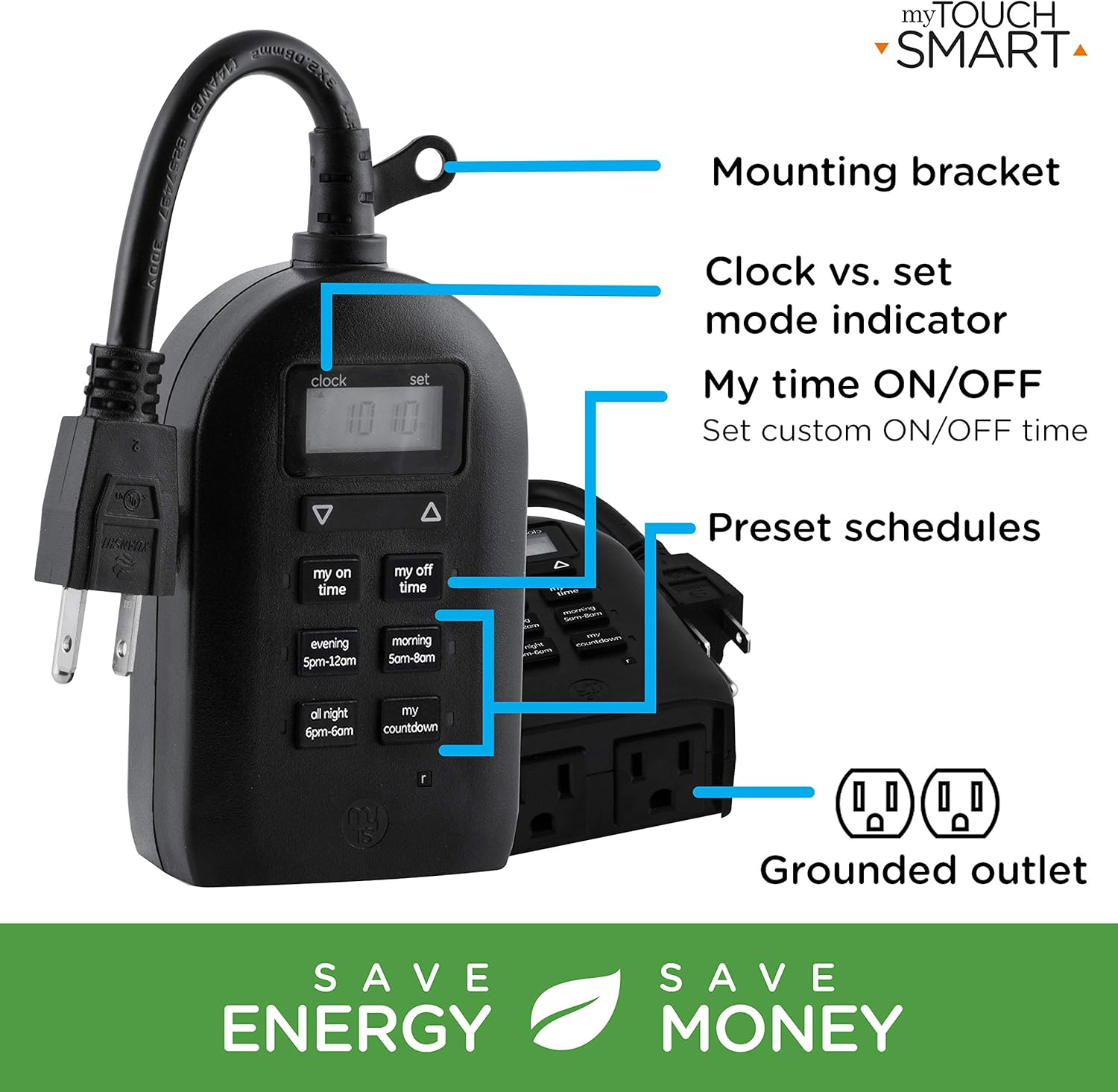
Figure 5: Key features and controls of the myTouchSmart timer.
Održavanje
- čišćenje: Disconnect the timer from the power outlet before cleaning. Wipe the exterior with a soft, damp tkanina. Nemojte koristiti jake hemikalije ili abrazivna sredstva za čišćenje.
- Skladištenje: Kada se tajmer ne koristi duži period, čuvajte ga na hladnom i suhom mjestu, dalje od direktne sunčeve svjetlosti i ekstremnih temperatura.
- Unutrašnja baterija: The timer contains an internal battery to maintain settings during power outages. If the display is dim or blank, plug the timer into an outlet for at least one hour to recharge the battery.
Rješavanje problema
| Problem | Mogući uzrok | Rješenje |
|---|---|---|
| Prikaz tajmera je prazan ili taman. | Unutrašnja baterija je slaba ili ispražnjena. | Plug the timer into a live outlet for at least one hour to charge the internal battery. |
| Connected device does not turn ON/OFF. |
|
|
| Tajmer ne reaguje na pritiskanje dugmadi. | Privremeni softverski kvar ili slaba baterija. | Unplug the timer from the outlet for a few minutes, then plug it back in. Allow the internal battery to charge if the display was dim. |
Specifikacije
| Feature | Detalj |
|---|---|
| Broj modela | 26898-P1 |
| Električna ocjena | 125V AC, 60Hz, 15A, 1875W (General Purpose/Resistive) |
| Utičnice | 2 uzemljenih utičnica |
| Dimenzije | 3.2 cm D x 7 cm Š x 7.5 cm V (približno) |
| Težina artikla | 9.92 unce |
| Display Type | LCD |
| Vrsta montaže | Plug-In Mount |
| Certifikati | UL Listed, CSA Listed |
| Interna baterija | Yes (for settings retention) |

Figure 6: Product dimensions for the myTouchSmart timer.
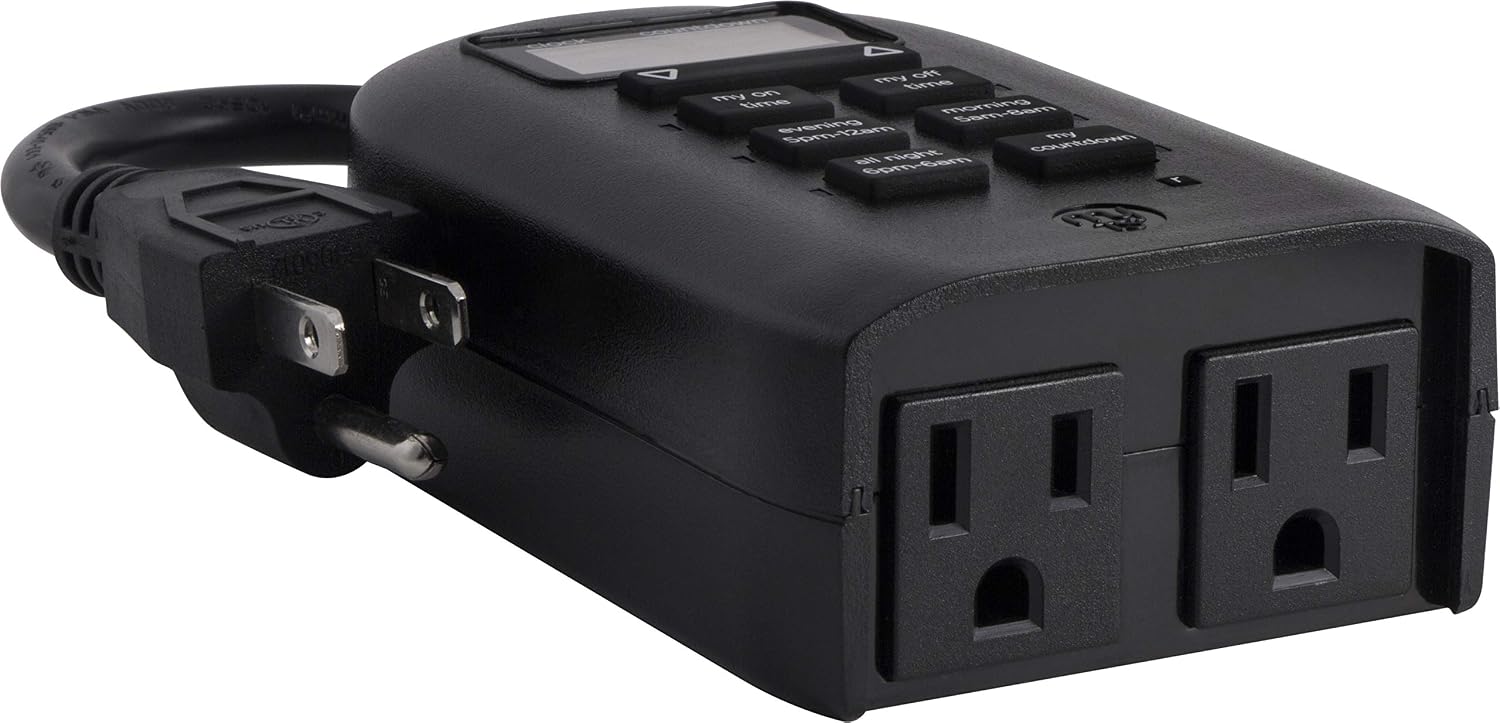
Figure 7: Dual grounded outlets for connecting devices.
Garancija i podrška
This myTouchSmart timer is backed by a jednogodišnja ograničena garancija from the date of purchase. For warranty claims or technical support, please refer to the contact information provided with your product packaging or visit the official myTouchSmart website.
Za dodatne resurse, možete se obratiti i službenim Uputstvo za upotrebu (PDF) or Uputstvo za instalaciju (PDF) dostupno online.


