1. Uvod
Thank you for choosing the Utilitech White Doorbell. This manual provides essential information for the safe and efficient installation, operation, and maintenance of your new doorbell unit. Please read these instructions thoroughly before beginning installation and retain this manual for future reference.
2. Sigurnosne informacije
Always follow basic safety precautions when installing or servicing electrical equipment to reduce the risk of fire, electric shock, and personal injury.
- UPOZORENJE: Turn off power at the circuit breaker or fuse box before installing or servicing the doorbell. Failure to do so may result in serious injury or death.
- Osigurajte da su svi spojevi ožičenja sigurni i da su u skladu s lokalnim električnim propisima.
- Do not install the doorbell in wet or damp lokacijama, osim ako nisu posebno namijenjene za takva okruženja.
- Ako niste sigurni u vezi bilo kojeg dijela procesa instalacije, obratite se kvalificiranom električaru.
3. Sadržaj paketa
Prije početka instalacije provjerite da li su sve komponente prisutne.
- Utilitech White Doorbell Unit (Model: 108174)
- Uputstvo za upotrebu
- Note: Mounting hardware and transformer are typically sold separately and are not included with the doorbell unit.
4. Postavljanje i instalacija
Follow these steps to properly install your Utilitech White Doorbell.
- Isključite napajanje: Locate your home's circuit breaker or fuse box and turn off the power to the circuit that supplies electricity to your doorbell wiring. Verify power is off using a voltage tester.
- Mount the Doorbell Unit:
Position the doorbell unit in the desired location. Mark the mounting holes. Drill pilot holes if necessary and secure the doorbell unit to the wall using appropriate screws (not included).
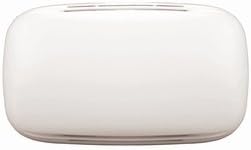
Slika 4.1: Prednja strana view of the Utilitech White Doorbell unit. This image displays the compact, white rectangular housing of the Utilitech doorbell unit, featuring a smooth, minimalist design suitable for various home aesthetics.
- Žične veze:
Povežite nisku jačinu zvukatage wires from your doorbell transformer and push button to the appropriate terminals on the Utilitech doorbell unit. Typically, there are terminals for "TRANS" (transformer), "FRONT" (front door push button), and "REAR" (rear door push button, if applicable). Ensure all connections are tight and secure.
- Connect the transformer wire to the "TRANS" terminal.
- Connect the front door push button wire to the "FRONT" terminal.
- If using a rear door push button, connect its wire to the "REAR" terminal.
- Vrati snagu: Once all connections are made and the unit is securely mounted, return to your circuit breaker or fuse box and turn the power back on.
- Probni rad: Press the doorbell push button(s) to ensure the chime sounds correctly.
5. Uputstvo za upotrebu
The Utilitech White Doorbell operates by producing an audible chime when the connected push button is pressed. The sound output is designed to alert occupants to visitors at the door.
- To activate the doorbell, a visitor simply presses the corresponding push button located outside your door.
- The doorbell unit will then emit its chime sound.
6. Održavanje
The Utilitech White Doorbell requires minimal maintenance to ensure long-lasting performance.
- čišćenje: Periodically wipe the exterior of the doorbell unit with a soft, dry cloth to remove dust and dirt. Do not use abrasive cleaners or solvents, as these may damage the finish.
- Provjera veze: If you experience issues, ensure all wiring connections remain secure. Always turn off power at the circuit breaker before inspecting connections.
7. Otkrivanje problema
If your Utilitech White Doorbell is not functioning as expected, refer to the following common issues and solutions:
| Problem | Mogući uzrok | Rješenje |
|---|---|---|
| Doorbell does not chime or chimes weakly. |
|
|
| Doorbell chimes continuously. |
|
|
8. Specifikacije
Key technical specifications for the Utilitech White Doorbell (Model 108174).
- Broj modela: 108174
- Broj dijela: 108174
- ASIN: B014FWTJLE
- Težina artikla: 16 unce
- Dimenzije paketa: 9.2 x 5.7 x 2 inča
- Potrebne baterije: br
- Datum prve dostupnosti: 25. avgusta 2015
- Boja: Bijelo
9. Garancija i podrška
Specific warranty details and customer support contact information for the Utilitech White Doorbell are not provided within this manual. Please refer to the product packaging or the retailer's website for information regarding warranty coverage and how to obtain technical support.


