1. Uvod
The Edifier P180 is a stereo earbud headset designed for clear audio and convenient communication. Featuring an inline microphone and control, it offers a comfortable listening experience for various devices.

Figure 1: Edifier P180 Wired Earbud Headset
2. Šta se nalazi u kutiji
- Edifier P180 Earbud Headset
- Kabl
3. Ključne karakteristike
- Classic Comfort: Ergonomic design for comfortable wear without irritating the ear canal.
- Vrhunski kvalitet zvuka: Equipped with 16mm neodymium magnetic monomers for high-fidelity audio playback.
- Integrated Microphone and Control: 3.5mm stereo earphones with a built-in microphone and remote button for mobile phone communication.
- Funkcionalnost: Single button control for picking up/hanging up calls and skipping songs (device dependent for iOS/Android).
- Izdržljiv dizajn: Constructed with quality materials for longevity.

Figure 2: Ergonomic design for comfortable fit.
4. Podešavanje
- Raspakirajte: Carefully remove the Edifier P180 headset from its packaging.
- Pregledajte: Check the earbuds and cable for any visible damage.
- Povežite se: Insert the 3.5mm audio jack into the headphone port of your compatible device (smartphone, tablet, computer, etc.). Ensure the jack is fully inserted for proper audio and microphone function.
- pozicija: Place the earbuds comfortably in your ears. The ergonomic design is intended to rest well without causing irritation.
5. Uputstvo za upotrebu
The Edifier P180 features an inline control button for easy management of calls and music playback.
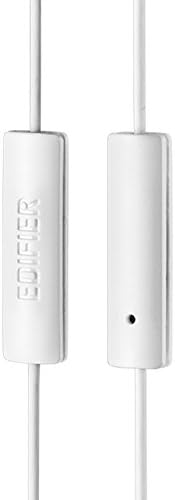
Figure 3: Inline microphone and control button.
- Odgovaranje / završavanje poziva: Press the control button once to answer an incoming call. Press it again to end an active call.
- Reprodukcija/Pauziranje muzike: Press the control button once to play or pause audio playback.
- Preskakanje staza: Double-press the control button to skip to the next track. Triple-press to go to the previous track (functionality may vary by device and operating system).
- Glasovni asistent: Long-press the control button to activate your device's voice assistant (e.g., Siri, Google Assistant).
Video 1: Zvanični proizvod je završenview of the Edifier P180 Classic Earbud Headsets, demonstrating features and usage.
6. Održavanje
- čišćenje: Nježno obrišite slušalice i kabel mekom, suhom krpom. Izbjegavajte upotrebu jakih hemikalija ili abrazivnih materijala.
- Skladištenje: When not in use, store the headset in a clean, dry place, away from extreme temperatures and direct sunlight. Avoid tangling the cable.
- Izbjegavajte vlagu: Do not expose the headset to water or excessive moisture, as this can damage the internal components.
7. Otkrivanje problema
- Nema zvuka:
- Ensure the 3.5mm jack is fully inserted into your device's audio port.
- Provjerite postavke jačine zvuka na vašem uređaju.
- Testirajte slušalice s drugim uređajem kako biste isključili problem specifičan za taj uređaj.
- Mikrofon ne radi:
- Provjerite je li 3.5 mm priključak potpuno umetnut.
- Provjerite postavke ulaza mikrofona na vašem uređaju.
- Testirajte mikrofon s drugim uređajem ili aplikacijom.
- Povremeni zvuk:
- Check the cable for any kinks or damage.
- Provjerite je li audio priključak čist i bez ostataka.
8. Specifikacije
| Feature | Specifikacija |
|---|---|
| Broj modela | P180 |
| Frekvencijski odziv | 20 Hz - 20,000 Hz |
| Priključak za slušalice | 3.5 mm Jack |
| Tehnologija povezivanja | Žičani |
| Težina artikla | 1.76 unci (50 grama) |
| Dimenzije proizvoda | 2.01 x 5.59 x 0.91 inča |
| Materijal | Neodimijum |
| Tip kontrole | Inline Control Button |
| Impedansa | 32 Ohma |
| Kontrola buke | Zvučna izolacija |
9. Jamstvo i podrška
The Edifier P180 headset is backed by a 1 godine garancije. For any support inquiries or warranty claims, please refer to the contact information provided with your purchase or visit the official Edifier website.


