Uvod
Hvala na kupoviniasing the Madison FREESOUND-VR40R Vintage Portable Radio. This device combines a classic retro design with modern audio technology, offering versatile listening options. This manual provides detailed instructions on how to set up, operate, and maintain your radio to ensure optimal performance and longevity.
The FREESOUND-VR40R is a portable, USB-rechargeable radio designed for those who appreciate a vintage aesthetic combined with modern audio technologies. It features an analog dial tuner, Bluetooth, USB, AUX, and FM connectivity, bass enhancement, and a convenient dual metal handle for portability.
Sigurnosna uputstva
Molimo vas da pažljivo pročitate ova sigurnosna uputstva prije upotrebe uređaja i sačuvate ih za buduću upotrebu. Nepravilna upotreba može dovesti do strujnog udara, požara ili drugih opasnosti.
- Ne izlažite uređaj kiši ili vlazi kako biste spriječili požar ili strujni udar.
- Ne izlažite uređaj direktnoj sunčevoj svjetlosti ili ekstremnim temperaturama.
- Ne otvarajte casing. Unutra nema dijelova koje korisnik može sam servisirati. Za sve servisne radove obratite se kvalifikovanom osoblju.
- Use only the specified power adapter/charging cable.
- Držite uređaj dalje od jakih magnetnih polja.
- Clean the device only with a dry, soft cloth. Do not use liquid cleaners.
- Osigurajte odgovarajuću ventilaciju oko uređaja. Ne blokirajte ventilacijske otvore.
Product Overview
Familiarize yourself with the components and features of your Madison FREESOUND-VR40R radio.

Slika 1: Prednja strana View. Shows the analog dial tuner, speaker grille, Madison logo, and control knobs for volume and source selection.
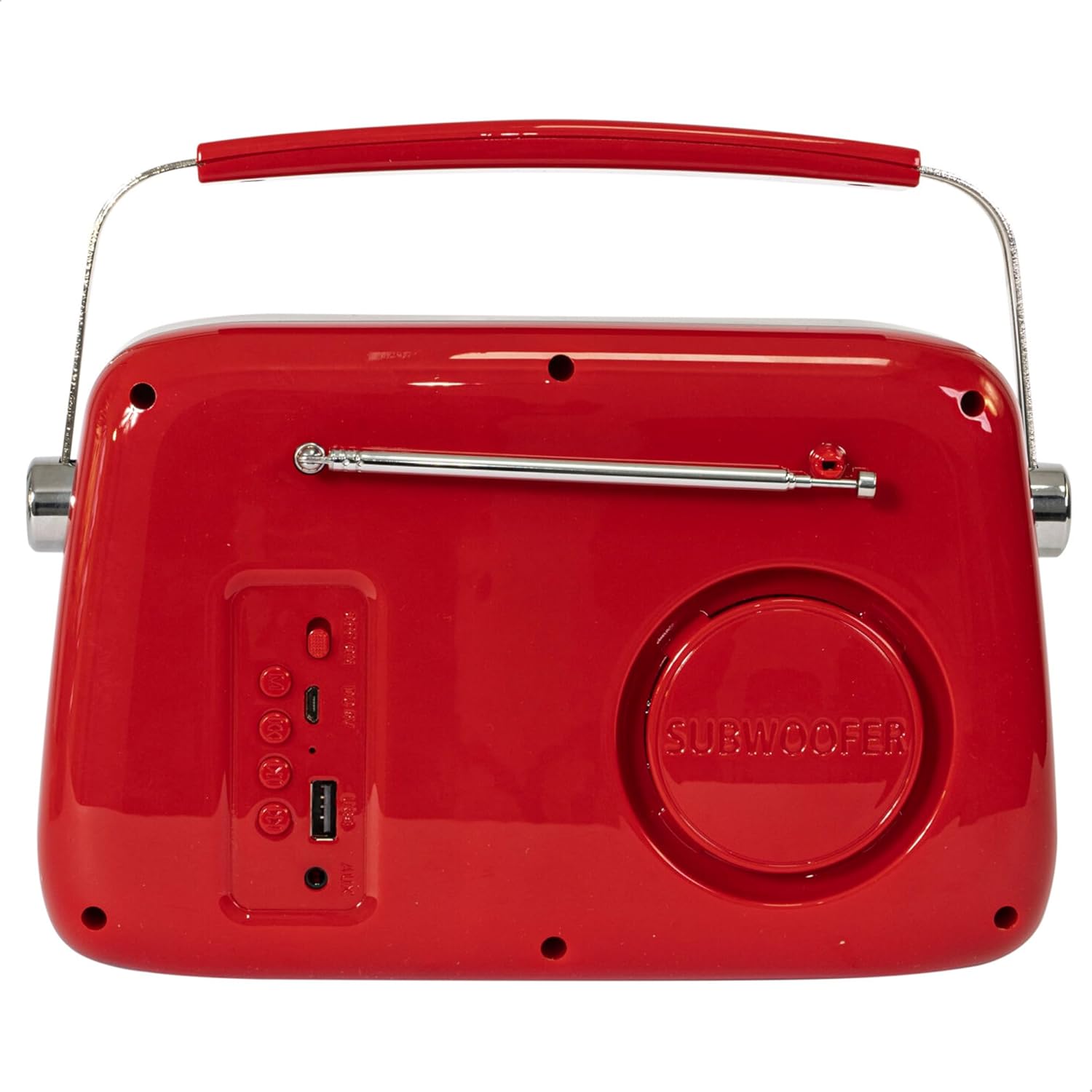
Slika 2: Pozadi View. Displays the subwoofer, USB port, AUX input, and power/mode buttons.
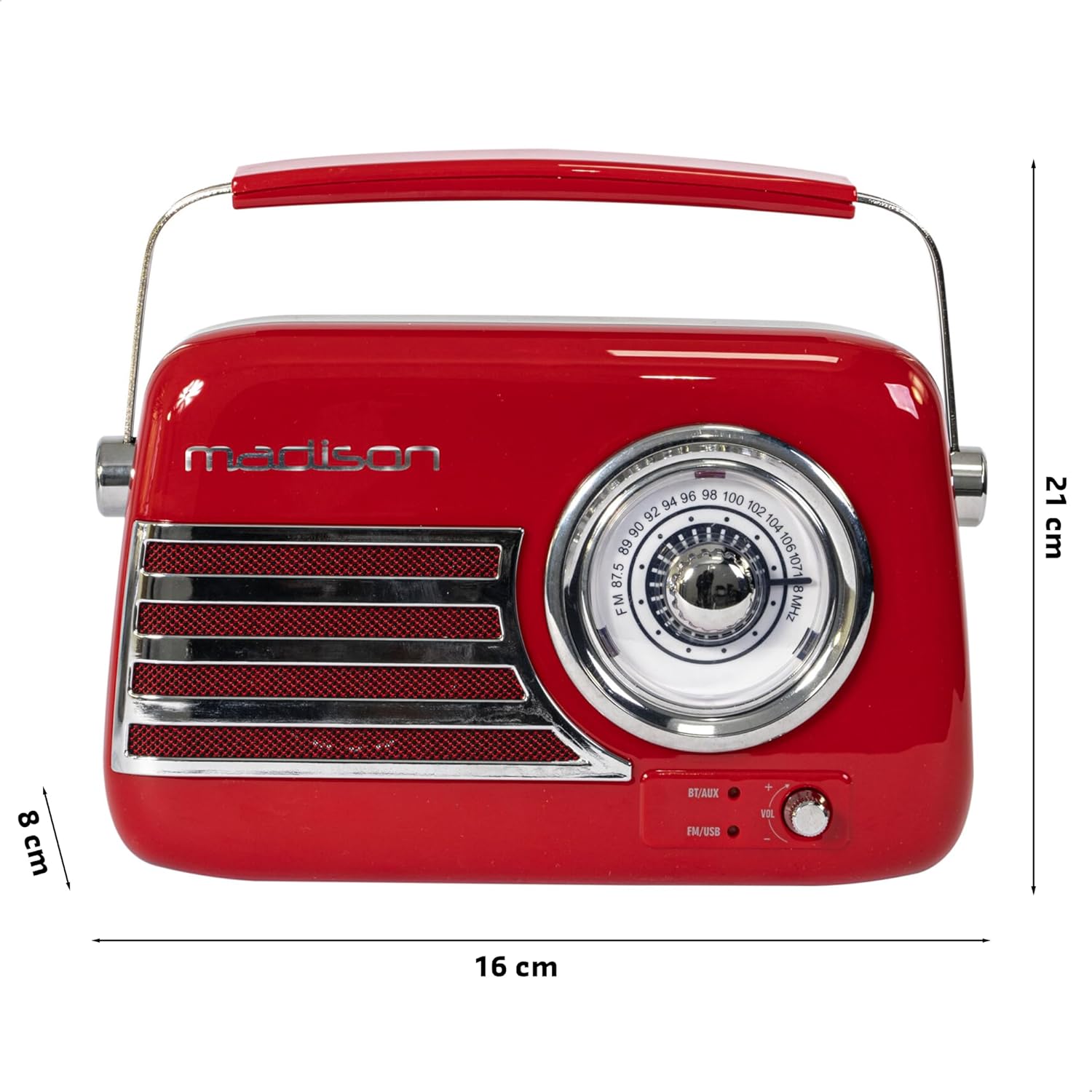
Slika 3: Dimenzije proizvoda. Illustrates the radio's approximate dimensions: 21 cm length, 8 cm width, and 16 cm height.

Slika 4: Pozadi View with Antenna Extended. Shows the telescopic antenna fully extended for improved FM reception.
Ključne karakteristike:
- Analog Dial Tuner: For classic FM radio tuning.
- Bluetooth povezivanje: Bežično strimujte zvuk sa svog pametnog telefona ili tableta.
- USB reprodukcija: Play music directly from a USB drive.
- AUX ulaz: Povežite eksterne audio uređaje putem 3.5 mm audio kabla.
- FM radio: Enjoy your favorite FM stations with the retractable antenna.
- Poboljšanje basa: Integrated subwoofer for richer bass sound.
- Punjiva baterija: Built-in long-lasting battery for portable use.
- Prijenosni dizajn: Lightweight with a dual metal handle for easy carrying.
Setup
Punjenje baterije:
- Locate the USB charging port on the rear of the radio.
- Connect the provided USB charging cable to the radio's USB port.
- Drugi kraj USB kabla priključite na kompatibilni USB adapter za napajanje (nije uključen) ili na USB priključak računara.
- Indikator punjenja će se upaliti. Nakon što se uređaj potpuno napuni, lampica može promijeniti boju ili se ugasiti, ovisno o modelu.
- Potpuno punjenje obično traje nekoliko sati.
Početno uključivanje:
- Ensure the radio is sufficiently charged.
- Press and hold the Power/Mode button (usually located on the rear or front panel) to turn on the radio.
- The front indicator lights will show the currently selected source.
Uputstvo za upotrebu
Kontrola jačine zvuka:
Rotirajte Volume knob (VOL) on the front panel to adjust the sound level. Turn clockwise to increase volume, counter-clockwise to decrease.
Odabir izvora:
Pritisnite Izvor/režim button (often labeled BT/AUX or FM/USB) repeatedly to cycle through the available input modes: Bluetooth, AUX, FM Radio, and USB.
- Bluetooth način rada:
- Switch the radio to Bluetooth mode. The Bluetooth indicator light will blink, indicating it's ready for pairing.
- Na pametnom telefonu ili tabletu omogućite Bluetooth i potražite dostupne uređaje.
- Select "FREESOUND-VR40R" (or similar name) from the list.
- Once paired, the Bluetooth indicator light will become solid, and you can stream audio from your device.
- FM radio način rada:
- Switch the radio to FM mode.
- Za optimalan prijem, potpuno izvucite teleskopsku antenu.
- Rotirajte Tuning Dial on the front panel to manually select your desired FM radio station.
- Način USB reprodukcije:
- Umetnite USB fleš disk koji sadrži MP3 audio zapis fileu USB priključak na stražnjoj strani radija.
- Switch the radio to USB mode. The radio will automatically begin playing the audio files.
- Use the playback controls (if available, usually on the rear panel) to skip tracks or pause/play.
- AUX ulazni režim:
- Connect one end of a 3.5mm audio cable (not included) to the AUX input port on the rear of the radio.
- Connect the other end of the cable to the headphone jack or audio output of your external device (e.g., MP3 player, CD player).
- Switch the radio to AUX mode. Audio from your external device will now play through the radio.
Održavanje
čišćenje:
Da biste održali izgled i funkcionalnost vašeg radija:
- Obrišite vanjske površine mekom, suhom krpom koja ne ostavlja dlačice.
- Ne koristite abrazivna sredstva za čišćenje, voskove ili rastvarače jer mogu oštetiti završnu obradu.
- Izbjegavajte prskanje tekućina direktno na radio.
Skladištenje:
If you plan to store the radio for an extended period:
- Potpuno napunite bateriju prije skladištenja.
- Radio čuvajte na hladnom i suhom mjestu, dalje od direktne sunčeve svjetlosti i ekstremnih temperatura.
- For optimal battery health, recharge the battery every 3-6 months, even if not in use.
Rješavanje problema
| Problem | Mogući uzrok | Rješenje |
|---|---|---|
| Nema napajanja / Radio se ne uključuje. | Baterija je prazna. | Napunite radio pomoću priloženog USB kabla. |
| Nema zvuka. | Jačina zvuka je preniska ili isključena. Odabran je pogrešan izvor. | Increase the volume. Ensure the correct input source (Bluetooth, FM, USB, AUX) is selected. |
| Loš FM prijem. | Antena nije izvučena. Slab signal. | Potpuno izvucite teleskopsku antenu. Pokušajte promijeniti položaj radi boljeg signala. |
| Bluetooth uređaj se ne može upariti. | Radio not in pairing mode. Device too far. Bluetooth disabled on source device. | Ensure radio is in Bluetooth pairing mode (blinking light). Move device closer. Enable Bluetooth on your smartphone/tablet. |
| Reprodukcija sa USB-a ne radi. | USB drive not inserted correctly. Unsupported file formatu. | Ensure USB drive is fully inserted. Check if audio files su u MP3 formatu. |
Specifikacije
| Broj modela: | 10-5567MA |
| Dimenzije proizvoda (D x Š x V): | 21 x 8 x 16 cm |
| Težina: | 635 grama |
| Boja: | Crveni |
| Materijal: | Plastika |
| Izvor napajanja: | Internal Rechargeable Battery (via USB) |
| Vrsta baterije: | 1 litijum-polimer (uključena) |
| Povezivanje: | Bluetooth, USB, Auxiliary (AUX) |
| Radio bendovi: | FM |
| Posebne karakteristike: | Telescopic antenna, Analog dial tuner, Bass enhancement |
| Uključene komponente: | USB kabl za punjenje |
| Proizvođač: | Lotronic SA |
| Zemlja porijekla: | Kina |
Garancija i podrška
For warranty information and customer support, please refer to the warranty card included with your product or visit the official Madison webSačuvajte dokaz o kupovini za eventualne reklamacije.
For technical assistance or troubleshooting beyond this manual, please contact Madison customer service.
Note: Availability of spare parts is not specified in the product information.


