1. Uvod
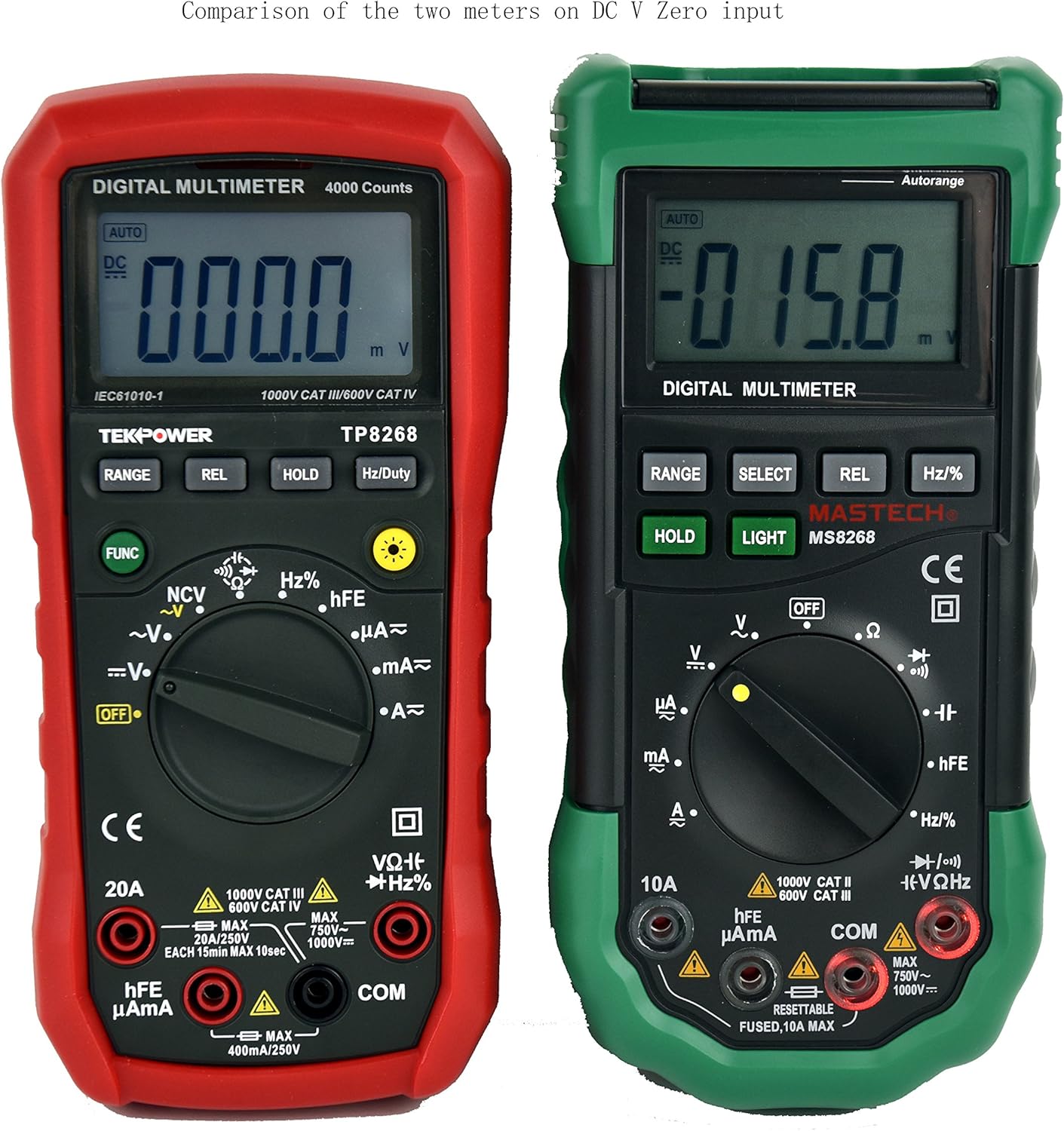
This manual provides detailed instructions for the safe and effective operation of your Tekpower TP8268 Digital Multimeter. The TP8268 is an advanced auto/manual ranging digital multimeter, featuring improved accuracy and additional functionalities compared to its predecessor, the MS8268. Key features include Non-Contact Voltage (NCV) detection and a blue LED back-lit LCD display. Please read this manual thoroughly before use.
2. Sigurnosne informacije
Always observe safety precautions when using electrical testing equipment. Failure to do so may result in injury or damage to the meter or equipment under test.
- Ensure the meter is set to the correct function and range before making measurements.
- Ne pokušavajte izmjeriti voltages or currents exceeding the maximum rated values for the meter.
- Uvijek isključite napajanje strujnog kola prije spajanja ili odspajanja mjernih kablova, posebno prilikom mjerenja struje.
- Budite oprezni kada radite sa voltagiznad 30V AC RMS, 42V peak ili 60V DC, jer predstavljaju opasnost od strujnog udara.
- Prije svake upotrebe provjerite mjerne kablove da li su oštećeni. Oštećene kablove odmah zamijenite.
- Ne koristite mjerač ako izgleda oštećeno ili ako je kućište otvoreno.
- Adhere to all local and national safety codes.
3. Sadržaj paketa
Provjerite da li se sve stavke nalaze u vašem paketu:
- 1x Tekpower TP8268 Digital Multimeter
- 1x Pair of High Quality Test Leads (Red and Black)
- 1x Multi-function Adapter for hFE and Capacitance Test
- 1x 9V Battery (pre-installed or included separately)
- 1x uputstvo za upotrebu

4. Proizvod je gotovview i karakteristike
The Tekpower TP8268 is designed for precision and ease of use in various electrical measurement tasks. Its robust design and comprehensive features make it suitable for both hobbyists and professionals.
- Auto/Manual Ranging: Automatically selects the appropriate measurement range or allows manual selection for specific applications.
- Non-Contact Voltage (NCV) Feature: Otkriva AC voltage above 110V RMS without direct contact, useful for identifying live wires.
- Blue LED Back-lit LCD Display: Provides clear readings in low-light conditions.
- Relativno mjerenje: Allows for comparison measurements against a stored reference value.
- Zadržavanje podataka: Freezes the displayed reading for convenient recording.
- Provjera diode: Tests the functionality of diodes.
- Test kontinuiteta: Audible indication for circuit continuity (less than 60 ohms).
- hFE Test: Mjeri pojačanje istosmjerne struje tranzistora.
- Automatsko isključivanje: Štedi vijek trajanja baterije (može se isključiti).

5. Podešavanje
5.1. Instalacija baterije
- Provjerite je li multimetar isključen.
- Pronađite odjeljak za baterije na stražnjoj strani mjerača.
- Koristite odvijač da otvorite poklopac baterije.
- Insert the 9V battery, observing the correct polarity (+/-).
- Vratite poklopac baterije i pričvrstite ga vijkom.
5.2. Povezivanje ispitnih vodova
- Umetnite crni mjerni kabel u "COM" (zajednički) priključak.
- Za većinu volumenatage, resistance, and continuity measurements, insert the red test lead into the "VΩHz" jack.
- For current measurements up to 400mA, insert the red test lead into the "µAmA" jack.
- For current measurements up to 20A, insert the red test lead into the "20A" jack.
6. Uputstvo za upotrebu
6.1. Turning On/Off and Function Selection
Rotate the central rotary switch to the desired measurement function to turn the meter ON. Turn the switch to "OFF" to power down the meter.
6.2. AC/DC Voltage Measurement
- Spojite crni kabel na COM, a crveni kabel na VΩHz.
- Rotate the switch to the "V~" (AC Voltage) ili "V-" (DC Voltage) položaj.
- The meter will automatically select the range. For manual ranging, press the RANGE dugme.
- Dodirnite mjerne sonde tačkama strujnog kola gdje je voltage treba izmjeriti.

6.3. Mjerenje AC/DC struje
- VAŽNO: Isključite napajanje strujnog kola prije serijskog spajanja mjerača.
- Connect the black lead to COM. Connect the red lead to "µAmA" for small currents or "20A" for larger currents.
- Rotate the switch to the "A~" (AC Current) or "A-" (DC Current) position.
- Prekinite strujni krug i spojite mjerač serijski s opterećenjem.
- Apply power to the circuit and read the current.
6.4. Mjerenje otpora
- Spojite crni kabel na COM, a crveni kabel na VΩHz.
- Rotate the switch to the "Ω" (Resistance) position.
- Prije mjerenja otpora provjerite je li strujno kolo bez napona.
- Touch the probes across the component to measure its resistance.
6.5. Non-Contact Voltage (NCV) Detekcija
- Rotate the switch to the "NCV" position.
- Move the top tip of the meter near the conductor or outlet.
- The meter will emit an audible beep and the NCV indicator will light up if AC voltage je otkriven.

6.6. Other Functions (Diode, Continuity, hFE, Capacitance, Frequency)
Refer to the specific symbols on the rotary switch and the detailed specifications table for instructions on using Diode Check, Continuity, hFE, Capacitance, and Frequency/Duty Cycle measurements. Use the multi-function adapter for hFE and capacitance tests as needed.
7. Održavanje
7.1. Opća njega
- Držite mjerač suhim. Ako se smoči, odmah ga obrišite suhim.
- Koristite i čuvajte mjerač u normalnim temperaturnim okruženjima. Ekstremne temperature mogu skratiti vijek trajanja elektroničkih uređaja.
- Handle the meter gently and carefully. Dropping it can damage circuit boards and cases.
- Držite mjerač dalje od prašine i prljavštine, koji mogu uzrokovati prerano trošenje dijelova.
- Obrišite mjerač oglasomamp povremeno krpu kako bi izgledala kao nova. Ne koristite jake kemikalije, otapala za čišćenje ili jake deterdžente.
7.2. Zamjena baterije
When the battery symbol appears on the display, replace the 9V battery as described in the Setup section (5.1). Always remove batteries if the meter is not going to be used for an extended period.
8. Otkrivanje problema
8.1. Display Shows "OL" (Overload)
If the display shows "OL" during a measurement, it indicates that the input value exceeds the selected range or the maximum measurement capability of the meter. Try selecting a higher range if available, or ensure the measured value is within the meter's specifications.
8.2. No Reading or Incorrect Reading
- Provjerite nivo baterije i zamijenite je ako je niska.
- Ensure test leads are securely connected to the correct jacks.
- Verify the rotary switch is set to the appropriate function and range for the measurement.
- Inspect test leads for damage or breaks.
- Ensure proper contact between probes and the circuit under test.
9. Specifikacije
The following table outlines the key specifications for the Tekpower TP8268 Digital Multimeter:
| Measurement Type | Domet | Preciznost |
|---|---|---|
| DC Voltage | 400mV/4V/40V/400V/1000V | ±(0.5%+3) |
| AC Voltage | 4V/40V/400V/750V | ±(1.2%+20) |
| DC Current | 400µA/4000µA/40mA/400mA/10A/20A | ±(1.2%+3) (up to 400mA), ±(1.5%+8) (10A), ±(2.0%+10) (20A) |
| AC struja | 400µA/4000µA/40mA/400mA/10A/20A | ±(1.5%+5) (up to 400mA), ±(2.0%+10) (10A), ±(2.0%+12) (20A) |
| Otpor | 400Ω/4kΩ/40kΩ/400kΩ/4MΩ/40MΩ | ±(1.0%+3) |
| Kapacitet | 4nF/40nF/400nF/4µF/40µF/200µF | ±(5.0%+5) (up to 400nF), ±(4.0%+15) (4µF-200µF) |
| Frekvencija | 10Hz-200KHz | ±(1.5%+15) |
| Duty Cycle | 1%-99% | ±(2.0%+2) |
| Display | 4000 Counts | - |
| Napajanje | 9V baterija | - |
| Dimenzije | 188 mm x 92 mm x 50 mm | - |
| Težina | Pribl. 370g | - |
| Safety Rating | CE CAT.III 1000V CAT.IV 600V RoHS | - |

10. Garancija i podrška
The Tekpower TP8268 Digital Multimeter comes with a 1-year warranty in the USA. For technical support, warranty claims, or service inquiries, please contact Tekpower customer service through their official webweb-mjestu ili prodavaču gdje je proizvod kupljen.
Za dodatne resurse i informacije o proizvodu, posjetite Tekpower Store on Amazon.
11. Videozapisi proizvoda
Digital Multimeter 6000 Count by PROSTER US
Ovaj video daje krajview of a digital multimeter, demonstrating its features and basic operation, including NCV and continuity tests. While not specific to the TP8268, it illustrates general multimeter usage.