Uvod
Hvala na kupoviniasing the Audioengine A2+ Powered Desktop Speakers. These speakers are designed to provide clear, full audio and can easily connect to various devices. This manual provides essential information for setting up, operating, and maintaining your speakers.

Image: A pair of red Audioengine A2+ powered desktop speakers, showcasing njihov kompaktni dizajn.
Šta je uključeno
Your Audioengine A2+ package includes the following components:
- Pair of Audioengine A2+ Powered Speakers (one active, one passive)
- 2m Speaker Wire for connecting the active and passive speakers
- Napajanje i kabel
- USB cable for digital audio input
- 1.5m Mini-Jack Audio Cable for analog audio input
- Microfiber Speaker bags and Cable Bags for protection
- Setup Guide and Brochure

Image: All cables and the power supply unit included with the Audioengine A2+ speakers.
Setup
Follow these steps to set up your Audioengine A2+ speakers:
- plasman: Position the active (left) speaker and passive (right) speaker on your desktop or desired location. Ensure adequate space for ventilation.
- Povežite zvučnike: Use the included speaker wire to connect the active speaker's "Out to Right" terminals to the passive speaker's input terminals. Match the positive (+) and negative (-) terminals.
- Priključite napajanje: Connect the power supply to the active speaker's "Power" input, then plug the power cord into a wall outlet.
- Audio ulaz: Odaberite željeni način audio unosa:
- USB audio: Connect the USB cable from your computer to the "USB Input" on the active speaker.
- Mini-Jack Audio: Use the 1.5m mini-jack cable to connect your device's headphone output to the "Input" mini-jack on the active speaker.
- RCA audio: Use RCA cables (not included) to connect your device's RCA outputs to the "Input" RCA jacks on the active speaker.
- Uključeno: Turn the volume knob on the active speaker clockwise to power on the unit.
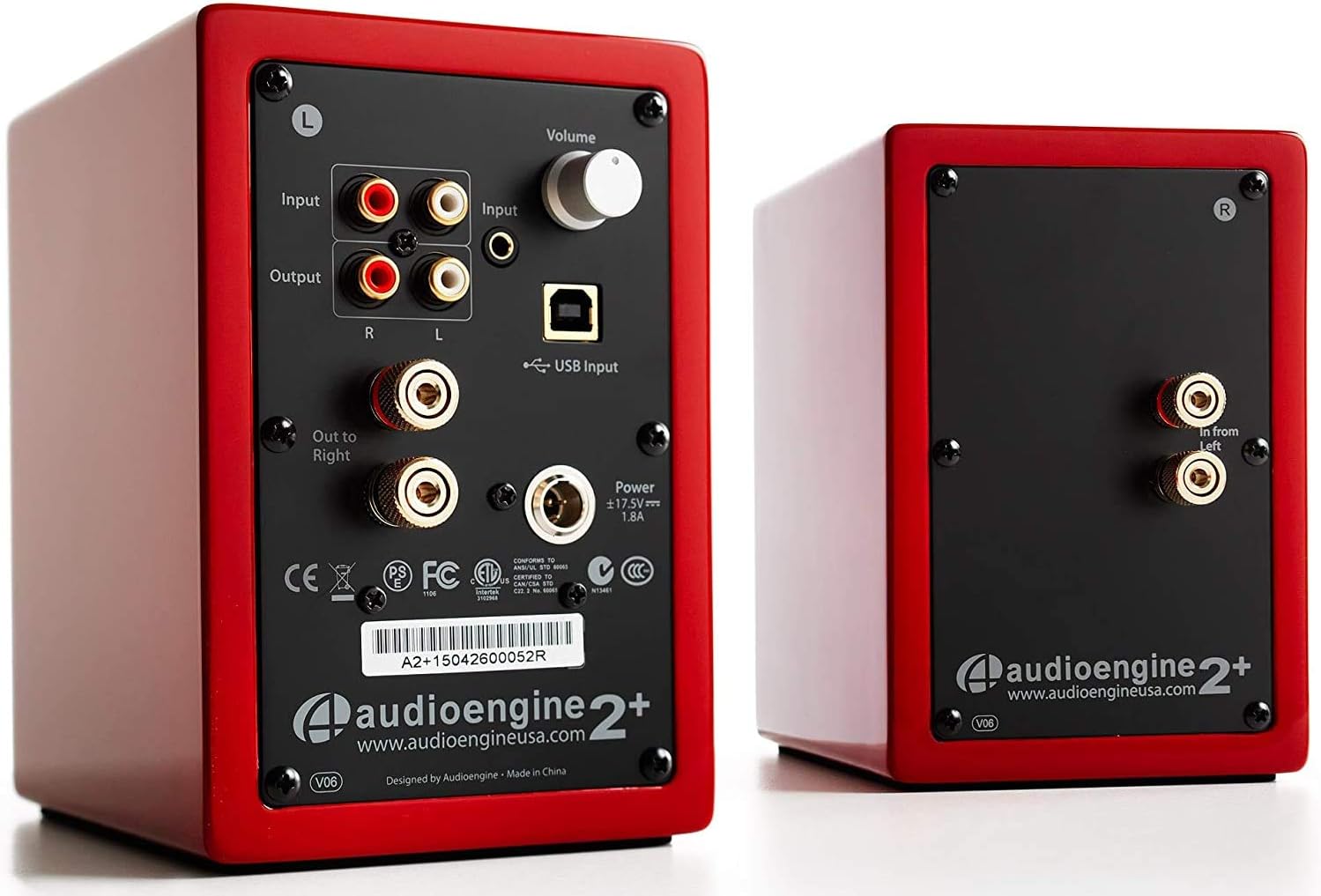
Image: Rear panel of the active speaker, highlighting various input and output connections.

Image: A detailed diagram of the A2+ speaker connections, including volume, inputs, and outputs.
Video: Prekorview of the Audioengine A2+ speakers, demonstrating setup and features.
Upravljanje zvučnicima
Once set up, operating your A2+ speakers is straightforward:
- Kontrola jačine zvuka: Adjust the volume using the knob on the active speaker. You can also control volume from your connected device.
- Odabir ulaza: The A2+ automatically detects and prioritizes active inputs. If multiple inputs are connected, ensure only one is playing audio at a time for optimal performance.
- Bluetooth povezivanje: The A2+ features Bluetooth for wireless audio streaming. Refer to your device's Bluetooth pairing instructions and select "Audioengine A2+" from the available devices.
- Izlaz subwoofera: The variable audio output allows for easy connection to a subwoofer (e.g., Audioengine S8) for enhanced bass.

Image: Versatile playback options for the A2+ speakers, illustrating connections for phone, USB, and turntable.
Video: Demonstrates various ways to play music through Audioengine speakers, highlighting different connectivity options.
Održavanje
To ensure the longevity and optimal performance of your Audioengine A2+ speakers, follow these maintenance guidelines:
- čišćenje: Use a soft, dry cloth to clean the speaker cabinets. Avoid using harsh chemicals or abrasive cleaners.
- Zaštita od prašine: When not in use, consider covering the speakers with the included microfiber bags to protect them from dust.
- ventilacija: Ensure the speakers have adequate airflow around them to prevent overheating. Do not block the rear panel.
- Izbjegavajte vlagu: Keep the speakers away from water and excessive humidity.
Rješavanje problema
If you encounter issues with your A2+ speakers, try the following common troubleshooting steps:
- Nema zvuka:
- Check all cable connections (power, speaker wire, audio input).
- Ensure the volume knob on the active speaker is turned up.
- Verify the volume on your connected device is not muted or too low.
- If using USB, ensure your computer's audio output is set to the A2+ speakers.
- izobličeni zvuk:
- Reduce the volume on both the speakers and your source device.
- Provjerite ima li labavih spojeva ili oštećenih kablova.
- Ensure the audio source is not overdriven.
- Problemi sa Bluetooth uparivanjem:
- Ensure the speakers are in pairing mode (refer to your device's Bluetooth settings).
- Približite uređaj zvučnicima.
- Forget the device on your source and re-pair.
Za detaljnije rješavanje problema, pogledajte službene Uputstvo za upotrebu (PDF).
Specifikacije
| Feature | Detalj |
|---|---|
| Naziv modela | A2+ Red |
| Vrsta zvučnika | Polica za knjige |
| Posebna karakteristika | Bežični |
| Preporučena upotreba | Muzika |
| Kompatibilni uređaji | Smartphone, Tablet, MP3 Player, Desktop, Television, Laptop |
| Maksimalna izlazna snaga zvučnika | 60 Watts |
| Tehnologija povezivanja | Bluetooth - Wired |
| Način audio izlaza | Stereo |
| Dimenzije proizvoda | 5.25"D x 4"Š x 6"H |
| Težina artikla | 3.6 funti |
| Woofer Diameter | 2 inča |
| Odnos signala i šuma | 95 dB |
Garancija i podrška
Audioengine stands behind the quality of their products. All Audioengine products come with a 3 godina prenosive garancije. For warranty claims or technical support, please refer to the official Audioengine webweb-mjesto ili kontakt informacije navedene u pakovanju vašeg proizvoda.
Additional resources can be found in the comprehensive Uputstvo za upotrebu (PDF).


