Uvod
This manual provides comprehensive instructions for the installation, operation, and maintenance of your Alcatel-Lucent 4018 Extended Edition IPTouch VoIP Phone. Please read this manual carefully before using the device to ensure proper functionality and to prevent damage.
Sigurnosne informacije
Observe the following safety precautions to reduce the risk of fire, electric shock, and injury:
- Koristite samo adapter za napajanje koji dolazi s telefonom.
- Ne izlažite telefon vodi ili vlazi.
- Izbjegavajte postavljanje telefona u blizinu izvora toplote ili na direktnu sunčevu svjetlost.
- Ne pokušavajte sami otvarati ili popravljati telefon. Za sve servisne radove obratite se kvalifikovanom osoblju.
- Osigurajte odgovarajuću ventilaciju oko uređaja.
Sadržaj paketa
Provjerite da li vaš paket sadrži sljedeće stavke:
- Alcatel-Lucent 4018 Extended Edition IPTouch VoIP Phone
- Slušalica
- Kabel slušalice
- Ethernet kabl
- Adapter za napajanje (ako postoji)
- Vodič za brzi početak
Product Overview
The Alcatel-Lucent 4018 Extended Edition IPTouch VoIP Phone is designed for efficient communication. Familiarize yourself with its components:
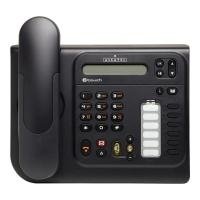
Front view of the Alcatel-Lucent 4018 Extended Edition IPTouch VoIP Phone, showing the display, keypad, and function buttons.
Ključne komponente:
- Zaslon: Prikazuje informacije o pozivu, menije i status.
- Contextual Keys: Buttons below the display that change function based on the current menu.
- Navigacijske tipke: Za listanje kroz menije i opcije.
- Taster za biranje: Standardna numerička tastatura za biranje.
- Funkcijski tasteri: Dedicated buttons for features like voicemail, hold, transfer, and speakerphone.
- Slušalica: Za privatne razgovore.
- spikerfon: Za komunikaciju bez upotrebe ruku.
Setup
1. Povezivanje telefona
- Connect the handset cord to the handset and the designated port on the phone base.
- Connect one end of the Ethernet cable to the LAN port on the back of the phone and the other end to your network switch or router.
- If Power over Ethernet (PoE) is not available, connect the power adapter to the phone's power port and then to an electrical outlet.
2. Početna konfiguracija
Upon first power-up, the phone will attempt to connect to your network and register with your VoIP server. This process may require network credentials or specific server settings, which are typically provided by your IT administrator.
- Slijedite sve upute na ekranu za početno podešavanje.
- Contact your system administrator for specific IP address, subnet mask, gateway, and DNS server settings if manual configuration is required.
Uputstvo za upotrebu
Pozivanje:
- Podignite slušalicu ili pritisnite Zvučnik dugme.
- Pozovite željeni telefonski broj pomoću tastature.
- Pritisnite Dial contextual key or wait for the call to connect automatically.
Odgovaranje na poziv:
- Kada telefon zazvoni, podignite slušalicu ili pritisnite Zvučnik dugme.
- Alternativno, pritisnite Odgovori contextual key.
Završetak poziva:
- Spustite slušalicu ili pritisnite Završi poziv contextual key or Zvučnik dugme.
Govorna pošta:
- Pritisnite namjensko Govorna pošta button (often indicated by an envelope icon).
- Follow the audio prompts to access and manage your messages.
Hold and Transfer:
- Tokom aktivnog poziva pritisnite Čekaj dugme da stavite poziv na čekanje.
- To transfer a call, press the Transfer dugme, birajte novi broj, a zatim pritisnite Transfer again or hang up (consult your system's specific transfer method).
Održavanje
- čišćenje: Koristite meku, suhu krpu za čišćenje površine telefona. Nemojte koristiti tečna sredstva za čišćenje ili aerosole direktno na telefonu.
- Skladištenje: Ako telefon skladištite duži period, isključite ga iz napajanja i mreže i čuvajte ga na hladnom i suhom mjestu.
- Ažuriranja softvera: Firmware updates are typically managed by your IT department. Do not attempt to update the firmware without guidance from your administrator.
Rješavanje problema
| Problem | Mogući uzrok | Rješenje |
|---|---|---|
| Telefon se ne uključuje. | No power connection or faulty power adapter. | Check power cable connection. Ensure power adapter is functional. If using PoE, verify network cable and switch. |
| Ne mogu upućivati ili primati pozive. | Problem s mrežnom vezom ili neuspjeh VoIP registracije. | Check Ethernet cable connection. Restart the phone. Contact your IT administrator to verify VoIP server settings and registration status. |
| Nema tona biranja. | Handset not properly connected or phone not registered. | Ensure handset cord is securely connected. Verify phone is registered to the VoIP server (check display for status). |
| Loš kvalitet zvuka. | Network congestion or faulty handset/speaker. | Check network connection. Try restarting the phone. If problem persists, contact support. |
For issues not listed here, please contact your IT support or the product manufacturer.
Specifikacije
| Feature | Detalj |
|---|---|
| Broj modela | 3GV27063DB |
| Kompatibilni uređaji | Internet, computers, VoIP services |
| Vrsta telefona | Vezani |
| Materijal | Plastika |
| Izvor napajanja | Električni kabel |
| Dialer Type | Jedna tastatura |
| Tip sistema za odgovor | Digital |
| Težina artikla | 4.52 funti |
| Caller ID | Da |
| Baterije su potrebne | Non-standard battery requires batteries (Note: This usually implies a backup battery or specific type, not standard AA/AAA) |
Garancija i podrška
For warranty information, technical support, or service inquiries, please contact your vendor or IT administrator. Alcatel-Lucent provides support through authorized channels.
Spare parts availability: Information unavailable on spare parts.
Ažuriranja softvera zagarantovana do: Informacije nisu dostupne.


