Uvod
The Logitech M310 Wireless Mouse is designed for comfortable and reliable everyday use. Its contoured shape with soft rubber side grips ensures a comfortable fit for either hand, even during extended periods of use. Featuring advanced 2.4 GHz wireless connectivity and precise optical tracking, this mouse offers smooth and responsive cursor control. The included plug-and-forget nano-receiver is small enough to remain in your USB port, providing hassle-free connectivity.
Setup
1. Umetnite bateriju
Locate the battery compartment on the underside of the mouse. Slide the cover open and insert one AA battery, ensuring correct polarity. The Logitech M310 is designed for an extended battery life of up to 18 months, though actual life may vary based on usage.
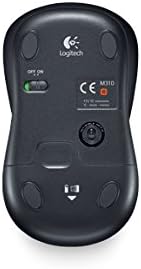
Slika: Donja strana view of the Logitech M310 mouse, highlighting the battery compartment and the ON/OFF switch.
2. Connect USB Nano Receiver
Remove the USB nano receiver from its storage slot within the battery compartment (if stored there) or from its packaging. Plug the receiver into an available USB port on your computer (PC, Mac, or Laptop). The mouse should automatically connect to the receiver.

Image: The Logitech M310 Wireless Mouse positioned next to its compact USB nano receiver.
3. Uključite napajanje
Slide the ON/OFF switch on the underside of the mouse to the 'ON' position. The mouse is now ready for use.
Upravljanje mišem
The Logitech M310 provides standard mouse functionality for seamless navigation.
- Lijevi klik: Pritisnite lijevu tipku za odabir stavki, otvorite files ili aktivirajte funkcije.
- Desni klik: Pritisnite desni taster za pristup kontekstualnim menijima ili određenim opcijama.
- Točak za pomicanje: Okrenite kotačić gore ili dolje da biste se pomicali kroz dokumente ili web pages. The scroll wheel can also be pressed for middle-click functionality, often used to open links in new tabs.
- Optičko praćenje: The advanced optical sensor provides smooth and precise cursor control on various surfaces, often eliminating the need for a mouse pad.
- Bežični domet: Enjoy reliable wireless connectivity with a range that allows for flexible positioning and movement.
Održavanje
Zamjena baterije
When the mouse's performance degrades or the indicator light (if present) signals low battery, replace the AA battery. Always use a fresh, high-quality AA battery for optimal performance.
Čišćenje
To maintain optimal performance, periodically clean the mouse. Use a soft, lint-free cloth slightly dampened with water or a mild cleaning solution to wipe the exterior. For the optical sensor on the underside, use a dry cotton swab to gently remove any dust or debris.
Čuvanje nano prijemnika
The USB nano receiver can be stored inside the mouse's battery compartment when not in use or when transporting the mouse. This helps prevent loss of the small receiver.
Rješavanje problema
- Miš ne reaguje:
Ensure the mouse is switched 'ON'. Check the battery and replace it if necessary. Verify that the USB nano receiver is securely plugged into a working USB port on your computer.
- Nepravilno kretanje kursora:
Clean the optical sensor on the underside of the mouse. Ensure you are using the mouse on a suitable surface; highly reflective or uneven surfaces can affect tracking performance. Try moving the mouse closer to the USB receiver to rule out interference.
- Problemi s povezivanjem:
Unplug the USB nano receiver and plug it back into a different USB port. If possible, try the mouse with another computer to determine if the issue is with the mouse or the computer's USB ports. Ensure no other wireless devices are causing interference.
Specifikacije
| Feature | Detalj |
|---|---|
| Model | M310 |
| Broj modela stavke | 910-003986 |
| Tehnologija povezivanja | Wireless (2.4 GHz USB Nano Receiver) |
| Tehnologija detekcije pokreta | Optički |
| Izvor napajanja | Battery Powered |
| Baterije su potrebne | 1 AA (uključeno) |
| Prosječno trajanje baterije | Do 18 mjeseci |
| Hardverska platforma | PC |
| Kompatibilnost operativnog sistema | Windows, macOS, Linux, Chrome OS |
| Težina artikla | 3.49 unce |
| Dimenzije proizvoda (DxŠxV) | 4.96 x 3.37 x 1.91 inča |
| Boja | Silver Grey (as per product title) |
Garancija i podrška
Informacije o garanciji
The Logitech M310 Wireless Mouse comes with a three-year limited hardware warranty from the date of purchase. This warranty covers defects in materials and workmanship under normal use. Please retain your proof of purchase for warranty claims.
Korisnička podrška
Za tehničku pomoć, rješavanje problema ili upite o garanciji, posjetite službenu Logitech podršku website or contact their customer service. Detailed support resources, FAQs, and driver downloads (if applicable) are available online.
Note: Specific contact details and website URLs may vary by region. Please refer to the packaging or Logitech's official webstranicu za najnovije informacije o podršci.


