1. Uvod
This manual provides essential instructions for the proper use and maintenance of your Phonak ComPilot II. The ComPilot II is a streaming accessory designed to enhance the functionality of your Phonak Venture series hearing aids by facilitating wireless connectivity to various audio sources.
Molimo vas da pažljivo pročitate ovaj priručnik prije upotrebe uređaja kako biste osigurali optimalne performanse i dugotrajnost.
2. Proizvod je gotovview
The Phonak ComPilot II serves as an intermediary device, connecting your Phonak Venture series hearing aids to Bluetooth-enabled audio devices such as mobile phones, MP3 players, and computers. It allows for direct audio streaming into both hearing aids, improving clarity and listening experience.

Figure 1: Phonak ComPilot II device with integrated neck loop for wearing.
Ključne karakteristike:
- New version of the original ComPilot, offering enhanced connectivity and performance.
- Compatible with Phonak Venture series hearing aids.
- Enables direct audio streaming from Bluetooth devices to both hearing aids.
- Includes a power charger for convenient recharging.

Figure 2: Package contents, showing the ComPilot II, instruction manual, and charging accessories.
3. Podešavanje
3.1. Početno punjenje
- Connect the provided power charger to the ComPilot II charging port.
- Uključite punjač u standardnu električnu utičnicu.
- Allow the device to charge fully before first use. The charging indicator light will change to indicate a full charge.
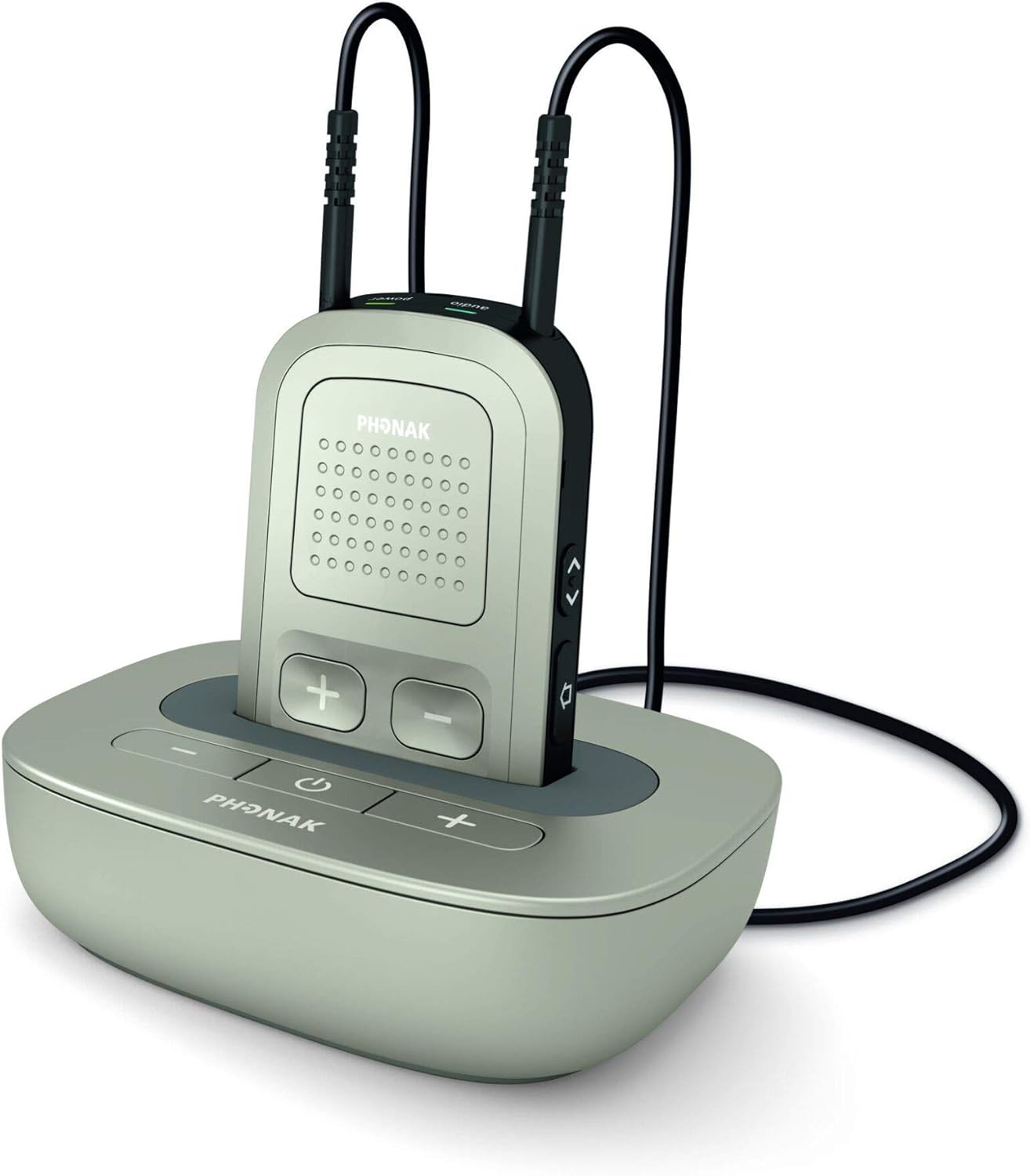
Figure 3: ComPilot II device in its charging cradle.
3.2. Uparivanje sa slušnim pomagalima
The Phonak ComPilot II must be professionally paired with your Phonak Venture series hearing aids. This process typically requires specialized equipment and should be performed by a qualified hearing care professional or Phonak dealer. Please contact your audiologist or hearing aid specialist for assistance with pairing.
3.3. Uparivanje sa Bluetooth uređajima
- Ensure your ComPilot II is charged and turned on.
- Activate Bluetooth on your desired audio device (e.g., smartphone, tablet).
- Put the ComPilot II into pairing mode (refer to the device's specific button sequence, usually by pressing and holding a dedicated Bluetooth button).
- Select "Phonak ComPilot II" from the list of available Bluetooth devices on your audio source.
- Once paired, audio from your device will stream directly to your hearing aids.
4. Uputstvo za upotrebu
4.1. Wearing the ComPilot II
The ComPilot II is designed to be worn around your neck using the integrated neck loop. Ensure the device is positioned comfortably for optimal microphone performance during phone calls.

Figure 4: ComPilot II showing the full length of the neck loop.
4.2. Audio Streaming
- Once paired, audio from your Bluetooth device will automatically stream to your hearing aids when the ComPilot II is active.
- Use the volume controls on the ComPilot II or your paired device to adjust the streaming volume.
4.3. Telefonski pozivi
- When a call comes in on a paired phone, the ComPilot II will alert you.
- Press the designated button on the ComPilot II to answer or end a call.
- Your voice will be picked up by the ComPilot II's integrated microphone and transmitted to the caller.
5. Održavanje
5.1. Čišćenje
- Wipe the ComPilot II regularly with a soft, dry cloth.
- Do not use cleaning agents, alcohol, or solvents, as these can damage the device.
- Izbjegavajte izlaganje uređaja prekomjernoj vlazi.
5.2. Skladištenje
When not in use, store the ComPilot II in a cool, dry place, away from direct sunlight and extreme temperatures.
6. Otkrivanje problema
If you experience issues with your ComPilot II, please refer to the following common solutions:
| Problem | Mogući uzrok | Rješenje |
|---|---|---|
| No audio streaming to hearing aids. | ComPilot II not turned on, not charged, not paired with hearing aids, or not paired with audio device. | Ensure ComPilot II is on and charged. Verify professional pairing with hearing aids. Re-pair with Bluetooth audio device. |
| Audio cuts out intermittently. | Interference, low battery, or device too far from audio source. | Charge ComPilot II. Move closer to the audio source. Avoid environments with strong electromagnetic interference. |
| Cannot pair with a new Bluetooth device. | ComPilot II is not in pairing mode, or too many devices already paired. | Ensure ComPilot II is in pairing mode. Delete old pairings if necessary (refer to full user guide for specific steps). |
If the problem persists, please contact your hearing care professional for further assistance.
7. Specifikacije
- Proizvođač: Phonak
- Model: ComPilot II
- Kompatibilnost: Phonak Venture Series Hearing Aids
- Dimenzije paketa: 4.2 x 3.9 x 2.3 inča
- Težina artikla: 7.2 unce
- Prvi dostupan datum: 22. novembra 2014
8. Garancija i podrška
8.1. Informacije o garanciji
The Phonak ComPilot II comes with a 1-godišnja garancija na popravku od datuma kupovine. Ova garancija pokriva proizvodne nedostatke i kvarove pri normalnoj upotrebi. Molimo sačuvajte dokaz o kupovini za reklamacije u slučaju garancije.
8.2. Politika povrata
A Politika povrata od 30 dana is applicable from the date of purchase. For details on returns, please refer to the retailer's specific return guidelines.
8.3. Korisnička podrška
For technical support, warranty claims, or further assistance, please contact your authorized Phonak dealer or hearing care professional. They are equipped to provide specialized support for your device.


