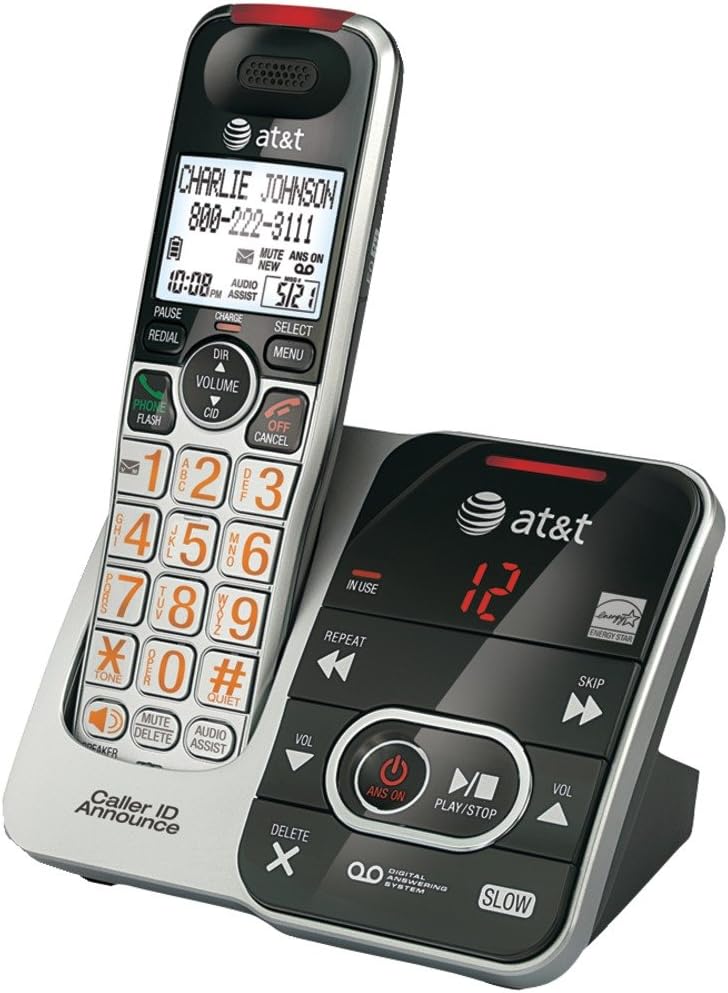
This manual provides instructions for the AT&T CRL32102 DECT 6.0 Expandable Cordless Phone with Answering System and Caller ID/Call Waiting. Please read this manual thoroughly before operating your new telephone to ensure proper use and to maximize its features.
Image Description: A silver and black AT&T CRL32102 cordless phone handset is shown resting in its matching base unit. The handset features a large display, a numeric keypad with large orange characters, and various function buttons. The base unit includes controls for the digital answering system, such as play/stop, skip, repeat, and volume, along with an "IN USE" indicator and a message counter displaying "12". The AT&T logo is visible on both the handset and the base.
Initial Setup
Instalacija baterije
Install the supplied battery pack into the handset battery compartment. Ensure correct polarity by aligning the connectors. Close the battery compartment cover securely.
Punjenje slušalice
Place the handset in the telephone base or charger with the display facing up. The CHARGE light on the handset will illuminate, indicating proper placement. Allow 16 hours for the battery to fully charge before first use to ensure optimal battery performance.
Connecting the Telephone Base
Connect the small end of the power adapter to the power jack on the back of the telephone base. Plug the large end into an electrical outlet that is not controlled by a wall switch.
Spojite jedan kraj telefonskog kabela na TEL LINE jack on the back of the telephone base. Plug the other end into a telephone wall jack. If you have DSL internet service, a DSL filter (not included) may be required.
Upravljanje vašim telefonom
Upućivanje poziva
Pritisnite TELEFON / FLASH or any dial pad key. Enter the phone number using the numeric keypad. The call will connect automatically.
Odgovaranje na poziv
Kada telefon zazvoni, pritisnite TELEFON / FLASH or any dial pad key to answer the incoming call.
Završavanje poziva
Pritisnite OFF/CANCEL or place the handset in the telephone base to end an active call.
Podešavanje jačine zvuka
U toku poziva pritisnite VOLUME▲ (strelica gore) ili ▼ (down arrow) on the handset to adjust the earpiece volume to your preferred level.
Mute Function
U toku poziva pritisnite MUTE to mute the microphone. This allows you to speak privately without the other party hearing you. Press MUTE again to unmute the microphone.
Ponovno biranje
Pritisnite REDIAL to view the last 10 dialed numbers. Use the DIR (directory) navigation keys to scroll through the list. Press TELEFON / FLASH da pozovete izabrani broj.
Answering System
The digital answering system can record up to 15 minutes of messages, memos, and announcements.
To turn the answering system ON/OFF, press ANS ON na telefonskoj bazi.
Za reprodukciju poruka pritisnite PLAY/STOP na telefonskoj bazi.
To skip a message, press SKIP tokom reprodukcije poruke.
To repeat a message, press REPEAT during message playback. Press twice to play the previous message.
To delete a message, press IZBRIŠI while the message is playing.
Održavanje
Čišćenje
Clean the telephone and base with a soft, slightly damp cloth. Do not use cleaning sprays or liquid cleaners as they may damage the finish or internal components.
Battery Care
To maintain the life of the battery, periodically fully discharge the handset battery by leaving it off the charger until it runs out of power. Then, fully recharge it for 16 hours. This helps to recondition the battery and extend its lifespan.
Rješavanje problema
If you experience difficulty with your telephone, please try the following suggestions. For more detailed troubleshooting, refer to the full user manual or AT&T support.
Nema tona biranja
Ensure the telephone line cord is securely plugged into the telephone base and the wall jack.
Check if the power adapter is properly connected to the telephone base and a working electrical outlet.
If you have multiple phones, try unplugging others to see if the issue is with a specific phone or line.
Handset Does Not Charge
Ensure the handset is correctly placed in the base. The CHARGE light on the handset should be on.
Clean the charging contacts on the handset and base with a soft, dry cloth to remove any dust or debris.
Verify that the power adapter for the base is securely plugged in.
Loš kvalitet zvuka
Move the handset closer to the telephone base to improve signal strength.
Avoid placing the phone near other electrical appliances, metal objects, or large electronic devices that may cause interference.
Check for interference from other DECT 6.0 devices or Wi-Fi routers.
Specifikacije proizvoda
Feature
Detalj
ASIN
B00OZ55DTY
Brand
AT&T
Boja
Crna, srebrna
Tip telefona
Bežični
Izvor napajanja
Corded Electric
Dialer Type
Jedna tastatura
Tip sistema za odgovor
Digital
Kompatibilni uređaji
AT&T cordless headset 2
Kapacitet snimanja
15 minuta
Mogućnost konferencijskog poziva
osnovni
Višelinijski rad
Jednolinijski rad
Datum prve dostupnosti
3. maja 2016
Korisnička podrška
For further assistance, technical support, or warranty information, please visit the official AT&T support website or refer to the contact information provided with your product packaging. You can also find FAQs and additional resources online.
AT&T Smart Call Blocker DL72119 Korisnički priručnik Vodič za korištenje funkcije AT&T Smart Call Blocker na bežičnim DECT 6.0 telefonima DL72119/DL72219/DL72319/DL72419/DL72519/DL72539/DL72549. Saznajte kako filtrirati automatske pozive i neželjene pozive, postaviti liste dozvoljenih i blokiranih poziva i upravljati postavkama filtriranja poziva.
AT&T Smart Call Blocker CL82219/CL82229/CL82319/CL82419/CL82519 Korisnički vodič Korisnički vodič za funkciju AT&T Smart Call Blocker na bežičnim DECT 6.0 telefonskim sistemima. Naučite filtrirati automatske pozive, upravljati listama poziva (imenik, dozvoli, blokiraj, označi zvjezdicom) i konfigurirati funkciju filtriranja.filekao što su 'Screen Robot' i 'Screen Unknown'.
AT&T DECT 6.0 Cordless Telephone Quick Start Guide - CL82115 Series Quick start guide for the AT&T DECT 6.0 cordless telephone and answering system (CL82115/CL82215/CL82315/CL82415/CL82465/CL82515). Learn about setup, features like Caller ID, Answering System, Bluetooth, and Smart Call Blocker.