1. Uvod
This manual provides essential information for the installation, operation, and maintenance of your HGST Ultrastar He8 HUH728080ALE604 8TB SATA Hard Drive. The Ultrastar He8 series utilizes HelioSeal technology, replacing air with helium inside the drive to reduce turbulence and enable a seven-disk design within a standard 3.5-inch form factor. This design contributes to industry-leading capacity, improved power efficiency, and enhanced performance for enterprise environments.

Figure 1: HGST Ultrastar He8 8TB SATA Hard Drive, top view.
2. Sigurnosne informacije
Pridržavajte se sljedećih sigurnosnih mjera opreza kako biste spriječili oštećenje pogona i osigurali siguran rad:
- Zaštita od elektrostatičkog pražnjenja (ESD): Always handle the hard drive by its edges. Wear an anti-static wrist strap or frequently touch a grounded metal object before handling the drive to discharge static electricity.
- Fizičko rukovanje: Avoid dropping or subjecting the drive to sudden impacts. Hard drives are precision instruments and can be damaged by rough handling.
- Napajanje: Ensure your power supply unit (PSU) provides stable and sufficient power for the drive. Incorrect voltage or unstable power can damage the drive.
- ventilacija: Install the drive in a well-ventilated area to prevent overheating. Excessive heat can reduce the lifespan of the drive.
3. Sadržaj paketa
Provjerite da li vaš paket sadrži sljedeće stavke:
- HGST Ultrastar He8 HUH728080ALE604 8TB SATA Hard Drive
- Documentation (this user manual, if provided in print)
Note: SATA data cables, power cables, and mounting screws are typically supplied with your computer system or enclosure and are not usually included with the bare drive.
4. Podešavanje
4.1 Fizička instalacija
- Pripremite svoj sistem: Power off your computer and disconnect the power cord. Open the computer case to access the drive bays.
- Montirajte disk: Slide the HGST Ultrastar He8 drive into an available 3.5-inch drive bay. Secure the drive with appropriate mounting screws on both sides to prevent vibration.
- Povezivanje kablova:
- Spojite jedan kraj SATA podatkovnog kabela na SATA priključak na tvrdom disku, a drugi kraj na dostupni SATA priključak na matičnoj ploči.
- Spojite SATA kabel za napajanje iz jedinice za napajanje (PSU) na priključak za napajanje na tvrdom disku.
- Zatvorite kućište i uključite napajanje: Zatvorite kućište računara, ponovo priključite kabl za napajanje i uključite sistem.
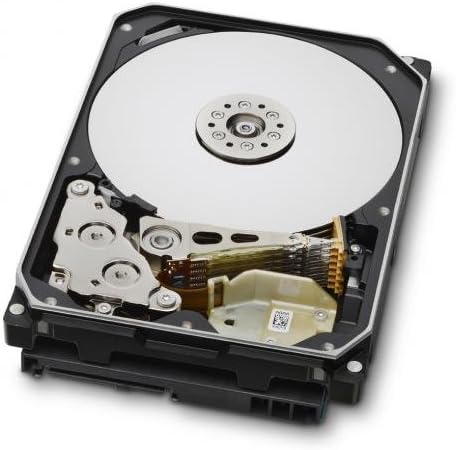
Figure 2: Internal components of the HGST Ultrastar He8, illustrating the platters and read/write head assembly.
4.2 Initial Configuration (Operating System)
After physical installation, the drive needs to be initialized, partitioned, and formatted by your operating system before it can be used for storage.
- Pristup upravljanju diskovima:
- Windows: Right-click on the Start button, then select "Disk Management."
- Linux: Koristite uslužne programe poput
fdisk,gparted, iliDisks. - macOS: Use "Disk Utility."
- Inicijalizacija diska: The new drive should appear as "Unallocated Space." You may be prompted to initialize the disk. Choose GPT (GUID Partition Table) for drives larger than 2TB.
- Create New Simple Volume (Partition): Right-click on the unallocated space and select "New Simple Volume." Follow the wizard to define the partition size, assign a drive letter, and format the volume.
- Formatirajte disk: Odaberite a file system (e.g., NTFS for Windows, ext4 for Linux, APFS/HFS+ for macOS). Perform a quick format for faster setup, or a full format for a more thorough check (which takes significantly longer).
5. Operativni
The HGST Ultrastar He8 is designed for continuous operation in enterprise environments, offering high capacity and reliable performance. Once configured, it functions like any other storage drive within your system.
- Prijenos podataka: Transfer files to and from the drive using your operating system's file explorer or command-line tools.
- Performanse: The drive operates at 7200 RPM with a SATA 6Gb/s interface, providing fast data access and transfer speeds suitable for demanding applications.
- Upravljanje napajanjem: Ensure your operating system's power settings are configured appropriately for hard drives, especially in server environments, to optimize power consumption and drive longevity.
6. Održavanje
Regular maintenance helps ensure the longevity and reliability of your hard drive and the data stored on it.
- Sigurnosna kopija podataka: Regularly back up critical data to another storage device or cloud service. No storage device is infallible.
- Praćenje stanja diska: Use S.M.A.R.T. (Self-Monitoring, Analysis and Reporting Technology) tools to monitor the drive's health status. Many operating systems and third-party utilities offer this functionality.
- Uslovi okoline: Maintain a stable operating environment. Avoid extreme temperatures, high humidity, and excessive vibrations.
- Ažuriranja firmvera: Periodically check the Western Digital support website for firmware updates for your specific drive model. Firmware updates can improve performance, stability, or address known issues. Exercise caution when performing firmware updates, as an interrupted update can render the drive inoperable.
7. Otkrivanje problema
If you encounter issues with your HGST Ultrastar He8 drive, consider the following troubleshooting steps:
- Disk nije otkriven:
- Check all cable connections (SATA data and power) to ensure they are secure.
- Verify that the SATA port on the motherboard is enabled in the system's BIOS/UEFI settings.
- Test the drive in a different SATA port or with different cables.
- Ensure the drive is initialized and formatted in Disk Management (Windows) or equivalent utility (Linux/macOS).
- Spore performanse:
- Provjerite ima li pozadinskih procesa koji troše resurse diska.
- Ensure the drive is connected to a SATA 6Gb/s port and that the necessary drivers are installed.
- Monitor drive health using S.M.A.R.T. tools for potential issues.
- Osigurajte odgovarajuću ventilaciju kako biste spriječili termičko gušenje.
- Neobični zvukovi:
- Clicking, grinding, or repetitive beeping sounds can indicate a mechanical failure. Immediately back up any accessible data and consider replacing the drive.
- A slight hum or whirring is normal for a spinning hard drive.
- Korupcija podataka:
- Pokrenite uslužne programe za provjeru grešaka na disku (npr.
chkdskon Windows,fsckon Linux). - Ensure proper system shutdowns to prevent data loss.
- Pokrenite uslužne programe za provjeru grešaka na disku (npr.
8. Specifikacije
| Feature | Specifikacija |
|---|---|
| Brojevi modela | HUH728080ALE604, 0F23668, 0F25721 |
| Kapacitet | 8 TB |
| Interface | SATA 6Gb/s (Serial ATA-600) |
| Form Factor | 3.5 inča |
| Brzina rotacije | 7200 RPM |
| Cache | 128 MB |
| Dimenzije (DxŠxV) | 5.79 x 4 x 1.03 inča |
| Težina | 1.43 funte |
| Tehnologija | HelioSeal |
| Pouzdanost (MTBF) | 2+ Million Hours (typical) |
9. Informacije o garanciji
The HGST Ultrastar He8 hard drive typically comes with a 3-year seller warranty, covering defects in materials and workmanship under normal use. For specific warranty terms and conditions, please refer to the documentation provided at the time of purchase or contact your seller directly.
Standard return policies usually allow for returns or replacements within 30 days of purchase, subject to the seller's terms.
10. Podrška
For further assistance, technical support, or warranty claims, please contact Western Digital customer support or visit their official webstranica:
- Western Digital podrška Webstranica: https://support.wdc.com
- Western Digital Store: Western Digital Store on Amazon
When contacting support, please have your drive's model number (HUH728080ALE604 or 0F23668) and serial number ready.