1. Uvod
This manual provides detailed instructions for the proper use, setup, and maintenance of your Genius HS-920BT Bluetooth Headset. Please read this manual thoroughly before using the device to ensure optimal performance and longevity.
The Genius HS-920BT is a versatile Bluetooth headset designed for wireless audio streaming and hands-free communication with compatible devices such as smartphones, tablets, and PCs.
2. Sadržaj paketa
Provjerite da li se sve stavke nalaze u vašem paketu:
- Genius HS-920BT Bluetooth Headset
- USB kabl za punjenje
- Multi-language User Manual (this document)
3. Proizvod je gotovview
The HS-920BT headset features an adjustable headband and comfortable earcups, integrating controls for audio playback and call management.
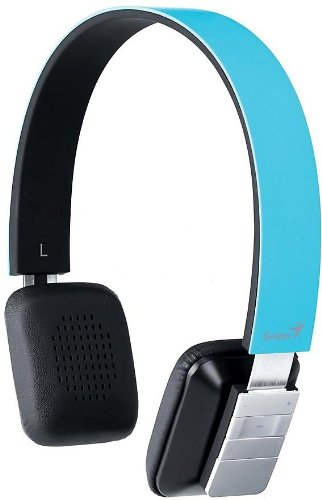
Figure 1: Genius HS-920BT Bluetooth Headset (Blue)
This image displays the Genius HS-920BT Bluetooth Headset in blue, viewed from an angle, highlighting its adjustable headband and earcup design.
Ključne karakteristike:
- Wireless Bluetooth connectivity for audio and calls (A2DP support)
- Integrated rechargeable Lithium-Ion battery
- Ugrađen mikrofon za hands-free komunikaciju
- On-ear controls for volume adjustment, track skipping (AVRCP support)
- Podesiva traka za glavu za udobno nošenje
- 40 mm driver units for clear sound
4. Podešavanje
4.1 Punjenje slušalica
Before initial use, fully charge the headset. Use the provided USB charging cable.
- Connect the small end of the USB charging cable to the charging port on the headset.
- Povežite veći kraj USB kabla na USB priključak sa napajanjem (npr. računar, USB adapter za zid).
- The LED indicator on the headset will illuminate during charging and change color or turn off when fully charged. Refer to the headset's LED behavior for specific indications.
Potpuno punjenje obično traje otprilike 2-3 sata.
4.2 Uparivanje s Bluetooth uređajem
To use the HS-920BT wirelessly, you must pair it with your Bluetooth-enabled device.
- Uključeno: Press and hold the Power button on the headset until the LED indicator flashes, usually alternating blue and red, indicating pairing mode.
- Aktivirajte Bluetooth: On your smartphone, tablet, or PC, enable Bluetooth functionality.
- Traži uređaji: In your device's Bluetooth settings, search for available devices. The headset should appear as "HS-920BT".
- Select and Pair: Select "HS-920BT" from the list. If prompted for a passcode, enter "0000" (four zeros).
- Potvrda: Once paired, the headset's LED indicator will typically flash blue slowly, and your device will confirm the connection.
The headset will automatically attempt to reconnect to the last paired device when powered on, if that device's Bluetooth is active and within range.
5. Uputstvo za upotrebu
The HS-920BT features intuitive controls located on the earcup.

Figure 2: Earcup Controls of HS-920BT
This image shows a close-up of the right earcup of the Genius HS-920BT Bluetooth Headset, detailing the control buttons for power, volume, and track navigation.
5.1 Uključivanje/isključivanje napajanja
- Uključeno: Press and hold the Power button for approximately 3 seconds until the LED indicator flashes blue.
- Iskljuciti: Pritisnite i držite dugme za napajanje otprilike 3 sekundi dok se LED indikator ne ugasi.
5.2 Reprodukcija muzike
- Pusti/pauza: Pritisnite dugme za reprodukciju/pauzu jednom.
- Sljedeća pjesma: Press the "Next Track" button (usually marked with a forward arrow).
- Prethodni zapis: Press the "Previous Track" button (usually marked with a backward arrow).
5.3 Upravljanje pozivima
- Odgovori/Završi poziv: Press the Multi-function button (often the same as Play/Pause) once during an incoming call to answer, or once during a call to end it.
- odbiti poziv: Press and hold the Multi-function button for approximately 2 seconds during an incoming call.
- Ponovno biranje zadnjeg broja: Dvaput pritisnite višenamjensko dugme kada niste u toku poziva.
5.4 Kontrola jačine zvuka
- Povećajte jačinu zvuka: Pritisnite dugme za pojačavanje zvuka (+).
- Smanji jačinu zvuka: Pritisnite dugme za smanjenje jačine zvuka (-).
6. Održavanje
Proper care ensures the longevity of your headset.
- čišćenje: Za čišćenje slušalica koristite meku, suhu krpu. Nemojte koristiti abrazivna sredstva za čišćenje ili rastvarače.
- Skladištenje: Slušalice čuvajte na hladnom i suhom mjestu, dalje od direktne sunčeve svjetlosti i ekstremnih temperatura.
- Održavanje baterije: Da biste produžili vijek trajanja baterije, izbjegavajte često potpuno pražnjenje baterije. Redovno punite slušalice, čak i ako ih ne koristite duži period.
- Izloženost vodi: Slušalice nisu vodootporne. Izbjegavajte izlaganje vodi ili prekomjernoj vlazi.
7. Otkrivanje problema
If you encounter issues with your HS-920BT headset, refer to the following common solutions:
| Problem | Moguće rješenje |
|---|---|
| Slušalice se ne uključuju. | Ensure the battery is charged. Connect the headset to a power source using the USB cable. |
| Cannot pair the headset with a device. |
|
| Nema zvuka ili je jačina zvuka niska. |
|
| Kvalitet poziva je loš. |
|
8. Specifikacije
| Naziv modela: | HS-920BT |
| Bežična tehnologija: | Bluetooth |
| Jedinice vozača: | 40 mm |
| baterija: | Ugrađena punjiva litijum-jonska baterija |
| Vrsta kontrole: | Volume Control, Track Navigation, Call Management |
| mikrofon: | Ugrađeni |
| Podržani Profiles: | A2DP, AVRCP |
| Hardverska platforma: | PC, Smartphone, Tablet |
| Težina artikla: | 110 grama |
| Dimenzije (DxŠxV): | 13.6 x 17.3 x 2.9 cm |
9. Garancija i podrška
For warranty information and technical support, please refer to the warranty card included with your product or visit the official Genius webSačuvajte račun kao dokaz o kupovini.
Za dodatnu pomoć, možete kontaktirati Genius korisničku službu putem njihovih službenih kanala.


