1. Uvod
The THOMSON CT390 is a compact and versatile radio alarm clock designed to provide timekeeping, radio entertainment, and alarm functions. It features an intuitive LCD display with touch controls, FM/MW radio tuning, dual alarms with a weekend function, and connectivity options including USB and AUX for external audio playback. This manual provides detailed instructions for setting up and operating your CT390 unit.
2. Sigurnosne informacije
- Ensure the power adapter is connected to a compatible power outlet.
- Ne izlažite uređaj vodi, vlazi ili ekstremnim temperaturama.
- Izbjegavajte postavljanje jedinice u blizini izvora topline ili na direktnu sunčevu svjetlost.
- Čistite uređaj mekom, suhom krpom. Ne koristite tekuća sredstva za čišćenje ili abrazivne materijale.
- Ne pokušavajte sami rastavljati ili popravljati uređaj. Sve servisne radove prepustite kvalifikovanom osoblju.
3. Sadržaj paketa
Molimo Vas da provjerite da li se u paketu nalaze svi artikli:
- THOMSON CT390 Radio Alarm Clock Unit
- Adapter za napajanje
- External Temperature Sensor (for outdoor temperature display)
- Korisnički priručnik (ovaj dokument)
4. Proizvod je gotovview
4.1 Prednja ploča i ekran
The front panel features a large LCD display and touch-sensitive controls for various functions.
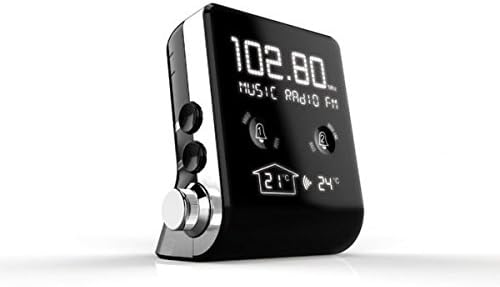
Slika 1: Front view of the THOMSON CT390, showing the LCD display with radio frequency (e.g., 102.80 MHz), 'MUSIC RADIO FM' text, two alarm bell icons, and indoor (21°C) and outdoor (24°C) temperature readings.

Slika 2: Front view of the THOMSON CT390, showing the LCD display with the current time (e.g., 0:20) and date (e.g., SU 01 JAN 2012). This view also shows the alarm icons and temperature readings at the bottom.
4.2 Side and Rear Controls/Ports
The side and rear panels house physical buttons, a rotary knob, and connection ports.

Slika 3: Bočno i pozadi view of the THOMSON CT390. Visible controls include 'SYNC TIME', 'DIMMER', 'SET', 'MODE' buttons, a 'TUNING/ADJUST' rotary knob, a USB port, and an AUX input jack.
4.3 Vanjski temperaturni senzor
The unit includes an external sensor for displaying outdoor temperature.
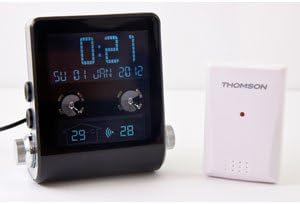
Slika 4: The THOMSON CT390 unit displayed alongside its compact white external temperature sensor, which wirelessly transmits outdoor temperature data to the main unit.
5. Podešavanje
5.1 Priključak za napajanje
- Connect the power adapter to the DC input jack on the rear of the CT390.
- Plug the power adapter into a standard wall outlet. The unit will power on and the display will illuminate.
5.2 Početno podešavanje vremena i datuma
The CT390 supports automatic time adjustment via RDS (Radio Data System) when tuned to an FM station that broadcasts time information. Manual setting is also possible.
- Automatic Setting (via RDS): Tune to an FM radio station. If the station broadcasts RDS time, the clock will automatically synchronize.
- Ručno podešavanje:
- Press and hold the 'SET' button (refer to Image 3) to enter time setting mode.
- Use the 'TUNING/ADJUST' knob to adjust the hour, then press 'SET' to confirm.
- Ponovite za minute, godinu, mjesec i dan.
- Press 'SET' again to exit the setting mode.
5.3 External Temperature Sensor Pairing
The external sensor should automatically pair with the main unit upon power-up. Ensure the sensor is placed in a suitable outdoor location, protected from direct rain and sunlight, for accurate readings.
6. Uputstvo za upotrebu
6.1 Prikaz vremena i datuma
The LCD display continuously shows the current time and date. Indoor and outdoor temperatures are also displayed.
6.2 Radio operacije
- Uključivanje/isključivanje: Press the 'MODE' button to switch between radio and other modes.
- Odabir benda: In radio mode, press 'MODE' to cycle between FM and MW bands.
- tuning: Use the 'TUNING/ADJUST' knob to manually tune to a desired frequency.
- Automatsko skeniranje: Press and hold the 'TUNING/ADJUST' knob to automatically scan for the next available station.
- Podešavanje jačine zvuka: Use the dedicated volume control (if present, otherwise the 'TUNING/ADJUST' knob might double as volume in certain modes).
6.3 Postavke alarma
The CT390 features two independent alarms (Alarm 1 and Alarm 2) and a weekend function.
- Postavljanje alarma:
- Press the Alarm 1 or Alarm 2 touch icon on the front display to activate/deactivate.
- Press and hold the respective alarm icon to enter alarm setting mode.
- Use the 'TUNING/ADJUST' knob to set the alarm time (hour and minute), then press the alarm icon to confirm each step.
- Select the alarm source: Radio, Buzzer, or USB (if a USB device is connected).
- Confirm the alarm settings to exit.
- Weekend Function: Activate the weekend function to disable alarms on Saturdays and Sundays. This option is typically set during the alarm setup process.
- Funkcija odgode: When an alarm sounds, press the 'SNOOZE' button (often a large button on top or a specific touch area) to temporarily silence the alarm for a few minutes.
- Zaustavljanje alarma: To turn off a sounding alarm, press any button other than 'SNOOZE'. The alarm will reset for the next day.
6.4 Postavke ekrana
Adjust the display brightness for optimal viewing.
- Zatamnjivač: Press the 'DIMMER' button (refer to Image 3) to cycle through different brightness levels for the LCD display.
6.5 Reprodukcija sa USB i AUX priključaka
Connect external audio devices for playback through the CT390's speaker.
- USB reprodukcija: Umetnite USB fleš disk sa MP3 files into the USB port. The unit should automatically switch to USB mode or require selection via the 'MODE' button.
- AUX ulaz: Connect an external audio device (e.g., smartphone, MP3 player) to the AUX input jack using a 3.5mm audio cable. Select AUX mode via the 'MODE' button.
7. Održavanje
To ensure the longevity and optimal performance of your THOMSON CT390:
- Wipe the unit with a soft, dry, lint-free cloth.
- Ne koristite abrazivna sredstva za čišćenje, voskove ili rastvarače jer mogu oštetiti završnu obradu.
- Uređaj držite čistim od prašine i prljavštine.
8. Otkrivanje problema
If you encounter issues with your CT390, refer to the following common problems and solutions:
| Problem | Mogući uzrok | Rješenje |
|---|---|---|
| Time is inaccurate or drifts. | No RDS signal; manual setting error; internal clock drift. | Tune to an FM station with RDS. Manually reset the time. Ensure the unit is not subject to frequent power interruptions. |
| Alarm se ne oglašava. | Alarm not activated; volume too low; weekend function active. | Ensure the alarm icon is displayed. Increase volume. Check weekend function settings. |
| Loš radio prijem. | Slab signal; antena nije izvučena; smetnje. | Extend the FM wire antenna fully. Reposition the unit. Avoid placing near electronic devices that may cause interference. |
| Ekran je previše taman ili previše svijetao. | Podešavanje prigušivača. | Press the 'DIMMER' button to adjust brightness. |
| Outdoor temperature not displayed. | External sensor not paired or out of range; sensor battery low (if applicable). | Ensure the external sensor is within range of the main unit. Check for any battery compartment on the sensor. |
9. Specifikacije
- Brand: Thomson
- Broj modela: CT390
- Boja: Crna
- Materijal: Plastika
- Vrsta prikaza: Digitalni LCD
- Radio bendovi: FM, SW
- Posebne karakteristike: Calendar, Alarm Function, Integrated Speakers, Indoor/Outdoor Temperature Display, USB Port, AUX Input
- Izvor napajanja: AC (Mains Power)
- Težina artikla: Otprilike 760 g
- Dimenzije paketa: 20.4 x 16.8 x 12.4 cm
10. Garancija i podrška
For warranty information and customer support, please refer to the documentation provided at the time of purchase or contact your local Thomson service center. Keep your proof of purchase for warranty claims.