Uvod
This manual provides essential instructions for the safe and effective use of your Olympus IS 10 Film Camera. Please read this manual thoroughly before using the camera and keep it in a safe place for future reference. The Olympus IS 10 is a 35mm point-and-shoot film camera featuring a 28-110mm Glass Aspherical AF Zoom Lens and Intelligent Flash.
Setup
1. Instalacija baterije
The Olympus IS 10 requires batteries for operation. Locate the battery compartment cover, typically on the bottom or side of the camera. Open the cover and insert the required batteries, ensuring correct polarity (+/-) as indicated inside the compartment. Close the cover securely.
2. Učitavanje filma
- Open the camera back cover by sliding the latch, usually located on the side of the camera body.
- Place a 35mm film cartridge into the film chamber.
- Pull the film leader across to the film take-up spool, aligning it with the orange mark or insertion point.
- Close the camera back cover firmly until it clicks shut. The camera will automatically advance the film to the first frame. The frame counter will display '1'.
3. Dodatak za remen
Attach the camera strap to the strap lugs located on the camera body. Ensure the strap is securely fastened to prevent accidental drops.
Operacija
1. Uključivanje/isključivanje
To power on the camera, slide the ON/OFF switch, typically located near the top left of the camera body. To power off, slide the switch back to the OFF position.

Slika: Prednja strana view of the Olympus IS 10 camera, showing the lens, power switch, and some control buttons. The lens is extended, indicating the camera is powered on or ready for use.
2. Focusing and Zooming
The Olympus IS 10 features a 28-110mm autofocus zoom lens. Use the zoom lever, usually located near the shutter button, to adjust the focal length. The camera will automatically focus on your subject when the shutter button is half-pressed.
3. Režimi snimanja
The camera offers various shooting modes, including a 'FULL AUTO' mode for simplified operation. Select your desired mode using the mode dial or buttons, typically located on the top right of the camera. Refer to the display for the selected mode.
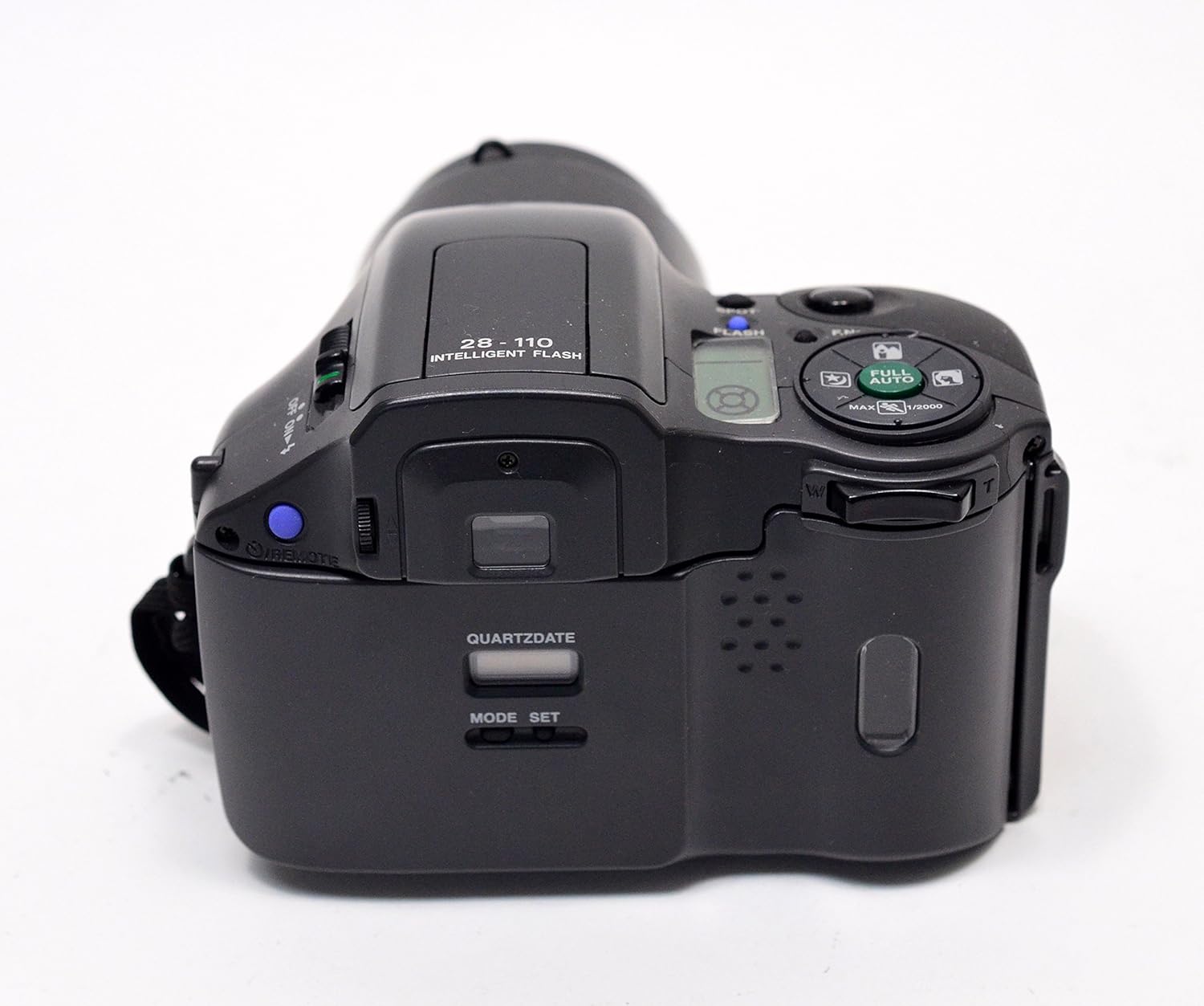
Image: Rear-top view of the Olympus IS 10 camera, highlighting the control panel with buttons for flash, full auto mode, zoom, and the Quartzdate settings. The LCD display is also visible.
4. Rad blica
The camera is equipped with an Intelligent Flash. Press the flash button to cycle through different flash modes (e.g., Auto Flash, Red-eye Reduction, Flash Off, Fill-in Flash). The selected mode will be indicated on the camera's display.
5. Otpuštanje zatvarača
To take a picture, compose your shot and gently press the shutter button located on the top of the camera. Pressing halfway will activate autofocus and exposure metering. Pressing fully will release the shutter and capture the image.
6. Quartzdate Function
The Quartzdate function allows you to imprint the date or time onto your photographs. Use the 'MODE' and 'SET' buttons, typically found on the rear of the camera, to adjust the date/time settings and activate/deactivate the imprint function.

Slika: Vrh view of the Olympus IS 10 camera, clearly showing the 'QUARTZDATE' display and its 'MODE' and 'SET' buttons for date imprinting functionality.
7. Premotavanje i istovar filma
Once all frames on the film roll have been exposed, the camera will automatically rewind the film back into its cartridge. Wait for the rewinding process to complete (indicated by a sound or display message), then open the camera back cover and remove the film cartridge.
Održavanje
1. Čišćenje kamere
- Tijelo kamere: Koristite meku, suhu krpu za brisanje kućišta fotoaparata. Za tvrdokornu prljavštinu, laganoampNamočite krpu vodom, a zatim obrišite suhom krpom. Izbjegavajte upotrebu organskih rastvarača.
- Objektiv: Use a lens brush or a blower to remove dust. For smudges, use a specialized lens cleaning cloth and lens cleaning fluid. Do not touch the lens surface with your fingers.
- Filmska komora: Keep the film chamber clean and free of dust or debris, which can scratch film. Use a blower brush if necessary.
2. Održavanje baterije
Remove batteries if the camera will not be used for an extended period to prevent leakage. Store batteries in a cool, dry place. Dispose of used batteries responsibly according to local regulations.
3. Skladištenje
Store the camera in a cool, dry, and well-ventilated place, away from direct sunlight, high temperatures, high humidity, and strong magnetic fields. Use a desiccant if storing in humid environments.
Rješavanje problema
- Kamera se ne uključuje: Provjerite jesu li baterije pravilno umetnute i nisu li ispražnjene. Po potrebi ih zamijenite novima.
- Blic se ne aktivira: Ensure the flash mode is not set to 'Flash Off'. Check battery level. In some low-light conditions, the flash may not fire if the camera determines sufficient ambient light.
- Pictures are out of focus: Ensure the subject is within the camera's focusing range. Half-press the shutter button to allow the camera to focus before fully pressing. Avoid shooting through dirty or smudged lenses.
- Film does not advance/rewind: Check if the film is loaded correctly. Ensure the camera back is securely closed. If the issue persists, the film may be jammed or the camera may require servicing.
- Poruka o grešci na ekranu: Consult the camera's display for specific error codes or messages. If the message is not clear, try turning the camera off and on again.
Ako naiđete na stalne probleme koji nisu ovdje obuhvaćeni, pogledajte odjeljak za podršku.
Specifikacije
| Brand | Olympus |
| Naziv modela | IS 10 |
| Broj modela stavke | 101-950 |
| Objektiv | 28-110mm Glass Aspherical AF Zoom Lens |
| Tip formata filma | 35mm |
| Shutter Type | Zatvarač fokalne ravni |
| Posebna karakteristika | Compact |
| Uključene komponente | Kućište i objektiv kamere |
| Težina artikla | 1.5 funte |
| Dimenzije paketa | 7.99 x 5.98 x 2.99 inča |
| UPC | 050332316157 |
Garancija i podrška
For warranty information, please refer to the documentation provided at the time of purchase or contact your retailer. Olympus provides customer support for their products. For technical assistance, service, or further inquiries, please visit the official Olympus webweb-mjesto ili kontaktirajte njihovu službu za korisnike. Sačuvajte račun kao dokaz o kupovini za reklamacije u slučaju garancije.
Note: This manual is for informational purposes. Product features and specifications are subject to change without notice.