1. Uvod
This user manual provides essential information for the proper setup, operation, maintenance, and troubleshooting of your Ozone OES-BAS-22 Electronic Safe-Core. Please read this manual thoroughly before using the safe to ensure optimal performance and security. This electronic safe is designed to provide secure storage for your valuables.
2. Proizvod je gotovview
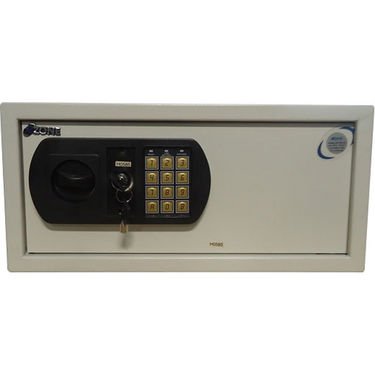
This image displays the front panel of the Ozone OES-BAS-22 Electronic Safe-Core, highlighting the electronic keypad, key override lock, and the overall compact design. The keypad allows for digital code entry, while the key provides an alternative access method.
3. Podešavanje
3.1. Instalacija baterije
- Pronađite odjeljak za baterije, obično s unutarnje strane vrata sefa.
- Otvorite poklopac baterije.
- Insert the required number of batteries (usually AA or AAA, refer to the compartment label) ensuring correct polarity (+/-).
- Čvrsto zatvorite poklopac baterije.
3.2. Početno podešavanje koda
- With the safe door open, locate the reset button (often a small red or green button) on the inside of the door or near the battery compartment.
- Press the reset button. You should hear a beep or see an indicator light.
- On the keypad, enter your desired new code (typically 3-8 digits).
- Confirm the code by pressing the 'E' or '#' button.
- Testirajte novi kod s otvorenim vratima kako biste bili sigurni da ispravno radi prije nego što zatvorite sef.
4. Uputstvo za upotrebu
4.1. Opening the Safe with Electronic Code
- Unesite svoj lični kod na tastaturi.
- Press the 'E' or '#' button.
- Within 5 seconds of a successful code entry, turn the handle clockwise (or counter-clockwise, depending on model) to open the door.
4.2. Opening the Safe with Override Key
- Pronađite ključaonicu, obično skrivenu iza malog poklopca na ploči s tipkovnicom.
- Insert the override key and turn it.
- While holding the key turned, rotate the handle to open the safe door.
4.3. Zatvaranje i zaključavanje sefa
- Čvrsto zatvorite vrata sefa.
- Turn the handle counter-clockwise (or clockwise) until the bolts are fully extended and the door is securely locked.
4.4. Promjena vašeg ličnog koda
- With the safe door open, press the reset button.
- Unesite novi željeni kod (3-8 cifara) na tastaturi.
- Press the 'E' or '#' button to confirm.
- Verify the new code by entering it with the door open before closing.
5. Održavanje
- Zamjena baterije: Replace batteries annually or when the low battery indicator (if present) illuminates. Always use new, high-quality batteries of the specified type.
- čišćenje: Očistite vanjski dio sefa mekom,amp krpom. Izbjegavajte abrazivna sredstva za čišćenje ili rastvarače koji bi mogli oštetiti završnu obradu ili tastaturu.
- Pohrana ključeva: Store override keys in a secure location away from the safe itself. Do not store them inside the safe.
- Provjera mehanizma: Periodically check the locking bolts and door hinges for smooth operation. Do not lubricate the electronic lock mechanism.
6. Otkrivanje problema
| Problem | Rješenje |
|---|---|
| Sef se ne otvara kodom. | Ensure batteries are fresh and correctly installed. Re-enter code carefully. Try the override key. |
| Tastatura ne reaguje. | Check battery power. Replace batteries if necessary. Ensure no foreign objects are obstructing buttons. |
| Alarm se neočekivano oglašava. | This safe features a visual alarm. Ensure the safe is not being tampered with. If persistent, contact customer support. |
| Vrata se ne zatvaraju ili ne zaključavaju pravilno. | Check for any obstructions inside the safe or around the door frame. Ensure the handle is fully turned to engage bolts. |
7. Specifikacije
| Feature | Detalj |
|---|---|
| Brand | Ozon |
| Model | OES-BAS-22 |
| Tip brave | Electronic |
| Posebna karakteristika | Prijenosni |
| Težina artikla | 12.2 kg (26.9 funti) |
| Alarm | Visual |
| Nivo vodootpornosti | Nije vodootporan |
| UPC | 783942612165 |
| Dimenzije paketa | 42.9 x 38 x 20 cm |


