Boxlight ACTG042

Zamjena kutije za svjetlo Lamp Modul User Manual

Models: LC-XG110, LC-XG210, LX32 (Part Number: ACTG042)

Uvod

This manual provides essential information for the safe and effective installation, operation, and maintenance of your Boxlight replacement lamp module. This module is designed for use with Boxlight LC-XG110, LC-XG210, and LX32 projector models. Please read these instructions carefully before proceeding with installation.

Zamjena kutije za svjetlo Lamp Modul

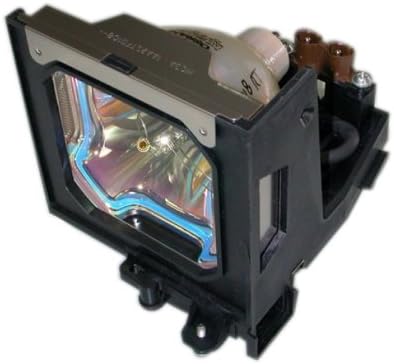
Image: Boxlight replacement lamp module, showing the bulb encased in its housing with electrical connectors.

The Boxlight replacement lamp module (Part Number: ACTG042) includes an original bulb and housing, ensuring compatibility and optimal performance with your projector. It features a 250-watt bulb with an average lamp life of 2000 hours under normal operating conditions.

Važne informacije o sigurnosti

Sijalica u ovom lamp contains Mercury (Hg). Please dispose of in accordance with local, state, or federal laws. Do not dispose of with regular household waste.

Uputstva za instalaciju

  1. Isključite i odspojite: Ensure your Boxlight projector is turned off and completely unplugged from the power source.
  2. Cool Down: Allow the projector to cool down for at least 30 minutes. The lamp operates at high temperatures and can cause burns if handled while hot.
  3. Pronađite Lamp omot: Refer to your projector's user manual to locate the lamp compartment cover. This is typically secured by one or more screws.
  4. Uklonite Lamp omot: Using a suitable screwdriver, carefully remove the screw(s) securing the lamp cover and then remove the cover.
  5. Unscrew Old Lamp: Stari lamp module will be secured by one or more screws. Unscrew these fasteners.
  6. Uklonite stari Lamp: Gently pull the handle on the old lamp module to slide it out of the projector. Be careful not to drop it.
  7. Umetnite novi Lamp: Carefully insert the new Boxlight replacement lamp module into the projector, ensuring it slides smoothly into place. Do not force it.
  8. Secure New Lamp: Fasten the new lamp module with the screw(s) you removed earlier. Ensure it is securely seated.
  9. Zamijenite L.amp omot: Ponovo pričvrstite lamp compartment cover and secure it with its screw(s).
  10. Ponovo priključite napajanje: Plug the projector back into the power outlet.
  11. Resetuj Lamp Tajmer: Consult your projector's user manual for instructions on how to reset the lamp timer. This is crucial for accurate lamp life tracking.

Operativne smjernice

Održavanje

Rješavanje problema

If you encounter issues after installing the new lamp, razmotrite sljedeće:

For further assistance, refer to your projector's original user manual or contact Boxlight customer support.

Specifikacije proizvoda

BrandBoxlight
Broj modelaACTG042
Compatible Projector ModelsLC-XG110, LC-XG210, LX32
Lamp Part Numbers03-000712-01P; 610 305 5602; MP56T-930; POA-LMP59
Wattage250 vati
Lamp Life (Normal)2000 sati
Light TypeXenon
Lamp TehnologijaLCD
Težina artikla13.3 unce (0.83 funte)
Dimenzije proizvoda5.32 x 4.53 x 4.13 inča
UPC840398106805

Informacije o garanciji

This Boxlight replacement lamp module is covered by a 180-dnevno jamstvo od datuma kupovine. Ova garancija pokriva nedostatke u materijalu i izradi pri normalnoj upotrebi. Molimo sačuvajte dokaz o kupovini za reklamacije.

For warranty service or inquiries, please contact the seller or manufacturer directly.

Korisnička podrška

If you require further assistance, have questions about installation, or need to report an issue, please contact the retailer where you purchased this product or the manufacturer, Arclyte Tech. (Boxlight's manufacturer).

When contacting support, please have your product model number (ACTG042) and proof of purchase readily available.

Povezani dokumenti - ACTG042

Preview Korisnički priručnik za mikro prenosivi LCD projektor
Sveobuhvatno korisničko uputstvo za mikro prenosivi LCD projektor, koje obuhvata funkcije, podešavanje, povezivanje, rad OSD menija, održavanje i rješavanje problema.
Preview BOXLIGHT Boston Series projektor - uputstvo za podešavanje, funkcije i upotrebu
Sveobuhvatno korisničko uputstvo za projektor BOXLIGHT Boston serije. Saznajte više o funkcijama, sigurnosnim smjernicama, postupcima postavljanja, radu, održavanju i rješavanju problema. Posjetite BOXLIGHT.com za podršku.
Preview Interaktivni ravni ekran Boxlight MimioPro G: Uputstvo za raspakivanje i instalaciju
Sveobuhvatni vodič za raspakivanje i instalaciju interaktivnog ravnog ekrana Boxlight MimioPro G. Obuhvata podešavanje hardvera, Wi-Fi modul, ažuriranja firmvera i početnu konfiguraciju Googlea.
Preview BOXLIGHT ProjectoWrite5|6 Korisnički priručnik
Sveobuhvatno korisničko uputstvo za BOXLIGHT ProjectoWrite5 i ProjectoWrite6 projektore, koje detaljno opisuje podešavanje, funkcije, rad, održavanje i rješavanje problema za poboljšane prezentacije.
Preview Korisnički priručnik za interaktivni ekran MimioPro G | Boxlight
Sveobuhvatno korisničko uputstvo za interaktivni ekran Boxlight MimioPro G, koje obuhvata sigurnost, podešavanje, rad, održavanje i rješavanje problema. Saznajte kako povezati uređaje, koristiti daljinski upravljač i rješavati uobičajene probleme.
Preview Vodič za nadogradnju firmvera za Boxlight ProColor Series Two IFPD
Ovaj vodič detaljno opisuje proces nadogradnje firmvera za Boxlight ProColor Series dva interaktivna ravna ekrana (IFPD), obuhvatajući nove funkcije, korake implementacije i potrebne alate. Uključuje informacije o aplikacijama kao što su Unplug'd i Chrome, uslužnim programima kao što je NDMS i proceduru ručne nadogradnje.