Uvod
This user manual provides comprehensive instructions for the setup, operation, and maintenance of your Reloop RP-8000 Advanced Hybrid Torque Turntable. The RP-8000 combines traditional direct-drive turntable functionality with advanced digital control features, making it a versatile tool for DJs and audio enthusiasts.
Molimo vas da pažljivo pročitate ovaj priručnik prije upotrebe uređaja kako biste osigurali pravilnu upotrebu i maksimizirali njegove performanse i dugotrajnost.
Sigurnosna uputstva
- Uvjerite se da napajanje odgovara voltage requirements specified on the unit.
- Ne izlažite uređaj kiši, vlazi ili ekstremnim temperaturama.
- Izbjegavajte postavljanje jedinice u blizini izvora topline ili na direktnu sunčevu svjetlost.
- Ne otvarajte casing; sve servisne radove prepustite kvalifikovanom osoblju.
- Always disconnect the power cable before cleaning or moving the unit.
- Čuvati van domašaja djece.
Sadržaj paketa
Provjerite da li su sve stavke prisutne u paketu:
- Glavna gramofonska jedinica
- Power Cable
- USB kabel
- RCA Cable (with ground wire)
- Slipmat
- Protuteg
- Headshell (cartridge not included)
- Korisnički priručnik (ovaj dokument)
Product Overview
Familiarize yourself with the various components of your Reloop RP-8000 turntable.
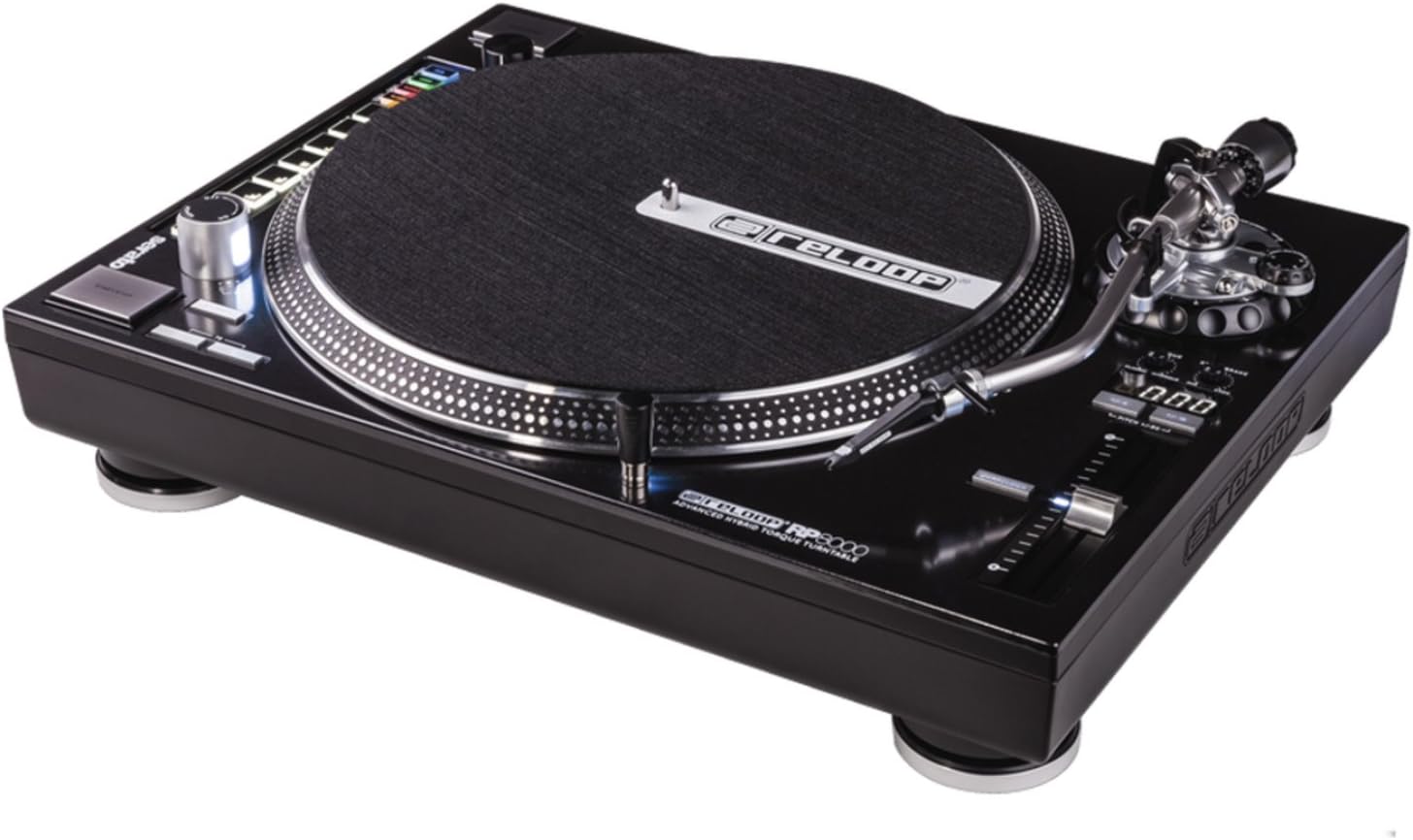
Slika 1: Odozgo view of the Reloop RP-8000 turntable, showcasing the platter, tone arm, pitch fader, and MIDI control section with performance pads.

Slika 2: Ugao view of the Reloop RP-8000, highlighting the robust construction, the illuminated platter edge, and the integrated MIDI controls on the left side.

Slika 3: Rear panel of the Reloop RP-8000, showing the audio output (Phono/Line), USB ports (USB A and TT Link), power input, and power switch. Note the additional start/stop button for vertical setup.
Ključne komponente:
- tanjir: The rotating surface where records are placed.
- Tonska ručica: Holds the cartridge and stylus, tracking the record's grooves.
- Visina tona: Adjusts the playback speed (BPM).
- Dugmad za pokretanje/zaustavljanje: Controls platter rotation. An additional button is provided for battle setup.
- MIDI Control Section: Features a Trax encoder, 8 backlit drum pads, and mode selection buttons for software control.
- Phono/Line Output: RCA jacks for audio output, with a switch to select between phono (turntable level) and line (mixer/amp level) output.
- USB portovi: For connecting to a computer and linking multiple turntables.
Setup
1. Raspakivanje i postavljanje
- Carefully remove the turntable from its packaging.
- Place the unit on a stable, level surface away from direct vibrations.
- Osigurajte adekvatnu ventilaciju oko uređaja.
2. Tone Arm and Cartridge Assembly
- Attach your preferred headshell and cartridge (sold separately) to the tone arm.
- Install the counterweight onto the rear of the tone arm.
- Adjust the counterweight to balance the tone arm horizontally. Refer to your cartridge's instructions for recommended tracking force.
- Podesite regulator protiv klizanja tako da odgovara sili praćenja.
3. Veze
- Audio veza: Connect the RCA cables from the turntable's PHONO/LINE output to your mixer or amplifier.
- If connecting to a PHONO input on your mixer/amp, set the turntable's PHONO/LINE switch to PHONE.
- If connecting to a LINE input, set the turntable's PHONO/LINE switch to LINE.
- Connect the ground wire to the ground terminal on your mixer/amp to reduce hum.
- USB veza: Connect the USB cable from the turntable's USB port to your computer for MIDI control and DVS (Digital Vinyl System) functionality.
- Turntable Link (TT Link): For linking multiple RP-8000 units, connect them in series using standard USB cables. Only one turntable needs to be connected to the computer.
- Priključak za napajanje: Connect the power cable to the turntable and then to a suitable power outlet.
Uputstvo za upotrebu
1. Osnovna reprodukcija
- Place a record on the platter and put the slipmat on top.
- Select the desired speed (33, 45, or 78 RPM) using the speed selection buttons.
- Pritisnite dugme START/STOP da biste započeli rotaciju tanjira.
- Carefully lower the tone arm onto the record using the cue lever.
- Adjust the pitch using the pitch fader as needed.
2. Pitch Control
- The pitch fader allows for precise adjustment of playback speed.
- Use the Pitch Range buttons (+/-8%, +/-16%, +/-50%) to select the desired pitch adjustment range.
- The LCD display shows the current pitch percentage.
- Press the Quartz Lock button to return the pitch to 0% (nominal speed).
3. MIDI Control and Performance Modes
The RP-8000 features an integrated MIDI control section for seamless integration with DJ software.
- Trax Encoder: Use this large encoder to browse through playlists and load tracks in your DJ software.
- Jastučići za performanse: The 8 backlit drum pads offer various performance modes:
- Način rada Hot Cue: Trigger up to 8 hot cue points.
- Način rada petlje: Set and trigger loops.
- Sample Mode: Access and play samples.
- Korisnički način: Freely assign MIDI functions to the pads and other control elements.
- Dual Performance Mode: Activate two modes simultaneously (e.g., Hot Cue and Loop) by pressing their respective buttons. The pads will be split to control both functions.
- Turntable Link Mode: Connect up to four RP-8000 turntables via USB. The units automatically assign themselves to available decks in your DJ software, requiring only one USB connection to your computer.
- Dugme za obrnuto: Instantly reverses platter rotation.
- Adjustable Start/Stop Time: Use the dedicated dials to fine-tune the platter's start and brake times for customized performance.
Održavanje
- čišćenje: Koristite meku, suhu krpu za brisanje uređaja. Za tvrdokornu prljavštinu, laganoamp cloth can be used, but ensure no liquid enters the unit. Avoid abrasive cleaners.
- Njega olovke: Regularly clean your stylus with a soft brush designed for this purpose. Replace the stylus when it shows signs of wear to prevent damage to your records.
- Poklopac za prašinu: Use a dust cover (if available) when the turntable is not in use to protect it from dust and debris.
Rješavanje problema
| Problem | Mogući uzrok | Rješenje |
|---|---|---|
| Nema zvuka ili je mala jačina zvuka | Incorrect PHONO/LINE switch setting; loose RCA cables; faulty cartridge/stylus. | Ensure PHONO/LINE switch matches input; check cable connections; inspect/replace cartridge/stylus. |
| Zujanje | Ground wire not connected; interference from other electronics. | Connect ground wire to mixer/amp; move turntable away from other electronic devices. |
| Plato se ne okreće | Power not connected; power switch off; START/STOP button not pressed. | Check power cable; ensure power switch is ON; press START/STOP button. |
| MIDI controls not responding | USB cable not connected; incorrect software settings; outdated firmware. | Ensure USB cable is connected; check DJ software MIDI settings; update turntable firmware if available. |
If the problem persists after attempting these solutions, please contact Reloop customer support.
Specifikacije
| Feature | Detalj |
|---|---|
| Naziv modela | RP-8000 MK2 (AMS-RP-8000) |
| Tip motora | AC Motor, Quartz-driven Direct Drive |
| Težina artikla | 22 funte (otprilike 9.98 kg) |
| Dimenzije proizvoda (D x Š x V) | 20.66 x 16.53 x 7.48 inča (približno 52.5 x 42 x 19 cm) |
| Tehnologija povezivanja | Wired (RCA, USB 2.0) |
| Izvor napajanja | Corded Electric |
| Voltage | 220 Volts (Note: Check specific unit for local voltagkompatibilnost) |
| Hardversko sučelje | USB 2.0 |
| Kompatibilni uređaji | Personal Computer |
| Format signala | Digital |
Garancija i podrška
For information regarding warranty coverage, please refer to the warranty card included with your product or visit the official Reloop website. Reloop offers various protection plans for extended coverage, which may be purchased separately.
For technical support, troubleshooting assistance beyond this manual, or spare parts, please contact Reloop customer service through their official weblokaciji ili ovlaštenim distributerima. Sačuvajte račun kao dokaz o kupovini za reklamacije u slučaju garancije.
Napomena: The user manual (PDF) is also available for download at https://manuals.plus/m/8eb0b60ccb1c6d10ac93577b129a938bfbac889fdb461902d354afc8d19b78dd.


