1. Uvod
This user manual provides comprehensive instructions for the Beats Studio Wired 2.0 Over-Ear Headphones. It covers essential information regarding product features, setup, operation, maintenance, and troubleshooting to ensure you get the most out of your listening experience. Please read this manual thoroughly before using your headphones.

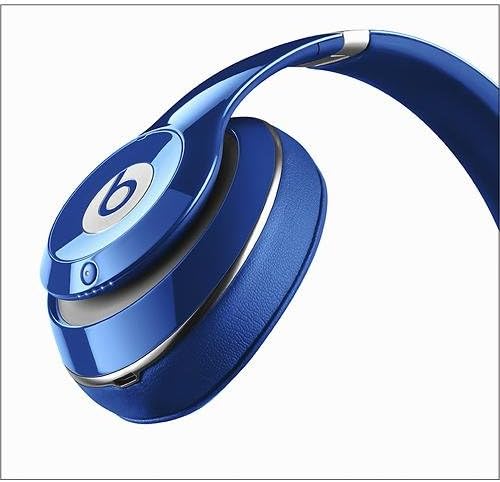
Slika 1.1: Prednja strana view of the Beats Studio Wired 2.0 Over-Ear Headphones in blue.
2. Značajke proizvoda
The Beats Studio Wired 2.0 headphones are engineered for a superior audio experience, combining advanced technology with a comfortable design.
- Beats Acoustic Engine: Delivers a precise and emotional listening experience, designed to reproduce music as the artist intended.
- Dual-Mode Adaptive Noise Canceling (ANC): Actively reduces ambient noise, allowing for immersive listening. It balances music and external sound when playing audio, and increases noise cancellation in ANC-only mode.
- 20-satna punjiva baterija: Provides extended listening time. Features an Auto On/Off function to conserve power and a visible Battery Fuel Gauge to monitor charge level.
- RemoteTalk Cable: Enables control over music playback (play/pause, skip tracks) and call management directly from the cable.
- Lagan i udoban dizajn: Reimagined with fast curves, smooth surfaces, and no visible screws. Features a lighter, stronger headband and softer, ergonomic ear cups for a flexible, custom fit.
3. Sadržaj paketa
Upon unboxing your Beats Studio Wired 2.0 Over-Ear Headphones, please ensure all the following items are present:
- Beats Studio Over-Ear Headphones
- USB 2.0 Charging Cable (USB-A to USB Micro-B)
- USB adapter za napajanje
- 3.5 mm audio kabel
- RemoteTalk Cable (3.5mm audio cable with in-line mic and remote)
- Hard Shell Carrying Case with Carabineer Clip
- Beats Cleaning Cloth
- Quick Start-up Guide (separate document)
4. Podešavanje
4.1 Punjenje slušalica
Before initial use, fully charge your Beats Studio headphones. A full charge provides approximately 20 hours of listening time.
- Locate the micro USB port on the right ear cup.
- Connect the small end of the USB 2.0 charging cable to the micro USB port on the headphone.
- Connect the large end of the USB 2.0 charging cable to the USB power adapter.
- Uključite USB adapter za napajanje u zidnu utičnicu.
- The Battery Fuel Gauge LEDs will illuminate to indicate charging status. All five LEDs will glow solid white when fully charged.
Slika 4.1: Krupni plan view of the right ear cup, highlighting the charging port and LED indicators.
4.2 Povezivanje s audio izvorom
The Beats Studio Wired 2.0 headphones connect to your audio device via a 3.5mm audio cable.
- Insert one end of the 3.5mm audio cable (either the standard audio cable or the RemoteTalk cable) into the audio input jack on the left ear cup.
- Insert the other end of the cable into the 3.5mm headphone jack of your audio device (e.g., smartphone, tablet, computer, MP3 player).
- Uvjerite se da je kabel dobro spojen na oba kraja.
5. Operacija
5.1 Powering On/Off and Adaptive Noise Canceling (ANC)
The Beats Studio headphones feature an integrated power button that also controls the Adaptive Noise Canceling (ANC) function.
- Za uključivanje: Press and hold the power button (located on the right ear cup) for 1 second. The Battery Fuel Gauge LEDs will light up.
- Za isključivanje: Disconnect the audio cable from the headphones. The Auto On/Off feature will automatically power down the headphones to conserve battery.
- ANC Mode (with audio): When the headphones are powered on and an audio cable is connected, ANC automatically balances your music with external noise.
- ANC-Only Mode (without audio): To use ANC without playing music, ensure no audio cable is connected, then press the power button. The ANC level will automatically increase to provide maximum noise cancellation.
5.2 Using the RemoteTalk Cable
The RemoteTalk cable provides convenient control over your audio and calls.
- Pusti/pauza: Pritisnite centralno dugme jednom.
- Preskoči naprijed: Pritisnite središnje dugme dva puta brzo.
- Preskoči unazad: Pritisnite središnje dugme tri puta brzo.
- Povećavanje glasnoće: Pritisnite dugme "+".
- Smanjivanje jačine zvuka: Pritisnite dugme "-".
- Odgovori/Završi poziv: Pritisnite središnje dugme jednom tokom dolaznog poziva ili aktivnog poziva.
- Odbijanje poziva: Pritisnite i držite središnji taster 2 sekunde tokom dolaznog poziva.
5.3 mjerač goriva u bateriji
The Battery Fuel Gauge on the right ear cup indicates the remaining battery life.
- Five white LEDs: Full charge.
- Fewer LEDs: Decreasing battery level.
- Single red LED: Low battery, recharge soon.
6. Održavanje
6.1 Čišćenje
To maintain the appearance and performance of your headphones:
- Koristite priloženu krpu za čišćenje Beats-a da nježno obrišete površine slušalica.
- Ne koristite abrazivna sredstva za čišćenje, alkohol ili hemijske rastvarače.
- Keep moisture away from openings and ports.
6.2 Skladištenje
When not in use, store your headphones in the provided hard shell carrying case to protect them from dust, scratches, and impacts.

Image 6.1: Beats Studio headphones folded compactly for storage in the carrying case.
7. Otkrivanje problema
If you encounter issues with your Beats Studio Wired 2.0 headphones, refer to the following common problems and solutions:
| Problem | Mogući uzrok / rješenje |
|---|---|
| Nema zvuka ili je jačina zvuka niska. |
|
| Adaptive Noise Canceling (ANC) not working or "hissing" sound. |
|
| Slušalice se ne pune. |
|
| RemoteTalk cable controls not responding. |
|
8. Specifikacije
| Feature | Detalj |
|---|---|
| Broj modela | BT OV STU BLU (B0500) |
| Tehnologija povezivanja | Žičano (3.5 mm priključak) |
| Postavljanje uha | Preko uha |
| Kontrola buke | Active Noise Cancellation (Dual-Mode) |
| Trajanje baterije | Up to 20 hours (rechargeable Lithium Ion) |
| Port za punjenje | Micro USB |
| Dimenzije (proizvod) | 1 x 7.99 x 1 inča (približno) |
| Težina artikla | 9.1 unci (0.26 kg) |
| Materijal | Plastika |
| Boja | Plava |
| Proizvođač | Beats Electronics, LLC |
9. Garancija i podrška
For information regarding warranty coverage, please refer to the warranty card included with your product or visit the official Beats by Apple support website.
If you require further assistance or have questions not covered in this manual, please contact Beats by Apple customer support. You can also refer to the official Uputstvo za upotrebu (PDF) za dodatne detalje.


