1. Uvod
This manual provides essential instructions for the safe and efficient use of your Kyocera EBVK-2650 Engine Blower Vacuum. Please read this manual thoroughly before operating the machine and keep it for future reference. The EBVK-2650 is designed for blowing and vacuuming leaves and light debris in outdoor environments.
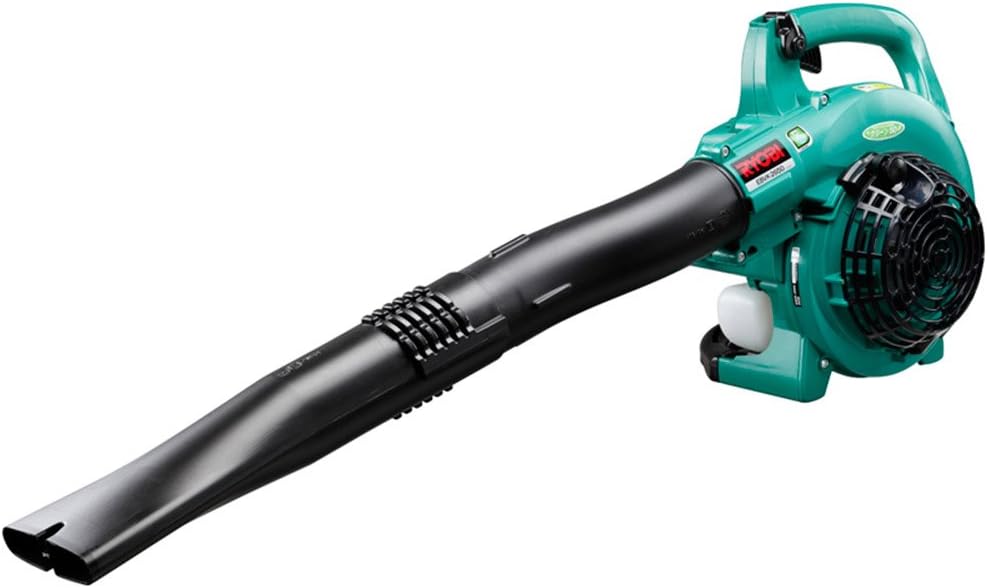
Image 1.1: The Kyocera EBVK-2650 Engine Blower Vacuum in its primary blower configuration. This image shows the main unit with the straight nozzle attached, ready for blowing leaves and debris.
2. Sigurnosne informacije
Uvijek dajte prioritet sigurnosti prilikom rada s električnim alatima. Nepoštivanje ovih uputa može dovesti do ozbiljnih povreda ili materijalne štete.
2.1 Opšta sigurnosna pravila
- Pročitajte i razumite sva uputstva prije upotrebe stroja.
- Nosite odgovarajuću ličnu zaštitnu opremu (LZO), uključujući zaštitu za oči, zaštitu za sluh, rukavice i čvrstu obuću.
- Do not operate the machine in wet conditions or in the presence of flammable liquids or gases.
- Keep children, bystanders, and pets at a safe distance (at least 15 meters / 50 feet) from the operating area.
- Inspect the machine for loose parts, damage, or wear before each use. Do not operate a damaged machine.
- Ensure proper ventilation when operating the engine, as exhaust fumes contain carbon monoxide.
- Nikada ne usmjeravajte mlaznicu puhača prema ljudima ili životinjama.
- Turn off the engine and allow it to cool before refueling, cleaning, or performing maintenance.
- Store the machine in a dry, secure location, out of reach of children.
2.2 Sigurnost goriva
- Use only the recommended fuel mixture: unleaded gasoline and 2-cycle engine oil at a 50:1 ratio.
- Miješajte gorivo u dobro prozračenom prostoru, dalje od iskri ili otvorenog plamena.
- Do not smoke while mixing or refueling.
- Odmah obrišite proliveno gorivo.
- Čuvajte gorivo u odobrenoj posudi na hladnom i suvom mestu.
3. Sadržaj paketa i komponente
Prilikom raspakivanja provjerite da li su sve komponente prisutne i neoštećene.
3.1 Uključeni dodaci
- Main Unit (Engine Blower Vacuum)
- Ravna mlaznica
- Zakrivljena mlaznica
- Usisna cijev
- Ventilatorska mlaznica
- Torba za prašinu
- Socket Wrench (13x19mm)
- Uputstvo za upotrebu
3.2 Ključne komponente iznadview
Familiarize yourself with the main parts of the EBVK-2650.

Image 3.1: The Kyocera EBVK-2650 configured for vacuuming. This view shows the suction pipe and the dust bag attached, ready to collect leaves and debris.
- Motorna jedinica: The core power source.
- rezervoar za gorivo: For mixed fuel.
- Ručica startera: For manual engine start.
- Ručica gasa: Kontroliše brzinu motora.
- Stop prekidač: Da ugasite motor.
- Poklopac filtera za zrak: Štiti vazdušni filter.
- svjećica: For ignition.
- Blower/Vacuum Port: Where nozzles or suction pipe attach.
- Dust Bag Connection: For attaching the collection bag in vacuum mode.
4. Postavljanje i montaža
4.1 Assembling for Blower Mode
- Provjerite je li motor isključen i hladan.
- Attach the desired nozzle (straight or curved) to the blower port. Twist until securely locked.
- Confirm all connections are tight before use.

Slika 4.1: Krupni plan view of the Kyocera EBVK-2650 in operation, demonstrating the blower function. The user is holding the unit, directing the airflow.
4.2 Assembling for Vacuum/Mulching Mode
- Provjerite je li motor isključen i hladan.
- Remove any blower nozzles from the blower port.
- Attach the suction pipe to the intake port. Secure it firmly.
- Connect the dust bag to the exhaust port. Ensure the bag is properly sealed to prevent debris leakage.
- Confirm all connections are tight before use.

Image 4.2: The Kyocera EBVK-2650 being used in vacuum mode. The suction pipe is directed towards leaves, and the dust bag is visible, collecting the mulched debris.
4.3 Fuel Preparation and Filling
The EBVK-2650 uses a 2-cycle engine. It requires a specific mixture of unleaded gasoline and 2-cycle engine oil.
- Fuel Ratio: Unleaded Gasoline : 2-Cycle Engine Oil = 50:1
- Use high-quality 2-cycle engine oil specifically designed for air-cooled engines.
- Mix the fuel in a separate, approved fuel container. Shake well before filling.
- Open the fuel tank cap slowly to release pressure.
- Fill the fuel tank (capacity 0.47 L) carefully, avoiding overfilling.
- Čvrsto zatvorite čep rezervoara za gorivo.
5. Uputstvo za upotrebu
5.1 Pokretanje motora
- Postavite mašinu na ravnu, stabilnu površinu.
- Provjerite da li je prekidač za zaustavljanje u položaju "UKLJUČENO".
- Uključite ručicu čoka (ako se radi o hladnom startu).
- Pritisnite pumpicu za gorivo nekoliko puta dok se gorivo ne vidi.
- Pull the starter handle firmly and smoothly until the engine starts. Do not pull the rope to its full extension.
- Nakon što se motor pokrene, postepeno isključujte čok.
- Ostavite motor da se zagrije nekoliko trenutaka prije nego što dodate puni gas.

Image 5.1: A user demonstrating the engine starting procedure for the Kyocera EBVK-2650. The starter handle is being pulled to ignite the engine.
5.2 Rad ventilatora
- Hold the machine firmly with both hands.
- Direct the nozzle towards the debris you wish to move.
- Gradually increase the throttle to achieve the desired airflow.
- Use a sweeping motion to gather leaves and debris into piles.

Image 5.2: A user operating the Kyocera EBVK-2650 in blower mode, clearing leaves from a path. The machine is held comfortably, directing the airflow.
5.3 Vacuum/Mulching Operation
- Ensure the machine is correctly assembled for vacuum mode with the dust bag attached.
- Hold the machine firmly, guiding the suction pipe over the leaves.
- Move slowly and steadily to allow the machine to pick up and mulch debris.
- Monitor the dust bag and empty it when it becomes full to maintain optimal performance.
- Note: Mulching performance varies based on leaf type, size, and moisture content. Avoid vacuuming wet leaves or large, hard objects.

Image 5.3: A user operating the Kyocera EBVK-2650 in vacuum mode, actively collecting leaves from a paved area. The dust bag is visible, indicating collection.
5.4 Zaustavljanje motora
- Release the throttle lever to allow the engine to idle.
- Pomaknite prekidač za zaustavljanje u položaj "ISKLJUČENO".
- Allow the machine to cool down before storage or maintenance.
6. Održavanje
Regular maintenance ensures optimal performance and extends the lifespan of your EBVK-2650. Always ensure the engine is off and cool before performing any maintenance.
6.1 Čišćenje filtera za zrak
- Skinite poklopac filtera za vazduh.
- Pažljivo uklonite element filtera za zrak.
- Clean the filter by tapping it gently or using compressed air. If heavily soiled, wash with warm, soapy water, rinse thoroughly, and allow to dry completely before reinstallation.
- Vratite poklopac filtera za vazduh.
6.2 Spark Plug Inspection and Replacement
- Skinite poklopac svjećice.
- Use the provided socket wrench to remove the spark plug (NGK BPM8Y).
- Inspect the spark plug for wear, carbon buildup, or damage. Clean if necessary.
- Check the electrode gap and adjust if needed.
- Replace with a new spark plug of the recommended type if worn or damaged.
- Reinstall the spark plug and cap securely.
6.3 Filter goriva
The fuel filter is located inside the fuel tank. Inspect it periodically for debris. If clogged, replace it. This procedure may require professional assistance.
6.4 Podešavanje karburatora
Carburetor adjustments should ideally be performed by a qualified service technician. Incorrect adjustments can lead to engine damage or poor performance.
6.5 Skladištenje
- For long-term storage, drain all fuel from the tank and run the engine until it stops to clear the carburetor.
- Očistite spoljašnjost mašine.
- Store in a dry, dust-free location, away from direct sunlight and extreme temperatures.
7. Otkrivanje problema
Ovaj odjeljak se bavi uobičajenim problemima na koje možete naići. Za probleme koji nisu ovdje navedeni, obratite se korisničkoj podršci.
| Problem | Mogući uzrok | Rješenje |
|---|---|---|
| Motor se ne pokreće |
|
|
| Motor radi, ali nema snage |
|
|
| Pretjerane vibracije |
|
|
8. Specifikacije
| Feature | Detalj |
|---|---|
| Brand | Kyocera |
| Broj modela | EBVK-2650 |
| Tip motora | Air-cooled 2-cycle single cylinder gasoline engine |
| Displacement | 25.4 ml |
| Average Air Volume | 8.7 m³/min |
| Maksimalna zapremina vazduha | 67.5 m³/min |
| Metoda paljenja | Electronic ignition (Flywheel magnet) |
| Spark Plug | NGK BPM8Y |
| Vrsta karburatora | Tip dijafragme |
| Gorivo | Mixed fuel (Unleaded gasoline: 2-cycle engine oil = 50:1) |
| Kapacitet rezervoara za gorivo | 0.47 L |
| Dimensions (L x W x H, excluding nozzle) | 330 x 270 x 345 mm |
| Weight (excluding nozzle, fuel) | 4.2 kg |
| Dodatna oprema uključena | Straight nozzle, Curved nozzle, Suction pipe, Fan nozzle, Dust bag, Socket wrench (13x19mm) |
| Preporučena upotreba | Dust cleaning, Leaf cleaning |
Note: Product specifications are subject to change without notice for improvement. The listed weight of 8.1 kg in some product descriptions likely includes packaging and all accessories, while 4.2 kg refers to the bare unit.
9. Garancija i podrška
For warranty information, service, or technical support, please refer to the warranty card included with your product or visit the official Kyocera webSačuvajte dokaz o kupovini za slučaj reklamacije.
Kyocera Customer Support: Please visit the official Kyocera website or contact your local dealer for assistance.


