Product Overview
The AntennaGear OEM SMK TS-9 Adapter Cable is designed to connect an external antenna to your Sierra Wireless AT&T Elevate 754S Hotspot. This cable facilitates improved signal reception and transmission by allowing the use of a more powerful or optimally placed external antenna. It features an 18-inch RG174 Coax Cable with Poly Seal Insulation and Thermoplastic Resin Connector End Housings, ensuring durability and reliable performance for both 3G and 4G networks.
The cable is equipped with an OEM SMK TS-9 (Gold-Plated Copper) connector for the Sierra Wireless Modem end and an FME Male (Stainless Steel with Copper Center Pin) connector for the external antenna end.
Uputstva za postavljanje
Follow these steps to properly connect your AntennaGear adapter cable to your Sierra Wireless AT&T Elevate 754S Hotspot and an external antenna.
- Identifikujte konektore: Locate the TS-9 port on your Sierra Wireless AT&T Elevate 754S Hotspot. Identify the FME Male connector on your external antenna cable.
- Povežite se na Hotspot: Carefully insert the OEM SMK TS-9 connector end of the adapter cable into the TS-9 port on your Sierra Wireless AT&T Elevate 754S Hotspot. Ensure a snug and secure fit.
- Connect to External Antenna: Connect the FME Male end of the adapter cable to the corresponding FME Female connector on your external antenna cable. Twist the connector until it is finger-tight.
- Pozicija antene: Once connected, position your external antenna in an optimal location for signal reception, typically near a window or outdoors, depending on the antenna type.
- Potvrdite vezu: Power on your hotspot and observe if the signal strength improves. Refer to your hotspot's user manual for details on checking signal indicators.
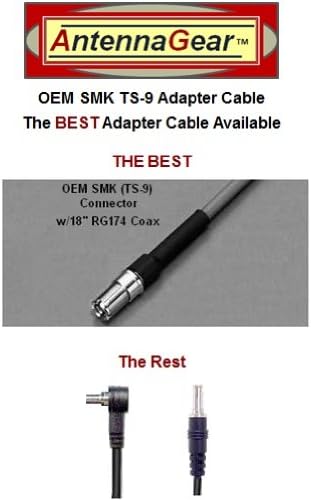
Image: The OEM SMK TS-9 connector with 18" RG174 Coax, designed for connecting to the hotspot.

Image: The complete AntennaGear adapter cable, showing both the TS-9 and FME Male ends.
Operacija
The AntennaGear adapter cable is a passive component designed to facilitate the connection between your hotspot and an external antenna. Once properly connected as per the setup instructions, the cable requires no further active operation. Its function is to transmit the signal between the hotspot and the external antenna, allowing the external antenna to enhance your hotspot's signal reception and transmission capabilities.
Održavanje
To ensure the longevity and optimal performance of your adapter cable, follow these simple maintenance guidelines:
- Održavati suhom: Avoid exposing the cable and its connectors to moisture or extreme humidity.
- Izbjegavajte savijanje: Do not sharply bend or crimp the cable, especially near the connectors, as this can damage the internal wiring.
- Čisti konektori: If necessary, gently clean the metal contacts of the connectors with a dry, lint-free cloth. Avoid using liquid cleaners.
- Čuvajte ispravno: Kada se ne koristi, kabl čuvajte na hladnom i suhom mjestu, idealno labavo namotan kako biste spriječili savijanje.
Rješavanje problema
If you experience issues after connecting the adapter cable, consider the following:
- Nema poboljšanja signala:
- Ensure all connections (hotspot to adapter, adapter to antenna) are secure and fully seated.
- Verify that your external antenna is compatible with your hotspot and is functioning correctly.
- Adjust the position of your external antenna to find the best signal.
- Slaba veza:
- Gently re-seat the TS-9 connector into the hotspot port. Avoid forcing it.
- Ensure the FME Male connector is securely tightened to the external antenna cable.
- Oštećenje kabla:
- Visually inspect the cable for any signs of physical damage, such as cuts, kinks, or frayed insulation. A damaged cable may need replacement.
Specifikacije
| Feature | Detalj |
|---|---|
| Broj modela | ADPT-SMK-AT&T Elevate 754S |
| Kompatibilnost | Sierra Wireless AT&T Elevate 754S Hotspot |
| Vrsta kabla | 18" RG174 Coax Cable |
| Izolacija | Poly Seal Insulation |
| Connector End Housings | Thermoplastic Resin |
| Modem Connector | OEM SMK TS-9 (Gold-Plated Copper) |
| Priključak za antenu | FME Male (Stainless Steel w/Copper Center Pin) |
| Mrežna podrška | 3G i 4G |
| Tehnologija povezivanja | Bežični |
| Proizvođač | SMK |
| ASIN | B00DA1LOXS |
Garancija i podrška
This AntennaGear adapter cable comes with a Nationwide / Worldwide Lifetime Warranty. For any questions, technical assistance, or warranty claims, please contact the manufacturer or your point of purchase. Ensure you have your product model number and purchase details ready when seeking support.
For further information or to register your product, please visit the official AntennaGear webweb-mjesto ili pogledajte kontakt informacije koje ste dobili uz kupovinu.


