1. Uvod
This manual provides instructions for the APEX LD200RM remote control, designed for use with various APEX LCD and LED television models. This remote control offers full functionality for your compatible APEX television, ensuring convenient operation of all features.
Compatible APEX TV Models:
- LD3249
- LD3288, LD3288T, LD3288M
- LD4077, LE4077M
- LD4088
- LD4688
- LE3212, LE3212D
- LE4012
- LE4612
- LE3242
- LE3942
- LE40B12
- LE4243
- LE4643
- LE5043
2. Podešavanje
2.1 Instalacija baterije
The APEX LD200RM remote control requires two (2) AA batteries for operation. Follow these steps to install the batteries:
- Pronađite poklopac odeljka za baterije na poleđini daljinskog upravljača.
- Pritisnite jezičak prema dolje i skinite poklopac.
- Umetnite dvije AA baterije, pazeći da pozitivni (+) i negativni (-) terminali budu pravilno poravnati s oznakama unutar odjeljka.
- Vratite poklopac pretinca za baterije na mjesto dok ne klikne sigurno.
Napomena: Uvijek mijenjajte obje baterije istovremeno. Nemojte miješati stare i nove baterije, niti različite vrste baterija.
2.2 Početna upotreba
The APEX LD200RM remote control is an original replacement and typically does not require any programming or pairing. Once batteries are installed, point the remote control towards your compatible APEX television and begin operation.
3. Uputstvo za upotrebu
This section details the functions of the buttons on your APEX LD200RM remote control.
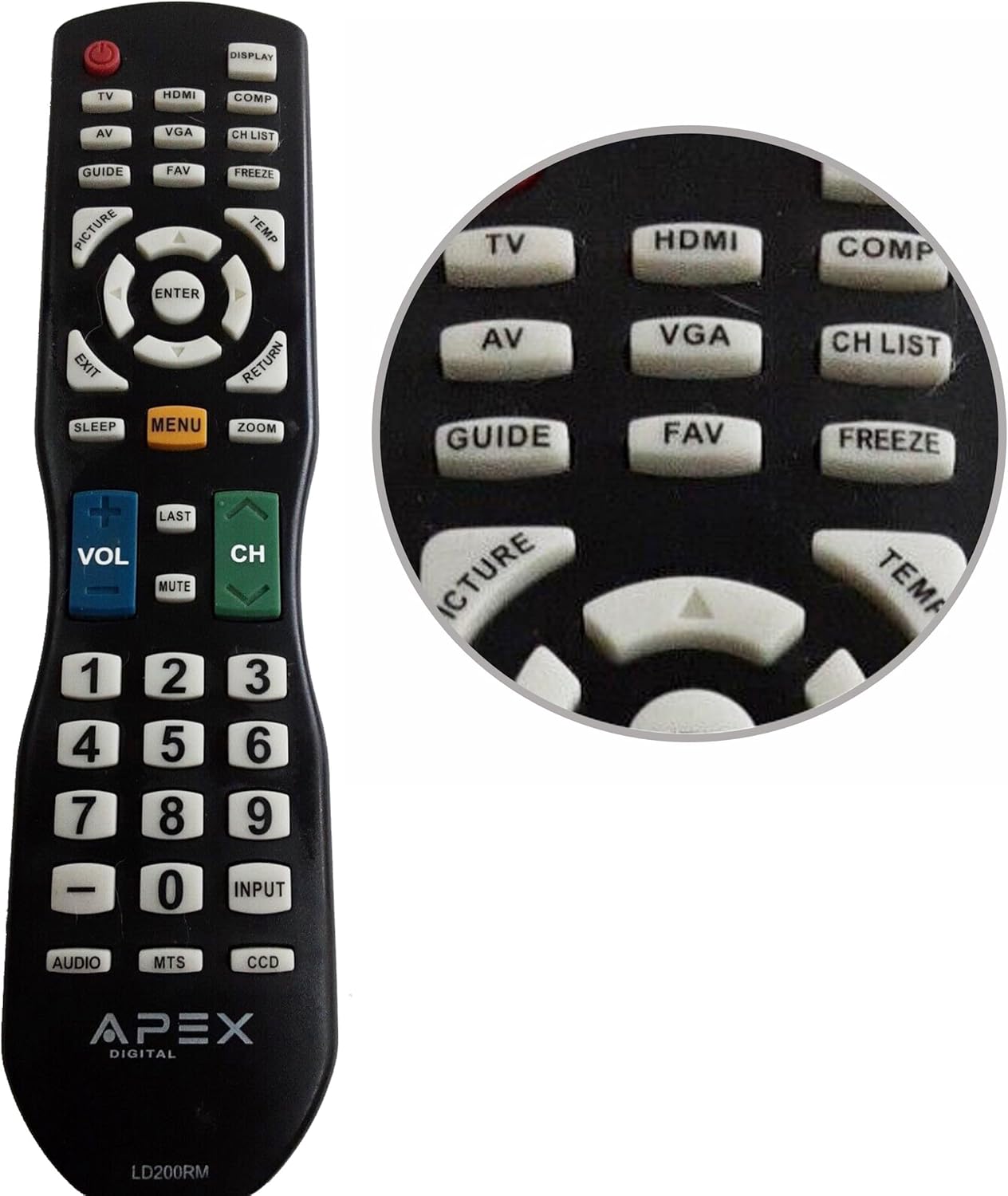
Figure 1: APEX LD200RM Remote Control Layout. This image displays the entire remote control, highlighting the arrangement of its various function buttons, including power, input selection, navigation, volume, channel, and numeric keypad.

Figure 2: Close-up of APEX LD200RM Remote Control Top Buttons. This image provides a detailed view of the upper section of the remote, focusing on buttons such as TV, HDMI, AV, VGA, COMP, CH LIST, DISPLAY, GUIDE, FAV, FREEZE, PICTURE, TEMP, MENU, ENTER, EXIT, RETURN, SLEEP, and ZOOM.
3.1 Power and Input Selection
- NAPAJANJE (crveno dugme): Uključuje ili isključuje televizor.
- TV: Selects the TV tuner input.
- HDMI: Selects the HDMI input.
- OD: Selects the Audio/Video input.
- VGA: Selects the VGA input.
- COMP: Selects the Component video input.
- DISPLAY: Prikazuje informacije na ekranu.
3.2 Kontrola kanala i jačine zvuka
- VOL (+/-): Povećava ili smanjuje jačinu zvuka.
- CH (Gore/Dolje): Mijenja televizijski kanal gore ili dolje.
- POSLEDNJE: Vraća se na prethodno viewed channel.
- MUTE: Isključuje ili uključuje zvuk televizora.
- CH LISTA: Prikazuje listu kanala.
3.3 Meni i navigacija
- MENI: Otvara glavni meni televizora.
- ENTER: Confirms a selection within the menu.
- Tipke sa strelicama (gore/dolje/lijevo/desno): Navigates through menu options and adjusts settings.
- IZLAZ: Izlazi iz trenutnog menija ili prikaza na ekranu.
- POVRATAK: Povratak na prethodni meni ili ekran.
3.4 Numeric Keypad and Special Functions
- 0-9 (Numeric Buttons): Direktno unosi brojeve kanala.
- ULAZ: Ciklično prelazi kroz dostupne ulazne izvore.
- VODIČ: Prikazuje elektronski programski vodič (ako je dostupan).
- FAV: Pristup omiljenim kanalima.
- ZAMRZNUTI: Freezes the current image on the screen.
- SLIKA: Podešava postavke slike.
- TEMP: (Function may vary by model, often related to picture temperature or a specific mode).
- SPAVANJE: Postavlja tajmer za spavanje.
- ZOOM: Podešava nivo zumiranja ekrana.
- AUDIO: Odabire audio modove ili zapise.
- MTS: Multi-channel Television Sound (stereo/SAP).
- DCC: Closed Captioning Display.
4. Održavanje
4.1 Zamjena baterije
When the remote control's performance degrades or it stops responding, it is likely time to replace the batteries. Refer to Section 2.1 for detailed battery installation instructions. Always use fresh AA batteries.
4.2 Čišćenje
Za čišćenje daljinskog upravljača koristite meku, suhu krpu. Za tvrdokornu prljavštinu, laganoampObrišite krpu vodom ili blagim, neabrazivnim sredstvom za čišćenje. Izbjegavajte upotrebu jakih hemikalija ili abrazivnih materijala, jer oni mogu oštetiti površinu daljinskog upravljača ili unutrašnje komponente.
4.3 Skladištenje
Daljinski upravljač čuvajte na hladnom i suhom mjestu, dalje od direktne sunčeve svjetlosti i ekstremnih temperatura. Ako se daljinski upravljač neće koristiti duži period, preporučuje se da izvadite baterije kako biste spriječili curenje i potencijalna oštećenja.
5. Otkrivanje problema
- Daljinski upravljač ne reaguje:
- Provjerite da li su baterije ispravno instalirane s ispravnim polaritetom (+/-).
- Zamijenite stare baterije novim AA baterijama.
- Provjerite ima li prepreka između daljinskog upravljača i infracrvenog senzora televizora.
- Ensure you are within the effective range of the television's IR receiver.
- Some buttons are not working:
- Ovo bi moglo ukazivati na slabu bateriju. Zamijenite baterije.
- Provjerite je li daljinski upravljač čist i da nema prljavštine ispod tipki.
- Verify that the button function is applicable to your specific TV model. Some functions may not be supported by all compatible TVs.
- Television is not turning on/off:
- Confirm the television is plugged into a working power outlet.
- Try using the power button directly on the television to rule out a TV issue.
6. Specifikacije
| Feature | Detalj |
|---|---|
| Broj modela | LD200RM |
| Brand | Apex |
| Kompatibilni uređaji | APEX LCD i LED televizori |
| Izvor napajanja | 2 x AA baterije (nisu uključene) |
| Dimenzije proizvoda | 10 x 6 x 2 inča (približno) |
| Težina artikla | 3.2 unce (otprilike) |
| Boja | Crna |
| Posebna karakteristika | Ergonomski dizajn |
7. Informacije o garanciji
This APEX LD200RM remote control typically comes with a 30-day warranty from the date of purchase. This warranty covers manufacturing defects. For specific details regarding warranty claims, returns, or replacements, please refer to your purchase documentation or contact the seller directly.
8. Podrška
If you encounter issues not covered in this manual or require further assistance, please contact the retailer or the manufacturer's customer support. When contacting support, please have your product model number (LD200RM) and your television model number readily available.