1. Uvod i krajview
This manual provides comprehensive instructions for the setup, operation, maintenance, and troubleshooting of your InFocus IN3124 Projector. Designed for clarity and ease of use, this guide will help you maximize your projector's performance and longevity.
The InFocus IN3124 is a high-performance projector featuring XGA (1024 x 868) native resolution, 4800 lumens of brightness, and a 3000:1 contrast ratio, making it suitable for various presentation environments. Its portable design allows for flexible placement and usage.
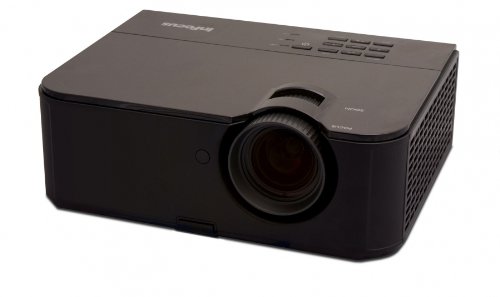
Slika 1: Prednja strana view of the InFocus IN3124 Projector, highlighting the main lens and the top-mounted control panel.
2. Podešavanje
2.1 Raspakivanje
Carefully remove the projector and all accessories from the packaging. Verify that all components listed in the packing list are present. Retain the original packaging for future transport or storage.
2.2 Postavljanje
Position the projector on a stable, level surface. Ensure adequate ventilation around the unit to prevent overheating. Maintain a clear path between the projector lens and the projection screen or surface. The optimal projection distance will vary based on the desired screen size.
2.3 Povezivanje napajanja
- Spojite kabel za napajanje na ulaz za napajanje projektora.
- Uključite drugi kraj kabla za napajanje u uzemljenu električnu utičnicu.
2.4 Povezivanje ulaznih izvora
The IN3124 projector supports various input sources. Connect your video source (e.g., computer, DVD player) to the appropriate input port on the projector. Common ports include VGA and HDMI (if available on your specific model).
- VGA: Use a VGA cable to connect to a computer's video output.
- HDMI: Use an HDMI cable for digital video and audio (check projector for HDMI port availability).
3. Uputstvo za upotrebu
3.1 Uključivanje/isključivanje
- Za uključivanje: Pritisnite dugme za napajanje na kontrolnoj tabli projektora ili daljinskom upravljaču. Indikator napajanja će se upaliti.
- Za isključivanje: Press the power button twice. The projector will enter a cooling cycle before shutting down completely. Do not unplug the projector during the cooling cycle.
3.2 Podešavanje fokusa i zumiranja
Rotate the focus ring on the projector lens until the image appears sharp and clear. Use the zoom ring (if present) to adjust the image size to fit your screen.
3.3 Selecting Input Sources
Press the "Source" or "Input" button on the projector's control panel or remote control to cycle through available input sources (e.g., VGA, HDMI). Select the input corresponding to your connected device.
3.4 Menu Navigation and Keystone Correction
Use the menu buttons on the projector or remote to access the On-Screen Display (OSD). Navigate through the menu options to adjust settings such as brightness, contrast, color, and keystone correction. Keystone correction helps to square the image if the projector is not perfectly perpendicular to the screen.
4. Održavanje
4.1 Čišćenje objektiva
Pažljivo obrišite sočivo projektora mekom krpom koja ne ostavlja dlačice, posebno dizajniranom za optičke površine. Nemojte koristiti abrazivna sredstva za čišćenje ili pretjeranu silu, jer to može ogrebati sočivo.
4.2 Čišćenje filtera za zrak
Regularly check and clean the projector's air filters to ensure proper airflow and prevent overheating. Refer to the projector's specific filter access instructions. Use a soft brush or vacuum cleaner to remove dust accumulation.
4.3 Lamp Zamjena
Projektor lamp ima ograničen vijek trajanja. Kada lamp Ako se pojavi indikator životnog vijeka ili slika postane tamna, lamp may need replacement. Consult the full service manual or manufacturer's webstranica za detaljne informacijeamp postupci zamjene i kompatibilni lamp models. Always allow the projector to cool down completely before attempting lamp zamjena.
4.4 Skladištenje
Kada se projektor ne koristi duži period, čuvajte ga na hladnom i suhom mjestu, dalje od direktne sunčeve svjetlosti i ekstremnih temperatura. Koristite originalno pakovanje ili zaštitnu futrolu kako biste spriječili prašinu i oštećenja.
5. Otkrivanje problema
This section addresses common issues you might encounter with your InFocus IN3124 Projector. For more complex problems, contact customer support.
- Nema prikazane slike:
- Provjerite je li projektor uključen i je li indikator napajanja stalno uključen.
- Verify that the input source cable (VGA, HDMI) is securely connected to both the projector and the source device.
- Odaberite ispravan ulazni izvor pomoću dugmeta "Izvor".
- Provjerite da li izvorni uređaj daje signal.
- Tamna ili izblijedjela slika:
- Podesite postavke svjetline i kontrasta u OSD meniju.
- Osigurajte lamp is not nearing the end of its lifespan.
- Clean the projector lens and air filters.
- Check the projection mode (e.g., Eco mode might reduce brightness).
- Slika je mutna:
- Podesite fokusni prsten na sočivu projektora.
- Provjerite da li je površina za projekciju ravna, a projektor stabilan.
- Check the resolution settings of your source device to match the projector's native resolution.
- Daljinski upravljač ne radi:
- Zamijenite baterije u daljinskom upravljaču.
- Provjerite da nema prepreka između daljinskog upravljača i IR prijemnika projektora.
- Usmjerite daljinski upravljač direktno prema projektoru.
6. Specifikacije
The following table outlines the key technical specifications for the InFocus IN3124 Projector:
| Feature | Specifikacija |
|---|---|
| Broj modela | IN3124 |
| Rezolucija ekrana (nativna) | XGA (1024 x 868) |
| Osvetljenost | 4800 lumena |
| Kontrast Ratio | 3000:1 |
| Display Type | LCD, LCoS |
| Težina artikla | 8.16 funte (3.7 kg) |
| Dimenzije proizvoda (D x Š x V) | 12.83 x 10.43 x 4.8 inča (32.59 x 26.49 x 12.19 cm) |
| Posebna karakteristika | Prijenosni |
7. Garancija i podrška
For detailed warranty information, please refer to the warranty card included with your product packaging or visit the official InFocus weblokacija. Garancija obično pokriva proizvodne nedostatke za određeni period od datuma kupovine.
If you encounter issues that cannot be resolved using the troubleshooting guide, or require technical assistance, please contact InFocus customer support. Contact details can usually be found on the manufacturer's webweb-mjestu ili u dokumentaciji vašeg proizvoda.


