Uvod
This manual provides essential instructions for the safe and effective use of your Pentax MX-1 Digital Camera. Please read this manual thoroughly before using the camera and keep it in a safe place for future reference.
Product Overview
The Pentax MX-1 is a high-end compact digital camera featuring a 12-megapixel back-illuminated CMOS sensor and a 4x optical zoom lens (28-112mm equivalent) with an f/1.8-2.5 aperture. It includes a 3-inch tilting LCD display and a dual shake reduction system for clear images and video.

Slika 1: Prednja strana view of the Pentax MX-1 Digital Camera.
Setup
1. Ugradnja i punjenje baterije
- Otvorite poklopac pretinca za bateriju koji se nalazi na dnu kamere.
- Umetnite priloženu litijum-jonsku bateriju, pazeći na pravilnu orijentaciju kao što je naznačeno unutar odjeljka.
- Čvrsto zatvorite poklopac odeljka za baterije.
- Connect the camera to the AC adapter using the supplied USB cable. The charging indicator will illuminate.
- Prije prve upotrebe, potpuno napunite bateriju. Potpuno punjenje obično traje otprilike 3 sata.
2. Instalacija memorijske kartice
- Locate the memory card slot, typically adjacent to the battery compartment or on the side of the camera.
- Umetnite SD, SDHC ili SDXC memorijsku karticu u utor s naljepnicom okrenutom u ispravnom smjeru dok ne klikne na svoje mjesto.
- To remove the card, push it in gently until it springs out.

Slika 2: Bočna strana view of the camera showing the open port cover for USB/HDMI connections.
3. Početne postavke
- Uključite kameru pritiskom na ON/OFF dugme.
- Pratite upute na ekranu da biste podesili jezik, datum i vrijeme.
- Format the memory card before first use to ensure optimal performance. Navigate to the MENU, izaberite SETUP, a zatim FORMAT KARTICA.
Upravljanje kamerom
1. Osnovna fotografija
- Uključeno: Pritisnite ON/OFF dugme. Objektiv će se izvući.
- Odaberite način rada: Rotate the mode dial on the top of the camera to select your desired shooting mode (e.g., Auto Pict, Program, Aperture Priority, Shutter Priority, Manual).
- Fokus: Point the camera at your subject. Press the shutter button halfway down to focus. The focus frame will turn green when focus is achieved.
- pucati: Pritisnite okidač do kraja da biste snimili sliku.

Slika 3: Vrh view of the camera showing the mode dial, shutter button, and exposure compensation dial.
2. Using the Tilting LCD Monitor
The 3-inch LCD monitor can be tilted up or down to facilitate shooting from various angles, such as low-angle shots or overhead shots. Gently pull the top or bottom edge of the LCD screen to adjust its position.
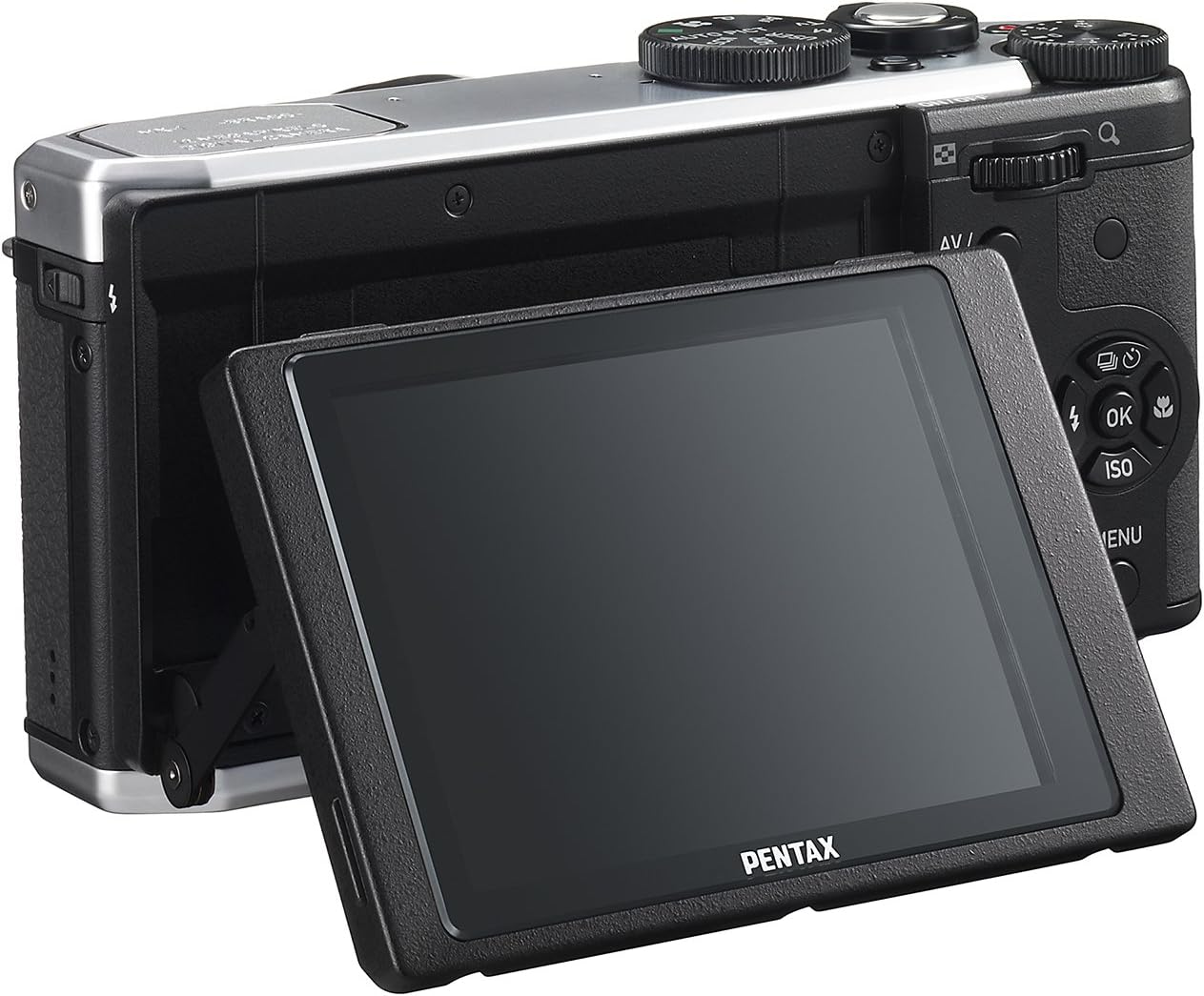
Slika 4: Pozadi view of the camera demonstrating the tilting LCD screen.
3. Rad blica
To use the built-in flash, slide the flash release lever to pop up the flash unit. The flash modes (Auto, On, Off, Slow Sync, Rear Curtain Sync) can be selected via the camera's menu or a dedicated button, depending on the shooting mode.

Slika 5: Prednja strana view of the camera with the pop-up flash in the extended position.
4. Režim reprodukcije
- Pritisnite IGRAJ dugme za ulazak u režim reprodukcije.
- Use the directional pad to scroll through your photos and videos.
- Pritisnite OK dugme za view information about the selected image or to play a video.
- Pritisnite MENU button to access playback options such as deleting, rotating, or resizing images.
Održavanje
1. Čišćenje kamere
- Tijelo kamere: Koristite meku, suhu krpu za brisanje kućišta fotoaparata. Za tvrdokornu prljavštinu, laganoampen the cloth with water or a mild cleaning solution. Avoid using organic solvents.
- Objektiv: Use a lens brush or a blower to remove dust. For smudges, use a lens cleaning cloth and lens cleaning fluid. Do not touch the lens surface with your fingers.
- LCD monitor: Pažljivo obrišite ekran mekom krpom koja ne ostavlja dlačice. Izbjegavajte snažan pritisak na ekran.
2. Skladištenje
- Kada se ne koristi duži period, izvadite bateriju iz fotoaparata.
- Čuvajte kameru na hladnom, suhom i dobro prozračenom mjestu, dalje od direktne sunčeve svjetlosti, visokih temperatura i vlage.
- Use a desiccant to prevent mold growth if storing in humid environments.
Rješavanje problema
If you encounter issues with your Pentax MX-1, refer to the table below for common problems and their solutions.
| Problem | Mogući uzrok | Rješenje |
|---|---|---|
| Kamera se ne uključuje. | Baterija je prazna ili nepravilno umetnuta. | Napunite bateriju ili je ponovo pravilno umetnite. |
| Ne mogu snimati slike. | Memorijska kartica je puna, zaključana ili nije umetnuta. | Insert a memory card, unlock it, or delete unnecessary files. |
| Slike su mutne. | Podrhtavanje fotoaparata, nepravilan fokus ili prljav objektiv. | Hold the camera steady, ensure proper focus, or clean the lens. |
| Blic se ne aktivira. | Flash is set to "Off" or not popped up. | Pop up the flash and set the flash mode to "Auto" or "On". |
| LCD screen is difficult to see in bright light. | Visoko ambijentalno svjetlo. | Adjust the tilting LCD for a better viewing angle or find shade. |
Specifikacije
| Feature | Detalj |
|---|---|
| Naziv modela | Pentax MX-1 |
| Rezolucija foto senzora | 12 MP |
| Veličina foto senzora | 1/1.7 inča |
| Optički zum | 4x |
| Fokalna dužina objektiva | 28-112 mm (ekvivalent od 35 mm) |
| Raspon otvora blende | f/1.8-2.5 |
| Stabilizacija slike | Senzor-shift |
| Veličina ekrana | 3 inča |
| Display Type | Nagibni LCD |
| Podržano File Format | JPEG 2.3, RAW |
| Video Rezolucija | FHD 1080p (H.264) |
| ISO Range (Expanded) | 100-12800 |
| Opseg brzine zatvarača | 30 sekundi do 1/8000 sekunde |
| Vrsta memorijske kartice | SD/SDHC/SDXC |
| Povezivanje | HDMI (Mini HDMI type-D), USB |
| Vrsta baterije | Lithium Ion |
| Težina artikla | 13.76 unce |
Garancija i podrška
Informacije o garanciji
The Pentax MX-1 Digital Camera comes with a 1 godine garancije covering parts and labor from the date of purchase. This warranty covers manufacturing defects and malfunctions under normal use. It does not cover damage caused by misuse, accidents, unauthorized repairs, or normal wear and tear. Please retain your proof of purchase for warranty claims.
Korisnička podrška
For technical assistance, service, or further inquiries, please visit the official Pentax support website or contact their customer service department. Refer to the product packaging or the official Pentax webstranicu za najnovije kontakt informacije.
Posjetite Pentax trgovinu na Amazonu za dodatne informacije o proizvodu i priboru.


