1. Uvod
This manual provides comprehensive instructions for the AT&T TL88102 DECT 6.0 2-Line Cordless Telephone System, including the TL88102 base unit and TL88002 accessory handsets. This system is designed for clear, interference-free communication with extended range, featuring a 2-line answering system with caller ID/call waiting, and intercom capabilities.
The AT&T TL88102 system is ideal for busy households or home offices requiring dual line functionality and multiple cordless handsets for convenience.

Figure 1: The AT&T TL88102 base unit with one cordless handset, and three additional TL88002 accessory handsets.
2. Podešavanje
2.1 Sadržaj paketa
- AT&T TL88102 Base Unit with Cordless Handset
- AC adapter za osnovnu jedinicu
- Kabl za telefonsku liniju
- TL88002 Accessory Handsets (quantity may vary based on bundle)
- Chargers for Accessory Handsets
- Rechargeable Batteries for Handsets (AAA batteries required)
2.2 Povezivanje osnovne jedinice
- Connect the small end of the AC power adapter to the POWER jack on the back of the TL88102 base unit.
- Uključite veći kraj AC adaptera u standardnu električnu utičnicu.
- Connect one end of the telephone line cord to the TEL LINE 1 or TEL LINE 2 jack on the back of the base unit. If using two lines, connect the second line cord to the other TEL LINE jack.
- Plug the other end(s) of the telephone line cord(s) into your telephone wall jack(s).
Slika 2: Pozadi view of the TL88102 base unit, illustrating the connection points for power and telephone lines.
2.3 Installing and Charging Handset Batteries
- Otvorite poklopac pretinca za baterije na poleđini svake bežične slušalice.
- Insert the supplied rechargeable AAA batteries, observing the correct polarity (+ and - markings).
- Zatvorite poklopac odeljka za baterije.
- Place each handset in its respective charger (base unit or accessory charger). The CHARGE light on the handset will illuminate, indicating proper charging.
- Prije prve upotrebe, ostavite uređaje da se pune najmanje 16 sati kako biste osigurali optimalne performanse baterije.
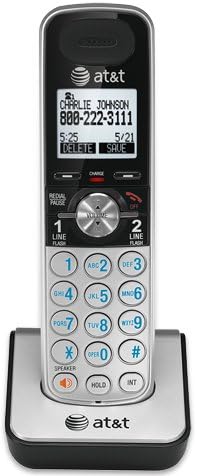
Figure 3: A cordless handset correctly seated in its charging cradle.
2.4 Registering Handsets
All accessory handsets (TL88002) must be registered to the TL88102 base unit before use. The handset included with the base unit is pre-registered.
- Place the handset you wish to register into the base unit's charger cradle.
- Na baznoj jedinici pritisnite i držite Pronađi slušalicu button for approximately 4 seconds until the IN USE light on the base unit begins to flash.
- Na slušalici pritisnite # key. The handset will display "Registering..." and then "Handset Registered" upon successful registration.
- If registration fails, remove the handset from the charger and repeat the steps.
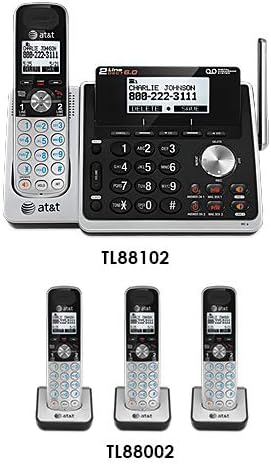
Figure 4: Illustration of the TL88102 base unit and TL88002 accessory handsets, indicating their relationship within the system.
3. Uputstvo za upotrebu
3.1 Upućivanje i primanje poziva
- Za upućivanje poziva: Pritisnite LINIJA 1 or LINIJA 2, a zatim birajte broj. Alternativno, prvo birajte broj, a zatim pritisnite LINIJA 1 or LINIJA 2.
- Da odgovorite na poziv: Pritisnite LINIJA 1, LINIJA 2, ili SPEAKER.
- Za završetak poziva: Pritisnite OFF ili stavite slušalicu u punjač.

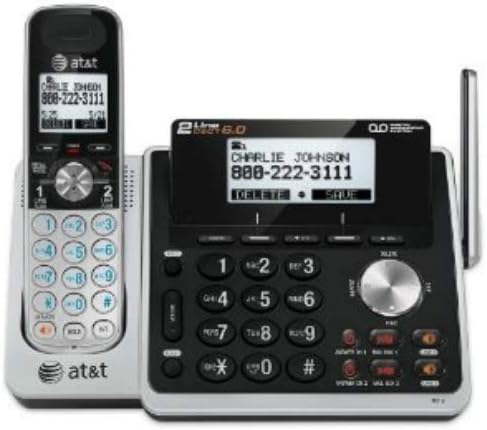
Figure 5: The TL88102 base unit and its cordless handset, highlighting the keypad and display for call management.
3.2 Answering System
The TL88102 features a digital answering system for both lines, capable of storing up to 14 minutes of messages per line.
- Uključivanje/isključivanje: Pritisnite ANS ON/OFF 1 or ANS ON/OFF 2 on the base unit to activate or deactivate the answering system for each line.
- Reprodukcija poruke: Pritisnite PLAY/STOP on the base unit or access the answering system menu from any handset.
- Daljinski pristup: You can retrieve messages remotely by calling your phone number and entering your remote access code.
3.3 Caller ID/Call Waiting
The system supports Caller ID and Call Waiting features. Ensure you subscribe to these services from your telephone service provider.
- Incoming call information (name and number) will display on the handset and base unit screens.
- During a call, if another call comes in, you will hear a tone. Press FLASH za prebacivanje između poziva.
3.4 Interfon
Use the intercom feature to communicate between the base unit and handsets, or between multiple handsets.
- To initiate intercom: Pritisnite INT on the handset, then select the desired handset or base unit to call.
4. Održavanje
4.1 Čišćenje proizvoda
Clean the telephone system with a soft, damp krpom. Ne koristite sprejeve za čišćenje ili jake hemikalije, jer mogu oštetiti završnu obradu ili električne komponente.
4.2 Njega baterija
- Uvijek koristite priložene punjive AAA baterije.
- For optimal performance, keep handsets in their chargers when not in use.
- Ako se slušalica neće koristiti duži period, izvadite baterije kako biste spriječili curenje.
- Replace batteries when the handset displays "Low Battery" or when talk time significantly decreases.
5. Otkrivanje problema
| Problem | Rješenje |
|---|---|
| Nema tona biranja. |
|
| Handset displays "Out of Range" or "No Power at Base". |
|
| Loš kvalitet poziva ili šumovi. |
|
| Telefonska sekretarica ne snima poruke. |
|
6. Specifikacije
- tehnologija: DECT 6.0 Digitalna tehnologija
- linije: Rad s 2 linije
- Sistem odgovora: Digital, up to 14 minutes recording time per line
- ID pozivaoca/poziv na čekanju: Da (potrebna pretplata)
- Imenik: 50-number phonebook
- interfon: Handset to Handset, Handset to Base
- Izvor napajanja: AC Power Adapter (Base Unit), Rechargeable AAA Batteries (Handsets)
- Dimenzije proizvoda (osnovna jedinica): Približno 12.1 x 10.2 x 8.6 inča
- Težina artikla: Otprilike 1.8 funti
- Boja: Srebro
- Materijal: Plastika
- Kompatibilni uređaji: Kompatibilan sa slušnim pomagalima
7. Garancija i podrška
For warranty information and technical support, please refer to the documentation included with your product or visit the official AT&T website. You may also contact AT&T customer service directly for assistance with product setup, operation, or troubleshooting.
Sačuvajte račun kao dokaz o kupovini za reklamacije u slučaju reklamacije.


