1. Uvod
Thank you for choosing the Hama 95236 8-inch LCD Digital Photo Frame. This manual provides important information regarding the safe operation, setup, and maintenance of your device. Please read it thoroughly before using the product and keep it for future reference.
2. Sigurnosna uputstva
- Do not open the device. Incorrect assembly or repair can lead to electric shock.
- Nemojte koristiti proizvod ako je vidljivo oštećen.
- Protect the product from dirt, moisture, and overheating. Use it only in dry environments.
- Nemojte ispuštati proizvod ili ga izlagati jakim vibracijama.
- Koristite proizvod samo za njegovu namjenu.
- Čuvajte ovaj proizvod, kao i sve električne proizvode, van domašaja djece.
- Odmah odložite materijal za pakovanje u skladu sa lokalnim propisima.
3. Sadržaj paketa
Please check that the package contains the following items:
- Hama 95236 8-inch LCD Digital Photo Frame
- Adapter za napajanje
- Korisnički priručnik (ovaj dokument)
4. Proizvod je gotovview
Upoznajte se s komponentama i kontrolama vašeg digitalnog foto okvira.
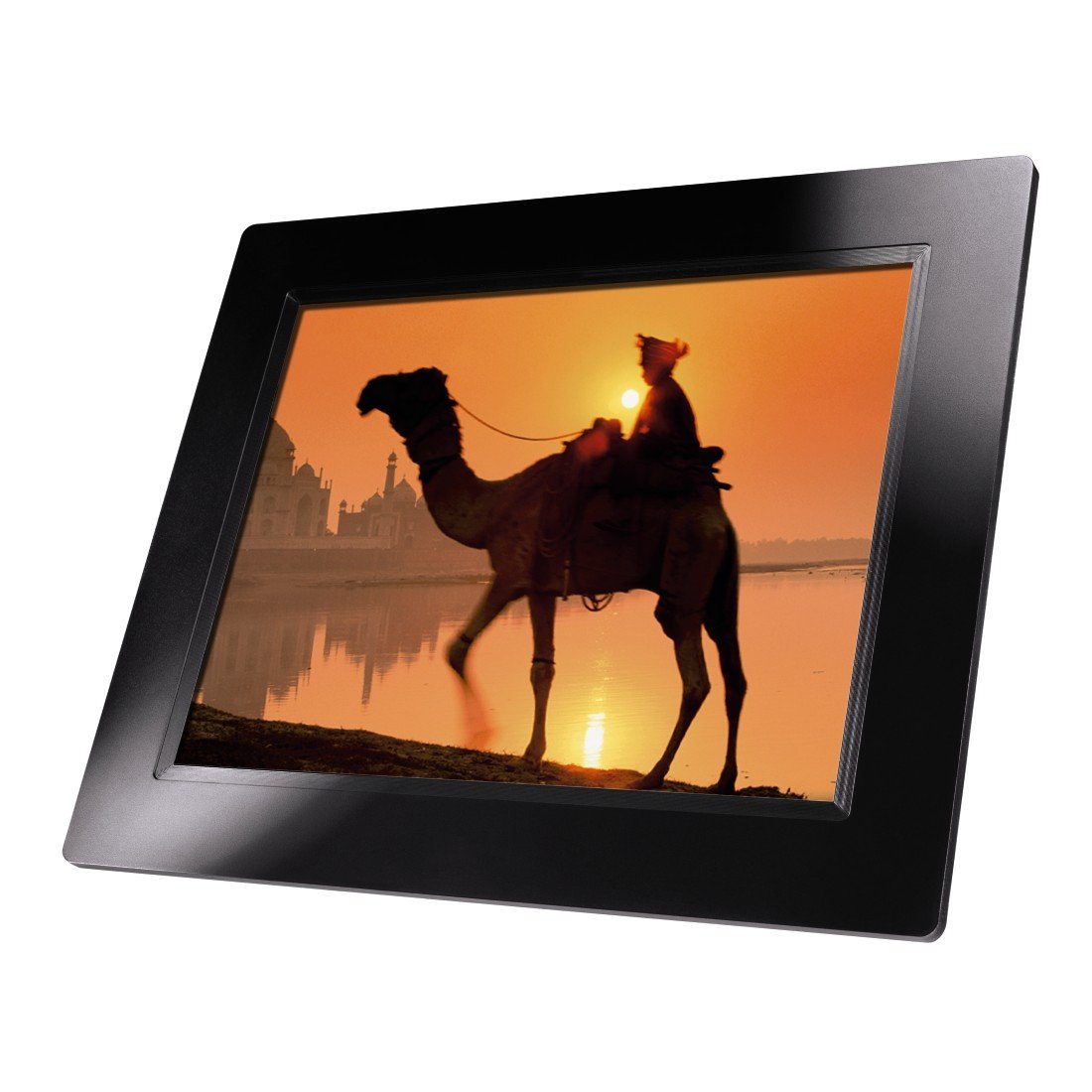
Slika 4.1: Front view of the Hama 95236 Digital Photo Frame, showing the 8-inch LCD screen.

Slika 4.2: Side view of the digital photo frame, highlighting the various input ports including the SD/MMC/MS card slot, USB port, and DC IN power port.

Slika 4.3: Pozadi view of the digital photo frame, showing the stand attachment point, ventilation grilles, and the control panel with power, navigation, and menu buttons.
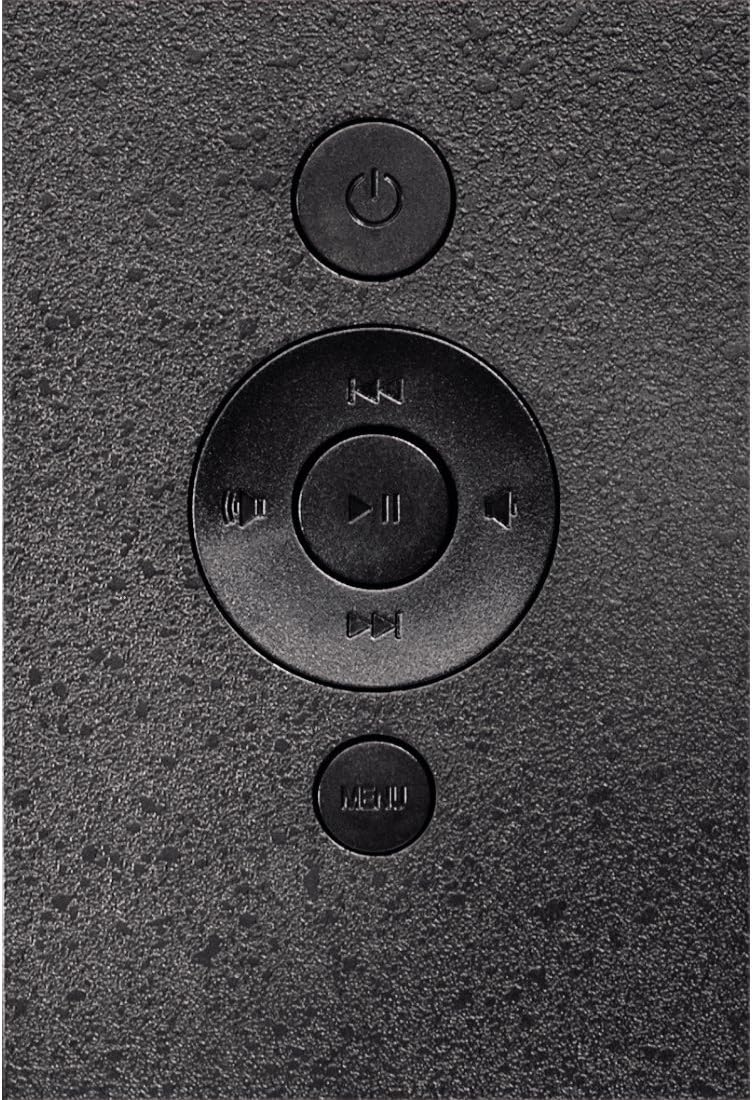
Slika 4.4: Close-up of the control buttons located on the back of the frame. These include the power button, directional navigation buttons (up, down, left, right), play/pause/enter button, and the menu button.
4.1. Portovi i kontrole
- SD/MMC/MS Card Slot: For inserting memory cards to display photos and videos.
- USB port: For connecting USB flash drives or other compatible USB storage devices.
- DC IN: Power input for connecting the provided power adapter.
- Dugme za napajanje: Uključuje ili isključuje uređaj.
- Navigacijski gumbi (gore/dolje/lijevo/desno): Used to navigate through menus and select options.
- Play/Pause/Enter Button: Confirms selections or controls media playback.
- Dugme menija: Pristupa glavnom meniju za postavke i opcije.
5. Podešavanje
5.1. Pričvršćivanje postolja
Insert the metal stand into the designated slot on the back of the digital photo frame. Ensure it is securely fastened to provide stable support for the frame.
5.2. Priključak za napajanje
- Spojite adapter za napajanje na DC IN priključak na stražnjoj strani fotookvira.
- Uključite adapter za napajanje u odgovarajuću električnu utičnicu.
- The frame will typically power on automatically or can be turned on using the power button.
5.3. Inserting a Memory Card or USB Drive
The Hama 95236 supports SD/MMC/MS memory cards and USB flash drives.
- Locate the SD/MMC/MS card slot or the USB port on the side of the frame (refer to Figure 4.2).
- Carefully insert your memory card or USB drive into the corresponding slot/port. Ensure it is inserted correctly to avoid damage.
- The frame should automatically detect the storage device and prompt you to view its contents or start a slideshow.
6. Uputstvo za upotrebu
6.1. Osnovna navigacija
Use the navigation buttons on the back of the frame to move through menus and options. The Play/Pause/Enter button confirms your selection.
6.2. Glavni meni
Pritisnite MENU button to access the main menu. From here, you can select different modes and settings:
- foto: View photos in a slideshow or individually.
- muzika: Pusti audio files.
- video: Pusti video files.
- Calendar/Clock: Display the calendar and time.
- Postavke: Adjust various device parameters.
6.3. Photo Playback
- Iz glavnog menija izaberite Fotografija.
- Navigate to your desired folder or select all photos.
- Pritisnite Play/Pause/Enter button to start the slideshow.
- During a slideshow, you can use the navigation buttons to skip photos or pause playback.
6.4. Sistemske postavke
Pristupite Postavke menu to customize your photo frame:
- Postavke ekrana: Adjust brightness, contrast, and display mode.
- Postavke slajdova: Configure transition effects, display time per photo, and repeat mode.
- Datum i vrijeme: Postavite trenutni datum i vrijeme. Note: Some users have reported that date and time settings may reset after power loss.
- Jezik: Select your preferred language for the menu interface.
- Informacije o skladištenju: View details about connected storage devices.
7. Održavanje
7.1. Čišćenje uređaja
- Uvijek isključite uređaj iz napajanja prije čišćenja.
- Clean the screen and exterior surfaces with a soft, dry, lint-free cloth.
- Do not use aggressive cleaning agents, solvents, or abrasive materials.
7.2. Skladištenje
Ako uređaj skladištite duži period, isključite ga iz struje i čuvajte ga na hladnom i suhom mjestu, dalje od direktne sunčeve svjetlosti i ekstremnih temperatura.
8. Otkrivanje problema
| Problem | Mogući uzrok | Rješenje |
|---|---|---|
| Uređaj se ne uključuje. | Adapter za napajanje nije priključen ili je neispravan. | Ensure the power adapter is securely connected to both the frame and the power outlet. Test the outlet with another device. |
| Nema prikazanih slika. | No memory card/USB drive inserted or filenije podržano. | Insert a compatible memory card or USB drive with supported image formats (e.g., JPEG). Check if the storage device is properly inserted. |
| Date and time reset after power off. | Nema interne baterije za rezervno napajanje sata. | This model may not retain date/time settings without continuous power. Re-enter settings if necessary after power interruption. |
| Video playback is choppy or distorted. | Unsupported video format or high bitrate. | Osigurajte video files are in a supported format and resolution. Convert videos to a lower resolution or bitrate if issues persist. |
| Dugmad ne reagiraju. | Privremeni softverski kvar. | Disconnect the power adapter, wait a few seconds, then reconnect it to restart the device. |
9. Specifikacije
| Feature | Detalj |
|---|---|
| Broj modela | 00095236 |
| Veličina ekrana | 8 inča |
| Rezolucija ekrana | 800 x 600 piksela |
| Aspect Ratio | 4:3 |
| Interna pohrana | 2 GB (2048 MB) |
| Povezivanje | USB, SD/MMC/MS Card Slot |
| Dimenzije (D x Š x V) | 2.6 x 22.2 x 17.8 cm |
| Težina | 550 g |
| Proizvođač | Hama |
10. Informacije o garanciji
Hama GmbH & Co KG provides a manufacturer's warranty for this product. The specific terms and conditions of the warranty period and coverage are subject to the purchase date and the region of purchase. Please retain your proof of purchase (receipt) for any warranty claims.
For detailed warranty information, please refer to the official Hama webstranicu ili direktno kontaktirajte njihovu korisničku podršku.
11. Korisnička podrška
Should you have any questions regarding this product, please contact Hama Customer Support:
- Webstranica: Visit the official Hama website for FAQs, drivers, and further product information. www.hama.com
- Kontakt: Refer to the contact section on the Hama webstranicu za telefonske brojeve ili podršku putem e-pošte u vašoj regiji.
Molimo vas da pripremite broj modela (00095236) i dokaz o kupovini kada kontaktirate podršku.