Uvod
This manual provides comprehensive instructions for the safe and efficient operation, maintenance, and troubleshooting of your Singer 1409 Electric Sewing Machine. Designed for ease of use, this machine offers 9 built-in stitches and 22 stitch functions, powered by a 70-watt motor, and features a 6-row feed dog system for precise fabric handling. Please read this manual thoroughly before using the machine to ensure optimal performance and longevity.
1. Postavljanje i montaža
Before operating your sewing machine, ensure it is properly set up and all components are accounted for.
1.1 Raspakivanje i komponente
Carefully remove the sewing machine and all accessories from the packaging. Retain the original packaging for future storage or transport. The box should contain the following items:
- 1 Sewing Machine with Accessories
- 1 Machine Cover
- 1 Nožni kontroler
- 1 Uputstvo za upotrebu (ovaj dokument)
1.2 Priključak za napajanje
Place the machine on a stable, flat surface. Connect the foot controller to the machine and then plug the power cord into a suitable electrical outlet. Ensure the power switch is in the OFF position before connecting.
1.3 Initial Setup: Bobbin Winding and Threading
Proper bobbin winding and machine threading are crucial for smooth operation and quality stitches.

Slika 1.1: Prednja strana view of the Singer 1409 Electric Sewing Machine, showing the main controls and sewing area.

Figure 1.2: Illustration of the automatic bobbin winding feature. The needle bar automatically disconnects during bobbin winding for safety and convenience.
For detailed steps on bobbin winding and upper thread threading, refer to the diagrams in the included instruction manual (physical copy) or the online resources provided by Singer. The automatic bobbin winding feature simplifies the process, ensuring thread is added smoothly to the bobbin.
2. Uputstvo za upotrebu
This section details the functions and controls of your Singer 1409 sewing machine.
2.1 Odabir boda
The Singer 1409 offers 9 built-in stitches and 22 stitch functions, providing versatility for various sewing projects. Use the stitch selector dial to choose your desired stitch pattern. The dial allows for easy switching between essential and decorative stitches.

Figure 2.1: Close-up of the stitch selection dials, showing options for essential and decorative stitches, and the simple stitch selection mechanism.
2.2 Automatic Reverse Option
The machine features an automatic reverse function. This allows you to sew in reverse automatically, which is essential for reinforcing stitches at the beginning and end of seams, ensuring durability.
2.3 Rupica za dugmad u 4 koraku
Create professional-looking buttonholes with the integrated 4-step buttonhole feature. Follow the specific instructions in your detailed manual for precise buttonhole creation.
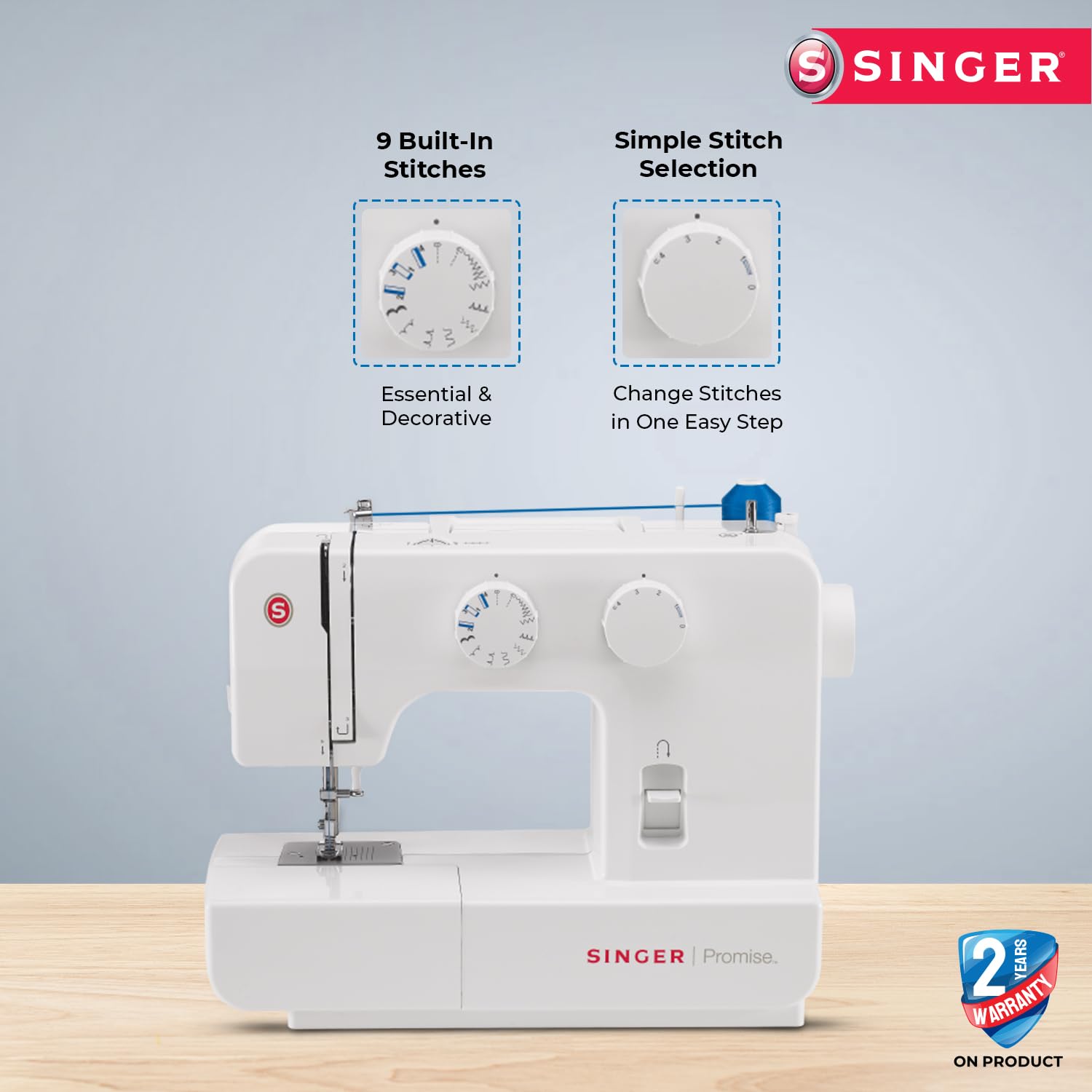
Figure 2.2: Visual representation of quick and easy threading, and the 4-step buttonhole process, designed for professional results.
2.4 Free Arm with Accessories Storage
The retractable free arm simplifies sewing sleeves, cuffs, and collars. It also provides convenient access to a built-in storage compartment for your sewing accessories.
3. Održavanje
Redovno održavanje osigurava dugotrajnost i optimalne performanse vaše šivaće mašine.
3.1 Čišćenje
Uklanjanje dlačica i prašine: Regularly remove lint and dust from the bobbin case area, feed dogs, and tension discs using a small brush or lint remover. Accumulation of lint can affect stitch quality and machine performance.
Ploča za iglu: Remove the needle plate and clean underneath it to clear any fabric fibers or broken needle pieces.
3.2 Podmazivanje
Refer to your detailed instruction manual for specific lubrication points and recommended sewing machine oil. Over-lubrication can attract more dust, so follow guidelines carefully.
3.3 Zamjena igle
Replace needles frequently, especially when working on new projects or if you notice skipped stitches or fabric damage. A dull or bent needle can cause significant issues.
4. Otkrivanje problema
This section addresses common issues you might encounter and provides basic solutions. For more complex problems, contact customer support.
| Problem | Mogući uzrok | Rješenje |
|---|---|---|
| Skipped Stitches | Nepravilna igla, savijena igla, nepravilno uvlačenje konca, pogrešna veličina igle za tkaninu. | Replace needle, re-thread machine, ensure correct needle type/size for fabric. |
| Thread Breaking | Nepravilno uvlačenje konca, prevelika napetost, konac loše kvalitete, savijena igla, neravnine na ploči igle. | Ponovo provucite konac u mašini, podesite napetost, koristite kvalitetan konac, zamijenite iglu i provjerite ima li neravnina. |
| Zaglavljivanje/nabiranje tkanine | Incorrect tension, dull needle, improper presser foot, lint under needle plate. | Adjust tension, replace needle, use correct presser foot, clean feed dogs and needle plate area. |
| Mašina se ne pokreće | Kabl za napajanje nije priključen, nožna pedala nije priključena, prekidač za napajanje je isključen. | Check all connections, ensure power switch is ON. |
5. Specifikacije
Key technical specifications for the Singer 1409 Electric Sewing Machine.
| Feature | Detalj |
|---|---|
| Broj modela | 1409 |
| Ugrađeni šavovi | 9 |
| Funkcije šava | 22 |
| Snaga motora | 70 Watts |
| Sistem za dovod hrane | 106 teeth in 6 rows |
| Vrsta rupice za dugmad | 4-korak |
| Dimenzije (DxŠxV) | 41 D x 21 Š x 34 V centimetara |
| Težina artikla | 5 kg 850 g |
| Zemlja porijekla | Vijetnam |

Slika 5.1: Interni view of the Singer 1409, highlighting its heavy-duty and durable metal frame construction.
6. Garancija i podrška
Information regarding product warranty and customer support services.
6.1 Jamstvo za proizvod
The Singer 1409 Electric Sewing Machine typically comes with a standard manufacturer's warranty. For specific details regarding the warranty period and terms, please refer to the warranty card included with your product or contact Singer customer support. Extended warranty options may also be available for purchase.
- 1 Year Extended Warranty (optional purchase)
- 2 Year Extended Warranty (optional purchase)
- 1 Year Fire Protection Plan (optional purchase)
6.2 Customer Support and Online Resources
For any queries, technical assistance, or service requests, please contact Singer customer support. You can also access online resources and interactive master classes to enhance your sewing skills.
- Broj korisničke podrške: 1800 103 3474 | 8860118855
- Email: korisnička podrška@singerindia.com
- Webstranica: www.singerindia.com

Figure 6.1: Information on Singer Live Assist, providing contact details for free home and online demos, available Monday to Sunday, 10 AM to 7 PM, in multiple languages.

Figure 6.2: Details about the offer for a free 1-month online sewing session upon purchase of any Singer sewing machine. Registration requires an Amazon invoice.
Singer also provides access to an online interactive master class to further enhance your sewing skills and knowledge. Details for accessing this class are typically provided upon product registration or through customer support.