1. Uvod
The HP 1910-8G-PoE+ 180W Switch (Model JG350A) is an advanced smart-managed, fixed-configuration Gigabit Ethernet Layer 3 switch. Designed for small businesses, it offers enhanced features in an easy-to-administer solution, providing reliable network connectivity and Power over Ethernet Plus (PoE+) capabilities.
2. Ključne karakteristike
- Gigabitni Ethernet portovi: Provides 8 Gigabit Ethernet ports for high-speed network connections.
- PoE+ Capability: Supports Power over Ethernet Plus (802.3at) to power compatible devices such as IP phones, wireless access points, and IP cameras directly through the network cable.
- SFP portovi: Includes additional true Gigabit SFP ports for fiber connectivity, extending network reach.
- Fleksibilno postavljanje: Supports both rack mounting and desktop operation.
- tihi rad: Utilizes variable-speed fans to minimize noise.
- IPv6 podrška: Operates at full wire-speed IPv6.
- Kvalitet usluge (QoS): Supports traffic prioritization for optimal performance of critical applications.
- Sigurnosne karakteristike: Includes 802.1X network login, access control lists (ACLs), and denial-of-service (DoS) prevention.
- Napredne karakteristike sloja 3: Customizable features such as VLANs, link aggregation trunking, static routing, and Spanning Tree Protocols (STP, RSTP, MSTP).
3. Sadržaj paketa
Provjerite da li vaš paket sadrži sljedeće stavke:
- HP 1910-8G-PoE+ 180W Switch (JG350A)
- Kabl za napajanje
- Komplet za montažu u rack (ako je primjenjivo)
- Vodič za brzi početak i informacije o garanciji
Ako bilo koji artikl nedostaje ili je oštećen, odmah se obratite svom prodavaču.
4. Fizički opis
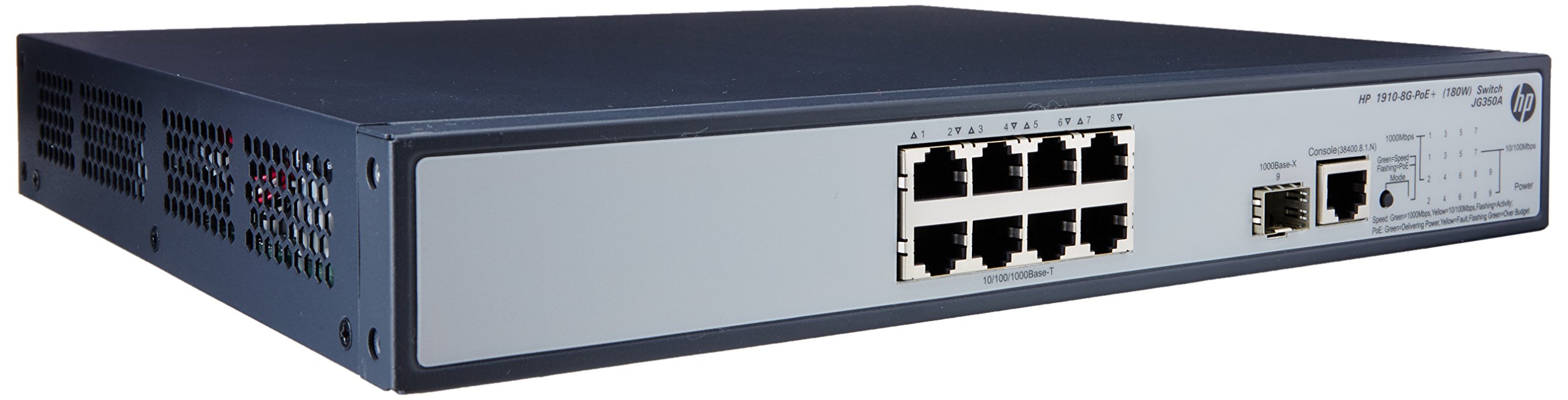

4.1 Prednja ploča
The front panel of the switch includes:
- 8 x RJ45 Gigabit Ethernet Ports: These ports support 10/100/1000 Mbps connections and are PoE+ enabled, providing power to connected devices.
- 2 x SFP Ports: Dedicated slots for Gigabit fiber optic transceivers, allowing for long-distance connections.
- LED indikatori: Status lights for power, system, and individual port activity/PoE status.
4.2 Zadnja ploča
The rear panel typically contains the AC power input connector and ventilation openings.
5. Podešavanje
5.1 Sigurnosne mjere
- Osigurajte odgovarajuću ventilaciju oko prekidača kako biste spriječili pregrijavanje.
- Nemojte blokirati otvore za ventilaciju.
- Koristite samo kabl za napajanje koji ste dobili uz uređaj.
- Avoid placing the switch in direct sunlight or near heat sources.
5.2 Montaža prekidača
The HP 1910-8G-PoE+ 180W Switch can be deployed in two ways:
- Položaj na radnoj površini: Place the switch on a flat, stable surface, ensuring adequate space for ventilation.
- Montaža u stalak: Use the provided rack-mount kit to install the switch into a standard 19-inch equipment rack. Follow the instructions included with the rack-mount kit for proper installation.
5.3 Povezivanje napajanja
- Spojite jedan kraj kabela za napajanje na ulaz za izmjeničnu struju na stražnjoj ploči prekidača.
- Drugi kraj kabla za napajanje priključite na uzemljenu električnu utičnicu.
- LED dioda za napajanje na prednjoj ploči trebala bi svijetliti, što ukazuje na to da prekidač prima napajanje.
5.4 Povezivanje mrežnih uređaja
- RJ45 portovi: Connect your network devices (computers, servers, IP phones, wireless access points) to the RJ45 ports using standard Ethernet cables. For PoE-powered devices, ensure they are PoE+ compatible.
- SFP portovi: Insert compatible SFP transceivers into the SFP slots, then connect fiber optic cables to the transceivers for fiber uplinks or long-distance connections.
5.5 Početna konfiguracija
The HP 1910 switch is a smart-managed device, typically configured via a web-based graphical user interface (GUI). Refer to the Quick Start Guide for the default IP address, username, and password to access the management interface. It is recommended to change default credentials immediately after initial access for security purposes.
6. Upravljanje prekidačem
6.1 Uključivanje
Once connected to power, the switch will automatically power on. Observe the system LED for boot-up status. A steady green light typically indicates normal operation.
6.2 Mrežna povezivost
When a device is connected to an RJ45 port, the corresponding port LED will illuminate. A blinking LED indicates network activity. Ensure the link LED is solid green for a stable connection.
6.3 PoE+ funkcionalnost
For devices requiring Power over Ethernet, connect them to the PoE+ enabled RJ45 ports. The switch will automatically detect and provide power to compatible devices. The PoE status LED for the port will indicate power delivery.
7. Održavanje
7.1 Čišćenje
Periodically clean the exterior of the switch with a soft, dry cloth. Do not use liquid or aerosol cleaners. Ensure ventilation openings are free from dust and debris to maintain proper airflow.
7.2 Ažuriranja firmvera
Regularly check the HP support webstranica za ažuriranja firmvera. Održavanje ažurnog firmvera prekidača osigurava optimalne performanse, sigurnost i pristup novim funkcijama. Pažljivo slijedite upute koje ste dobili uz paket za ažuriranje firmvera.
7.3 Razmatranja životne sredine
Operate the switch within its specified temperature and humidity ranges to ensure longevity and stable performance. Avoid extreme conditions.
8. Otkrivanje problema
8.1 Nema napajanja
- Provjerite je li kabel za napajanje sigurno spojen i na prekidač i na električnu utičnicu.
- Provjerite da li električna utičnica radi tako što ćete uključiti drugi uređaj.
- Ensure the power switch (if present) is in the ON position.
8.2 Nema mrežne veze
- Check the Ethernet cable connections between the switch and the device.
- Verify that the port LED on the switch is illuminated for the connected device.
- Ensure the device's network adapter is enabled and configured correctly.
- Try connecting the device to a different port on the switch or using a different Ethernet cable.
8.3 PoE ne radi
- Confirm that the connected device is PoE+ compatible.
- Check the PoE status LED for the specific port.
- Ensure the total power budget of the switch is not exceeded.
- Try connecting the PoE device to a different PoE+ port.
8.4 Resetiranje prekidača
If the switch is unresponsive or experiencing persistent issues, a factory reset may be necessary. Refer to the device's management interface or the full user guide for instructions on performing a factory reset. Upozorenje: A factory reset will erase all custom configurations and restore the switch to its default settings.
9. Specifikacije
| Feature | Specifikacija |
|---|---|
| Broj modela | JG350A |
| Interface Type | PoE+, SFP |
| Broj portova | 8 (Gigabit Ethernet PoE+) |
| Brzina prijenosa podataka | 1000 megabita u sekundi |
| RAM | 128 MB |
| Težina artikla | 8.35 funte (3.79 kg) |
| Dimenzije proizvoda (DxŠxV) | 17.5 x 13.12 x 3.5 inča (44.45 x 33.32 x 8.89 cm) |
| Kompatibilni uređaji | Camera, Desktop, Laptop, Printer |
| Proizvođač | HP |
10. Garancija i podrška
For detailed warranty information and technical support, please refer to the documentation included with your product or visit the official HP support website. The website provides access to drivers, firmware updates, troubleshooting guides, and contact information for customer service.