Uvod
This manual provides comprehensive instructions for the installation, operation, and maintenance of your Audiovox VE927 9-inch LCD Drop-Down TV with Built-in DVD Player and Clock Radio. Please read this manual thoroughly before using the product to ensure proper function and safety.
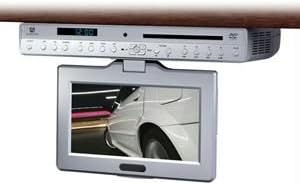
Slika 1: Audiovox VE927 unit with the 9-inch LCD screen in the extended, viewing position. The main unit is mounted under a cabinet, and the screen swivels down for use.
Sadržaj paketa
Provjerite da li su sve stavke prisutne u paketu:
- Audiovox VE927 9-inch LCD Drop-Down TV/DVD Player Unit
- Montažni stalak/nosač
- Daljinski upravljač
- Adapter za napajanje
- Korisnički priručnik (ovaj dokument)
Postavljanje i instalacija
1. Montaža jedinice
The VE927 is designed for under-cabinet mounting. Ensure the mounting surface is sturdy and capable of supporting the unit's weight (approximately 6 pounds). Use appropriate screws and tools for secure installation.
- Identify a suitable location under a cabinet, ensuring sufficient clearance for the screen to swivel down (270° swivel capability).
- Attach the mounting stand/bracket to the underside of the cabinet using appropriate fasteners.
- Securely attach the VE927 unit to the installed mounting stand/bracket. Refer to the detailed mounting diagram in the separate installation guide for precise instructions.
2. Priključak za napajanje
Connect the provided power adapter to the DC input port on the VE927 unit, then plug the adapter into a standard electrical outlet.
3. Početno uključivanje
Press the Power button on the unit or the remote control to turn on the device. The initial setup wizard may appear for language selection and time setting.
Uputstvo za upotrebu
1. Podešavanje ekrana
The 9-inch LCD screen can swivel up to 270 degrees. Gently adjust the screen to your desired viewing angle. Avoid excessive force.
2. Rad DVD plejera
- Insert a DVD disc into the disc slot on the front of the unit. The unit will automatically detect the disc and begin playback.
- Use the remote control for playback functions such as Play, Pause, Stop, Fast Forward, Rewind, and Chapter Skip.
- Access the DVD menu for language, subtitle, and multi-angle selections.
3. TV Tuner Operation (ATSC/NTSC)
- Ensure an antenna is connected to the TV antenna input (if applicable).
- Press the "TV" button on the remote control to switch to TV mode.
- Perform a channel scan to find available digital (ATSC) and analog (NTSC) channels in your area. Refer to the on-screen menu for scanning options.
- Use the Channel Up/Down buttons to navigate between channels.
4. AM/FM Clock Radio
- Press the "Radio" button to switch to radio mode.
- Use the "Band" button to select between AM and FM frequencies.
- Tune to desired stations using the tuning buttons or by performing an auto-scan.
- Set the clock using the menu options.
5. Cooking Timer
The unit includes a cooking timer function. Access the timer settings through the main menu or a dedicated button on the remote control. Set the desired countdown time, and an alarm will sound upon completion.
6. USB povezivanje
The unit features USB connectivity. Insert a USB flash drive into the USB port to play compatible media files (e.g., photos, music, videos). Navigate filepomoću daljinskog upravljača.
Održavanje
Čišćenje jedinice
- Uvijek isključite strujni adapter prije čišćenja.
- Koristite meku, suhu krpu da obrišete spoljašnjost jedinice.
- Za LCD ekran koristite meku krpu koja ne ostavlja dlačice, posebno dizajniranu za elektronske ekrane. Nemojte koristiti abrazivna sredstva za čišćenje ili rastvarače.
- Izbjegavajte prskanje tekućina direktno na uređaj.
Disc Care
- Diskove držite za rubove kako biste izbjegli otiske prstiju.
- Keep discs clean and free from scratches. Use a soft cloth to wipe discs from the center outwards.
Rješavanje problema
| Problem | Mogući uzrok | Rješenje |
|---|---|---|
| Nema struje | Power adapter not connected; outlet not functioning. | Ensure power adapter is securely connected to the unit and a working electrical outlet. |
| No picture/sound from DVD | Disc is dirty or scratched; disc inserted incorrectly; incorrect input selected. | Clean the disc; reinsert the disc correctly; ensure DVD mode is selected. |
| Loš TV prijem | Antenna not connected or positioned incorrectly; weak signal. | Connect and adjust the antenna; perform a channel scan; consider a stronger antenna. |
| Daljinski upravljač ne radi | Baterije su prazne ili su nepravilno umetnute; postoji prepreka između daljinskog upravljača i uređaja. | Replace batteries; ensure correct polarity; remove obstructions; point remote directly at the unit. |
Specifikacije
- Model: VE927
- Veličina ekrana: 9 inča
- Vrsta prikaza: LCD
- Omjer širine i visine: 16:9
- Okretni ekran: 270°
- Vrsta medija: SD, DVD, USB
- Tehnologija povezivanja: USB
- tjuner: ATSC/NTSC Digital Tuner
- radio: AM/FM radio sa satom
- Posebne karakteristike: Cooking Timer, Stereo Speakers, Language/Sub-Title/Multi-Angle Selection
- Težina artikla: 6 funte
- Proizvođač: Audiovox
- Prvo dostupno: 27. aprila 2011
Garancija i podrška
For warranty information, please refer to the warranty card included with your product or visit the official Audiovox website. For technical support or service inquiries, please contact Audiovox customer service directly. Keep your purchase receipt as proof of purchase.


