Product Overview
The Targus Presenter AMP09AP is a multimedia presentation remote designed for ease of use during presentations. It features a laser pointer for highlighting content, backlit buttons for low-light environments, and an ergonomic design for comfortable handling. This remote also offers cursor control for remote program access and volume adjustment for media. Its wireless technology provides a range of up to 50 feet, and the USB receiver conveniently stores within the presenter.
Vodič za postavljanje
1. Raspakivanje
Carefully remove the Targus Presenter AMP09AP and its components from the packaging. The box should contain:
- One Targus Presentation Remote
- One USB Receiver
2. Instalacija baterije
The Targus Presenter AMP09AP requires batteries (not included). Use alkaline batteries for optimal performance.
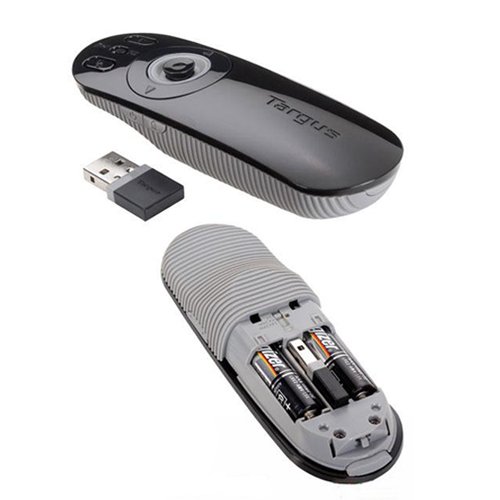
- Pronađite odjeljak za baterije na stražnjoj strani prezentera.
- Otvorite poklopac odeljka za baterije.
- Umetnite potrebne baterije, pazeći na ispravan polaritet (+/-).
- Čvrsto zatvorite poklopac odeljka za baterije.
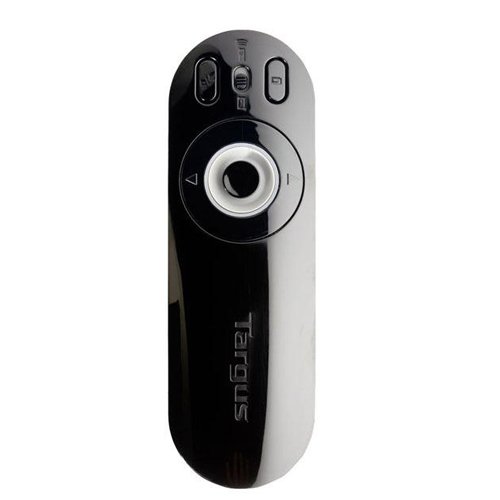
Image: The Targus Presenter AMP09AP, its USB receiver, and the open battery compartment revealing two AAA batteries.
3. Povezivanje USB prijemnika
- Remove the USB receiver from its storage slot within the presenter.
- Uključite USB prijemnik u slobodan USB port na vašem računaru.
- Računar bi trebao automatski prepoznati i instalirati potrebne upravljačke programe.
The remote is now ready for use.
Uputstvo za upotrebu
Način prezentacije
The presenter's simplistic layout allows for easy navigation during presentations.
Slika: Vrh view of the Targus Presenter AMP09AP, highlighting the laser pointer button, slide navigation buttons, and the mode switch.
- laserski pokazivač: Press and hold the dedicated laser button to activate the laser pointer for highlighting content.
- Next Slide: Press the forward arrow button to advance to the next slide.
- Previous Slide: Press the backward arrow button to return to the previous slide.
- Dugmad sa pozadinskim osvetljenjem: Buttons are backlit for visibility in dimly lit rooms.
Cursor Control Mode
The presenter features cursor control for remote access to programs and media functions.
- Activating Cursor Control: Use the mode switch (located at the top right of the remote) to toggle between presentation and cursor control modes.
- Moving Cursor: Use the central circular button (joystick/directional pad) to move the mouse cursor on the screen.
- Klikom na: Press the center of the circular button to perform a left-click action.
- Kontrola jačine zvuka: Adjust the volume for music and videos remotely using the designated volume controls (if available on your specific model).
bežični domet
The wireless technology allows operation up to 50 feet (approximately 15 meters) from the computer, providing flexibility during presentations.
Održavanje
- čišćenje: Wipe the presenter with a soft, dry cloth. Avoid using harsh chemicals or abrasive cleaners.
- Zamjena baterije: Replace batteries when the indicator light (if present) signals low power, or when performance degrades. Ensure correct polarity during replacement.
- Skladištenje: When not in use, store the USB receiver inside the presenter's dedicated slot to prevent loss. Store the presenter in a cool, dry place.
Rješavanje problema
| Problem | Mogući uzrok | Rješenje |
|---|---|---|
| Voditelj ne odgovara | Slabe ili prazne baterije | Zamijenite baterije novim alkalnim baterijama. |
| Voditelj ne odgovara | USB prijemnik nije pravilno povezan | Provjerite je li USB prijemnik sigurno priključen u ispravan USB priključak na vašem računaru. Pokušajte s drugim USB priključkom. |
| Voditelj ne odgovara | Van dometa | Move closer to the computer (within 50 feet / 15 meters). |
| Laserski pokazivač ne radi | Niska baterija | Zamijenite baterije. |
| Cursor control erratic or not working | Interference or mode not activated | Ensure no obstructions between presenter and receiver. Check if cursor control mode is active using the mode switch. |
Specifikacije
| Feature | Detalj |
|---|---|
| Brand | Targus |
| Broj modela | AMP09AP-51 |
| Boja | Crna i siva |
| Dimenzije (DxŠxV) | 12.1 x 3.8 x 2.5 cm |
| Težina artikla | 140 g |
| Tehnologija povezivanja | Bežični |
| bežični domet | Do 50 stopa (otprilike 15 metara) |
| Vrsta baterije | Alkalna (nije uključena) |
| Uključene komponente | Presentation Remote, USB Receiver |
| Posebne karakteristike | Ergonomic design, Laser pointer, Cursor control, Backlit buttons |
Garancija i podrška
For warranty information and technical support, please refer to the documentation provided with your purchase or visit the official Targus webSačuvajte dokaz o kupovini za slučaj reklamacije.


