1. Uvod
This manual provides essential information for the safe and efficient operation of your Panasonic VIERA TC-P55GT50 55-Inch Full HD 3D Plasma TV. Please read these instructions thoroughly before using your television and retain them for future reference. The TC-P55GT50 features a 55-inch 1080p display, 600Hz refresh rate, Full HD 3D capabilities, an Infinite Black Pro Panel, and built-in VIERA Connect Wi-Fi for smart functionality.
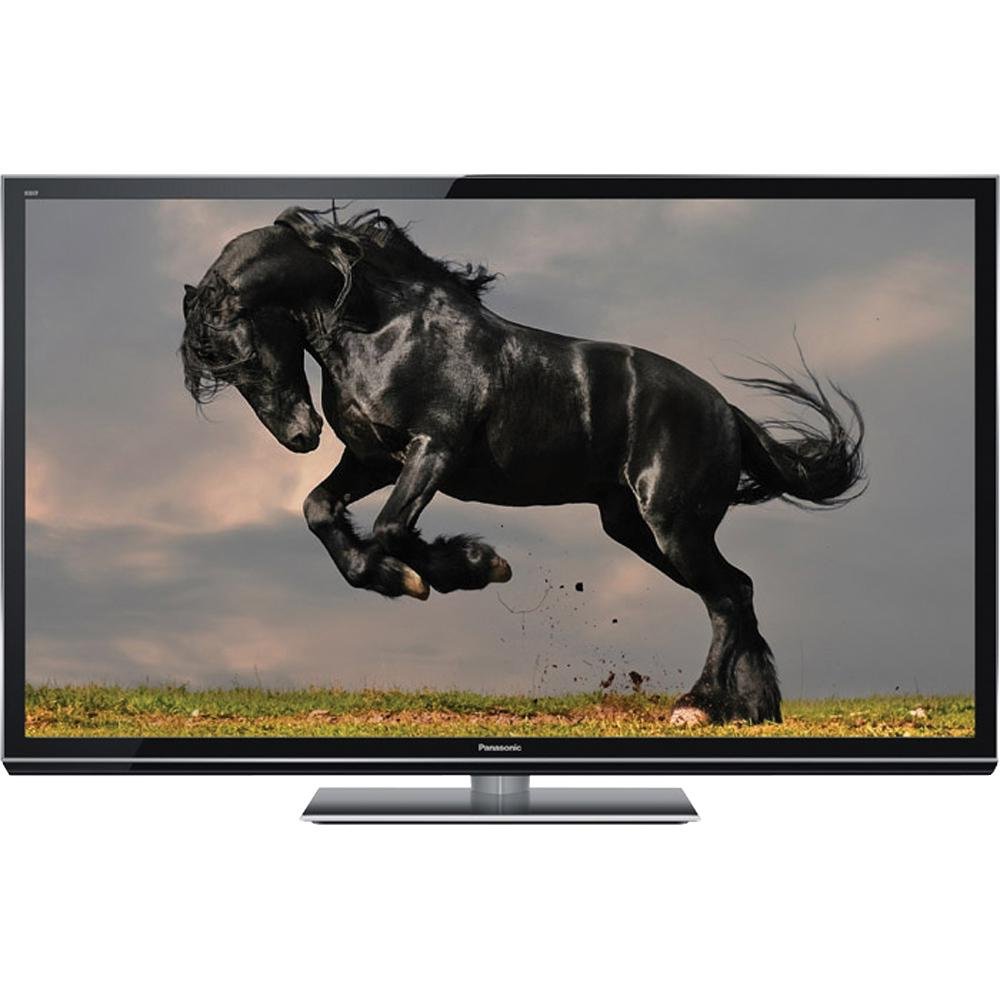
Image 1.1: The Panasonic VIERA TC-P55GT50 Plasma TV displayed in a living room setting, showcasing its slim design and large screen.
2. Sigurnosne informacije
Pridržavajte se sljedećih sigurnosnih mjera opreza kako biste spriječili oštećenje televizora i osigurali ličnu sigurnost.
- Izvor napajanja: Connect the TV only to an AC 120 V, 60 Hz power supply. Do not overload power outlets.
- ventilacija: Ensure adequate ventilation around the TV. Do not block ventilation openings. Maintain a minimum distance of 10 cm (4 inches) from walls and other objects.
- plasman: Place the TV on a stable, level surface. Avoid placing it in direct sunlight, near heat sources, or in areas with high humidity or dust.
- Tečnost i vlaga: Ne izlažite TV kiši ili vlazi. Ne stavljajte predmete napunjene tekućinom, poput vaza, na TV.
- čišćenje: Isključite kabel za napajanje prije čišćenja. Koristite meku, suhu krpu. Ne koristite tekuća sredstva za čišćenje ili aerosolna sredstva za čišćenje.
- Sigurnost djece: This product includes a Child Safety Guide. Follow its recommendations to prevent tip-over accidents.
3. Šta se nalazi u kutiji
Verify that all the following items are included with your Panasonic VIERA TC-P55GT50 TV:
- Panasonic VIERA TC-P55GT50 Plasma TV
- Daljinski upravljač
- AC strujni kabl
- Postolje (TV stalak)
- Uputstvo za upotrebu (ovaj dokument)
- Vodič za sigurnost djece
- Vodič za brzi početak
- Kartica za registraciju proizvoda (SAD)
- 2 x AA baterije (za daljinski upravljač)
4. Podešavanje
4.1. Pedestal Assembly
Carefully place the TV screen-down on a soft, clean cloth on a flat surface. Attach the pedestal to the TV using the provided screws, ensuring it is securely fastened. Refer to the Quick Start Guide for detailed diagrams.
4.2. Povezivanje uređaja
Connect your external devices such as Blu-ray players, cable/satellite boxes, and gaming consoles to the TV's input ports (HDMI, Component, etc.).
- HDMI: For high-definition video and audio. Use HDMI cables for best quality.
- Antena/kabel: Connect an antenna or cable TV line to the RF input.
- Audio izlaz: Koristite optički digitalni audio izlaz za povezivanje sa soundbarom ili kućnim kinom.
Slika 4.2: Krupni plan view of the side of the Panasonic VIERA TC-P55GT50, illustrating the various input and output ports available for connecting external devices.
4.3. Početno uključivanje i podešavanje mreže
- Plug the AC power cord into the TV and then into a wall outlet.
- Pritisnite dugme za napajanje na daljinskom upravljaču ili na televizoru.
- Slijedite upute na ekranu da biste odabrali jezik, državu i izvršili početno skeniranje kanala.
- For internet features, navigate to the Network Settings menu. Select your Wi-Fi network and enter the password. The TV supports VIERA Connect for accessing online services.
5. Uputstvo za upotrebu
5.1. Osnovne funkcije televizora
- Snaga: Pritisnite POWER button on the remote to turn the TV on or off.
- Volumen: Koristite VOL +/- dugmad za podešavanje jačine zvuka.
- Kanal: Koristite CH +/- dugmad za promjenu kanala.
- Unos: Pritisnite INPUT button to select connected devices (HDMI 1, HDMI 2, etc.).
- meni: Pritisnite MENU button to access picture, sound, and other settings.
5.2. VIERA Connect (Smart Features)
VIERA Connect provides access to various internet services and applications. Ensure your TV is connected to the internet.
- Pritisnite VIERA Connect dugme na vašem daljinskom upravljaču.
- Navigate through the available applications using the arrow buttons.
- Select an application (e.g., YouTube, Hulu Plus, Netflix) and press OK da ga pokrenete.
- Ugrađeni web browser allows for general internet browsing.
5.3. Full HD 3D Viewing
Your TC-P55GT50 supports Full HD 3D content. Active 3D glasses (sold separately) are required for 3D viewing.
- Play 3D content from a compatible source (e.g., 3D Blu-ray player).
- Put on your active 3D glasses. The TV should automatically detect the 3D signal and activate 3D mode.
- If 3D mode does not activate automatically, press the 3D button on your remote control and select the appropriate 3D format.
- Adjust 3D settings (depth, viewpoint) via the Picture menu if desired.
6. Održavanje
6.1. Čišćenje ekrana
To clean the plasma screen, first turn off the TV and unplug the power cord. Gently wipe the screen with a soft, dry, lint-free cloth. For stubborn marks, lightly dampen the cloth with water or a specialized screen cleaner designed for plasma displays. Do not apply pressure or use abrasive materials.
6.2. Čišćenje ormarića
Wipe the TV cabinet with a soft, dry cloth. Do not use strong detergents, waxes, or solvents as they can damage the finish.
6.3. Sprečavanje zadržavanja slike (Burn-in)
Plasma displays can exhibit temporary image retention if static images are displayed for extended periods. To minimize this:
- Avoid displaying static images (e.g., channel logos, video game HUDs, computer desktop) for more than a few hours.
- Use the TV's built-in pixel orbiter or screen saver functions if available.
- Regularly watch varied content to help clear any temporary image retention.
7. Otkrivanje problema
Prije nego što kontaktirate korisničku podršku, isprobajte sljedeća rješenja za uobičajene probleme:
| Problem | Mogući uzrok / rješenje |
|---|---|
| Nema struje |
|
| Nema slike, ali je zvuk prisutan |
|
| Nema zvuka, ali je slika prisutna |
|
| Cannot connect to Wi-Fi / Internet |
|
| Image retention (temporary burn-in) |
|
8. Specifikacije
Key technical specifications for the Panasonic VIERA TC-P55GT50 Plasma TV:
| Feature | Detalj |
|---|---|
| Broj modela | TC-P55GT50 |
| Veličina ekrana | 55 inča (dijagonalno) |
| Display Technology | Plazma |
| Rezolucija | 1080p (1920x1080) |
| Refresh Rate | 600Hz Sub-field Drive |
| 3D sposobnost | Full HD 3D (Active Shutter) |
| Povezivanje | Wi-Fi ugrađen |
| Internet usluge | VIERA Connect (Skype, FOX Sports, SHOUTcast, AccuWeather, Hulu Plus, MLB.tv, Pandora, Youtube) |
| Dimenzije proizvoda (bez postolja) | 50.6-Inch (W) x 14.1-Inch (H) x 1.7-Inch (D) |
| Dimenzije proizvoda (sa postoljem) | 50.6-Inch (W) x 32.3-Inch (H) x 14.1-Inch (D) |
| Težina artikla | 59.6 funti |
| Uključene komponente | Remote Control, AC Power Cord, Pedestal, Owner's Manual, Child Safety Guide, Quick Start Guide, Product Registration Card (U.S.A.), 2 x AA Batteries |
9. Garancija i podrška
This product is covered by the manufacturer's warranty. The seller offers no additional warranty beyond the remainder of the original manufacturer's warranty. For specific warranty terms, please refer to the Product Registration Card or contact Panasonic customer support directly.
Za tehničku pomoć, rješavanje problema izvan ovog priručnika ili reklamacije, obratite se korisničkoj podršci tvrtke Panasonic. Kontakt informacije se obično mogu pronaći na službenoj web stranici tvrtke Panasonic. website or on the Product Registration Card included with your TV.