1. Uvod
This manual provides essential information for the safe and efficient installation, operation, and maintenance of your Antec MT-352 Micro ATX Power Supply. Please read this manual thoroughly before installation and retain it for future reference. The Antec MT-352 is a 350W Micro ATX power supply designed for personal computer systems, offering 88% efficiency and compatibility with 110V AC and 220V AC input voltages.
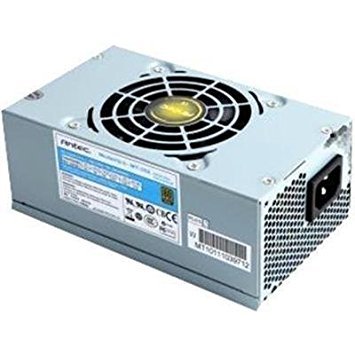
Figure 1: Antec MT-352 Micro ATX Power Supply unit.
2. Sigurnosne informacije
Uvijek se pridržavajte sljedećih sigurnosnih mjera opreza kako biste spriječili ozljede i oštećenje opreme:
- Električna opasnost: Ne otvarajte jedinicu za napajanje. Visoka jačina zvukatages are present inside, even when the system is turned off and unplugged. There are no user-serviceable parts inside.
- Isključivanje struje: Always disconnect the power cord from the wall outlet before installing, removing, or servicing the power supply or any other system components.
- Pravilno uzemljenje: Ensure your system is properly grounded. Use only the power cord provided with the unit or a suitable replacement that meets local safety standards.
- ventilacija: Ensure adequate airflow around the power supply. Do not block ventilation openings.
- Moisture and Temperature: Do not operate the power supply in high humidity environments or near water. Avoid extreme temperatures.
- Preopterećenje: Ne preopterećujte napajanje preko navedene snage.tage.
3. Sadržaj paketa
Verify that all items are present in your Antec MT-352 package:
- Antec MT-352 Micro ATX Power Supply Unit
- AC strujni kabl
- Montažni vijci
- Korisnički priručnik (ovaj dokument)
4. Postavljanje i instalacija
Follow these steps carefully to install your Antec MT-352 power supply:
- Priprema: Turn off your computer and disconnect the power cord from the wall outlet. Open your computer case. If replacing an existing power supply, disconnect all cables from the old PSU and remove it.
- Montiranje napajanja: Carefully slide the Antec MT-352 into the power supply bay of your Micro ATX case. Ensure the fan faces the correct direction for optimal airflow (typically facing downwards or towards the rear vent, depending on case design). Secure the power supply to the case using the provided mounting screws. (An image showing the PSU being mounted into a case would be helpful here.)
- Connecting the Motherboard:
- 20+4 Pin ATX Connector: Connect the main 20+4 pin ATX power connector to the corresponding socket on your motherboard. Ensure both parts of the connector are securely latched. (An image illustrating the 20+4 pin ATX connector connection would be helpful here.)
- 4-Pin ATX 12V (CPU) Connector: Connect the 4-pin ATX 12V connector to the CPU power socket on your motherboard. This is usually located near the CPU socket. (An image showing the 4-pin ATX 12V connector connection would be helpful here.)
- Povezivanje perifernih uređaja: Connect the SATA power connectors to your hard drives, SSDs, and optical drives. Use the 4-pin Molex connectors for older peripherals or case fans if needed. Ensure all connections are firm. (An image demonstrating SATA and Molex connections would be helpful here.)
- Upravljanje kablovima: Route cables neatly to improve airflow and aesthetics. Use cable ties if necessary.
- Završne provjere: Dvaput provjerite sve spojeve kako biste bili sigurni da su sigurni. Zatvorite kućište računara.
5. Operacija
After successful installation, follow these steps to operate your system:
- Priključite napajanje: Plug the AC power cord into the power supply's AC inlet and then into a grounded wall outlet.
- Uključeno: Press the power button on your computer case. The system should boot up normally.
- Iskljuciti: To turn off your system, use the operating system's shutdown procedure. For a hard shutdown, press and hold the power button on your case for several seconds. Always ensure the system is fully shut down before disconnecting the power cord.
6. Održavanje
Pravilno održavanje osigurava dugotrajnost i optimalne performanse vašeg napajanja:
- Uklanjanje prašine: Periodically clean the power supply's fan and vents to prevent dust buildup, which can impede airflow and cause overheating. Use compressed air to gently blow dust out of the unit. Ensure the system is powered off and unplugged before cleaning.
- Protok zraka: Ensure that your computer case has good airflow. Avoid placing the computer in enclosed spaces that restrict ventilation.
- Upravljanje kablovima: Maintain tidy cable routing to prevent obstruction of airflow within the case.
7. Otkrivanje problema
If you encounter issues with your Antec MT-352 power supply, refer to the following common problems and solutions:
| Problem | Mogući uzrok | Rješenje |
|---|---|---|
| Sistem se ne uključuje. | Labav kabel za napajanje, isključen prekidač za napajanje, neispravna komponenta. | Check AC power cord connection. Ensure PSU switch (if present) is ON. Verify all internal power connectors are secure. Test with a different power outlet. |
| Sistem se uključuje, ali se odmah isključuje. | Overload, short circuit, overheating, faulty component. | Disconnect non-essential peripherals to check for overload. Inspect for any loose screws or components causing a short. Ensure adequate ventilation. |
| Neobični zvukovi iz napajanja. | Začepljenje ventilatora, neispravan ležaj ventilatora. | Power off and unplug the system. Carefully inspect the fan for obstructions (e.g., loose cables). If noise persists, contact support. |
| Nestabilnost sistema ili nasumična ponovna pokretanja. | Insufficient power, faulty PSU, other component issues. | Ensure your system's power requirements do not exceed 350W. Check for other faulty components (RAM, GPU). |
If troubleshooting steps do not resolve the issue, contact Antec customer support for further assistance.
8. Specifikacije
The following are the technical specifications for the Antec MT-352 Micro ATX Power Supply:
- Model: MT-352
- Form Faktor: Micro ATX
- Output Wattage: 350 Watts
- Efikasnost: 88%
- Ulazni voltage: 110V AC - 220V AC (Minimum Input Voltage: 110 Volts, Maximum Input Voltage: 220 volti)
- Način hlađenja: Vazduh
- Tip konektora: ATX (20+4 Pin, 4-Pin ATX 12V, SATA, Molex)
- Kompatibilni uređaji: Personal Computer
- Težina artikla: 3.1 funti (približno 1.4 kg)
- Proizvođač: Antec
- ASIN: B0065OD10G
- Datum prve dostupnosti: 10. novembra 2011
9. Garancija i podrška
Antec proizvodi imaju garanciju proizvođača. Za specifične uslove garancije, molimo pogledajte garantni list koji dolazi uz vaš proizvod ili posjetite službenu Antec stranicu. webSačuvajte dokaz o kupovini za slučaj reklamacije.
For technical support, troubleshooting assistance, or warranty inquiries, please contact Antec customer service through their official webweb-mjesto ili kontakt informacije navedene u pakovanju vašeg proizvoda.
Note: No official product videos were found in the provided data for embedding.


