1. Uvod
Hvala na kupoviniasing the Edifier M3200 2.1 Multimedia Computer Speaker System. This manual provides detailed instructions for setting up, operating, maintaining, and troubleshooting your new speaker system. Please read this manual thoroughly before use to ensure optimal performance and longevity of your product.
2. Sigurnosna uputstva
- Izvor napajanja: Osigurajte napajanje voltage odgovara voltage indicated on the speaker system.
- ventilacija: Do not block any ventilation openings. Maintain adequate space around the speakers for proper airflow.
- Voda i vlaga: Do not expose the speakers to water, rain, or excessive moisture. Keep away from liquids.
- Izvori toplote: Avoid placing the speakers near heat sources such as radiators, heat registers, stoves, or other heat-producing apparatus.
- čišćenje: Use a soft, dry cloth for cleaning. Do not use liquid cleaners or aerosol cleaners.
- servisiranje: Ne pokušavajte sami servisirati proizvod. Sav servis prepustite kvalifikovanom servisnom osoblju.
- plasman: Place the speakers on a stable, flat surface to prevent accidental falls.
3. Sadržaj paketa
Prilikom otvaranja paketa, molimo Vas da provjerite da li se nalaze svi sljedeći artikli:
- Edifier M3200 Subwoofer
- Dva satelitska zvučnika
- Žični daljinski upravljač
- Audio Input Cables (3.5mm to 3.5mm, RCA to 3.5mm)
- Korisnički priručnik (ovaj dokument)
4. Proizvod je gotovview
The Edifier M3200 system consists of a powerful subwoofer, two elegantly designed satellite speakers, and a convenient wired remote controller.
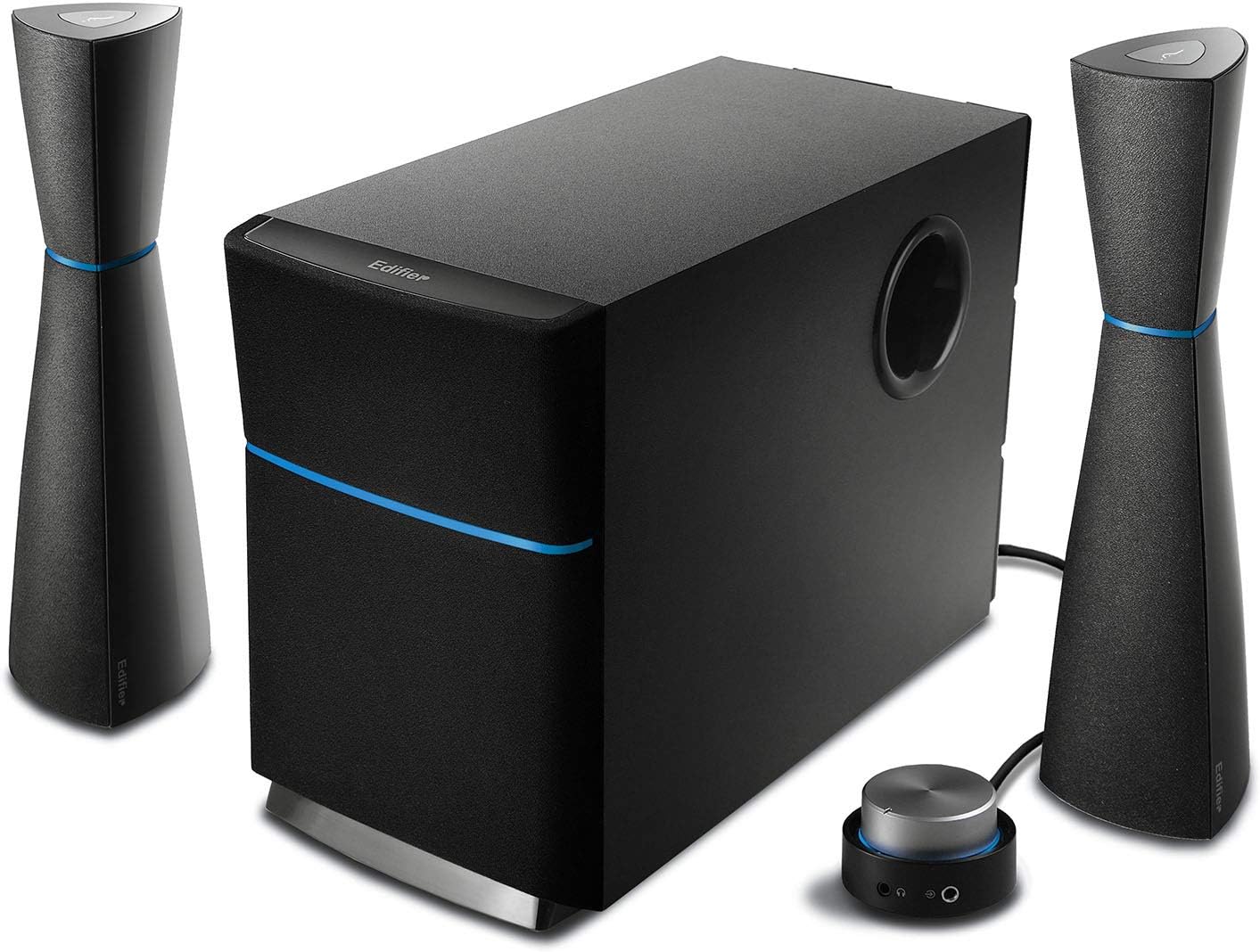
Figure 4.1: Complete Edifier M3200 2.1 Speaker System. This image displays the central subwoofer unit, two tall, slender satellite speakers, and the compact wired remote control, all in a sleek black finish with blue accents.
4.1 subwoofer
The wooden enclosed subwoofer houses a 5 1/2 inch (140mm) magnetically shielded driver, providing deep and rich bass. It also serves as the central hub for all connections.

Slika 4.2: Bočna strana view of the Edifier M3200 subwoofer, highlighting its robust wooden enclosure and the bass reflex port.
4.2 satelitskih zvučnika
The two satellite speakers are elegantly designed and magnetically shielded 2-way units. Each satellite contains a midrange unit (2 inch x 3 1/2 inch / 50mm x 90mm) and a treble unit (¾ inch / 20mm PV domed tweeter), delivering clear highs and balanced mids.

Slika 4.3: Krupni plan view of an Edifier M3200 satellite speaker, showcasing its sleek design and the speaker drivers.
4.3 Wired Remote Controller
The wired rotary master volume controller features a distinctive "red-halo" glowing effect. It includes an on/off feature, a headphone jack for private listening, and a 3.5mm auxiliary input for connecting additional audio devices.

Figure 4.4: The wired remote controller for the Edifier M3200, showing the large volume knob, headphone jack, and auxiliary input.
5. Podešavanje
Follow these steps to set up your Edifier M3200 speaker system:
- plasman: Place the subwoofer on the floor or a sturdy surface near your computer or audio source. Position the satellite speakers on either side of your monitor or listening area, ensuring they are equidistant for optimal stereo imaging.
- Povežite satelitske zvučnike: Connect each satellite speaker to the corresponding output ports on the back of the subwoofer using the integrated RCA cables.
- Povežite audio izvor: Connect your audio source (PC, laptop, CD player, etc.) to the subwoofer using the provided 3.5mm to 3.5mm audio cable or RCA to 3.5mm cable. The main audio input is typically on the back of the subwoofer.
- Connect Wired Remote: Plug the wired remote controller cable into the designated port on the subwoofer.
- Priključite napajanje: Plug the power cord from the subwoofer into a wall outlet.

Figure 5.1: The Edifier M3200 speaker system set up with a computer monitor, illustrating typical desktop placement and connections.

Slika 5.2: Prample of the Edifier M3200 speaker system integrated into a home office or study desk environment.
6. Uputstvo za upotrebu
6.1 Uključivanje/isključivanje napajanja
To power on the system, rotate the master volume knob on the wired remote controller clockwise until you hear a click and the red-halo light illuminates. To power off, rotate the knob counter-clockwise until it clicks and the light turns off.
6.2 Kontrola jačine zvuka
Adjust the overall system volume by rotating the large knob on the wired remote controller. Rotate clockwise to increase volume and counter-clockwise to decrease it.
6.3 Kontrola basa
The subwoofer features a dedicated bass control knob located on its rear panel. Adjust this knob to fine-tune the bass level to your preference.
6.4 Utičnica za slušalice
A 3.5mm headphone jack is located on the wired remote controller. Plugging in headphones will automatically mute the speakers, allowing for private listening.
6.5 Pomoćni ulaz
The wired remote controller also includes a 3.5mm auxiliary input. This allows you to quickly connect portable audio devices like smartphones or MP3 players without needing to access the main input on the subwoofer.
7. Održavanje
Proper maintenance ensures the longevity and performance of your Edifier M3200 speaker system:
- čišćenje: Regularly wipe the speaker surfaces with a soft, dry, lint-free cloth. Do not use abrasive cleaners, waxes, or solvents.
- prašina: Use a soft brush or a vacuum cleaner with a brush attachment to gently remove dust from speaker grilles and ports.
- ventilacija: Ensure the subwoofer's ventilation openings remain clear and unobstructed to prevent overheating.
- Kablovi: Periodically check all cables for any signs of damage or fraying. Replace damaged cables immediately.
- Skladištenje: Ako zvučnike skladištite duži period, isključite ih iz napajanja i čuvajte ih na hladnom i suhom mjestu, po mogućnosti u originalnom pakovanju.
8. Otkrivanje problema
If you encounter issues with your Edifier M3200 speaker system, refer to the following common problems and solutions:
| Problem | Mogući uzrok | Rješenje |
|---|---|---|
| Nema zvuka | Napajanje nije spojeno ili uključeno Audio kabl nije pravilno povezan Glasnoća je preniska Na uređaju je odabran pogrešan audio izvor | Ensure power cord is securely plugged in and the system is powered on. Check all audio cable connections between the source, remote, and subwoofer. Increase the master volume on the remote controller. Verify your computer or audio device's output settings. |
| Izobličen zvuk | Jako previše Audio source distortion Oštećen kabl | Smanjite glavnu jačinu zvuka. Check the audio quality from your source device. Inspect audio cables for damage and replace if necessary. |
| Nema basa | Subwoofer bass knob too low Subwoofer not powered on (if separate) Incorrect audio settings on source | Adjust the bass control knob on the back of the subwoofer. Ensure the subwoofer is receiving power. Check your audio device's equalizer or sound settings. |
| One satellite speaker not working | Slaba veza Damaged satellite cable | Check the RCA connection for the affected satellite speaker at the subwoofer. Inspect the satellite speaker cable for damage. |
If the problem persists after trying these solutions, please contact Edifier customer support for further assistance.
9. Specifikacije
Detailed technical specifications for the Edifier M3200 speaker system:
| Feature | Specifikacija |
|---|---|
| Vrsta zvučnika | 2.1 channel multimedia speaker system |
| Ukupna izlazna snaga | 34 W (RMS) |
| Upravljački program za subwoofer | 5 1/2 inch (140mm), magnetically shielded |
| Midrange Unit | 2 inch x 3 1/2 inch (50mm x 90mm), magnetically shielded |
| Visoki tonovi | ¾ inch (20mm) PV domed, magnetically shielded |
| Impedansa | 4 Ohm |
| Odnos signala i šuma | ≥85 dB |
| Povezivanje | 3.5mm Auxiliary Input, PC Input, CD Input |
| Boja | Crna |
| Dimenzije proizvoda (Subwoofer) | 10.5"D x 10"Š x 16"H |
| Težina artikla | 11.7 funti |

Figure 9.1: Dimensions of the Edifier M3200 subwoofer, showing its approximate depth, width, and height.
10. Garancija i podrška
The Edifier M3200 speaker system comes with a limited warranty. Please refer to the warranty card included in your product packaging for specific terms and conditions.
For technical support, troubleshooting assistance beyond this manual, or warranty claims, please contact Edifier customer service through their official webweb-mjesto ili kontakt informacije navedene u dokumentaciji o kupovini.


