1. Proizvod je gotovview
The POLY Plantronics CS540/A is a wireless DECT monaural headset designed for clear communication in professional environments. This convertible headset offers multiple wearing styles to suit individual preferences, providing comfort and flexibility for extended use. It features a lightweight design and intuitive call controls.
Ključne karakteristike:
- Wireless DECT connectivity for extended range and security.
- Convertible design for multiple wearing styles (ear hook, headband).
- Lightweight construction for all-day comfort.
- Intuitive call control buttons on the headset.
- Noise-canceling microphone for clear voice transmission.
Šta je u kutiji:
- CS540/A Wireless Headset
- Base Station
- Ear hook and Headband wearing styles
- Adapter za napajanje
- Telephone Interface Cable
- Lithium Polymer Battery (pre-installed or separate)

Image 1.1: The Plantronics CS540/A wireless headset docked in its base station.
2. Vodič za postavljanje
2.1 Punjenje slušalica
- Connect the power adapter to the base station and plug it into a power outlet.
- Place the headset into the charging cradle of the base station. The charge indicator light on the headset will illuminate to confirm charging.
- Allow approximately 3 hours for a full charge. A fully charged headset provides up to 6 hours of talk time.
2.2 Connecting to a Desk Phone
The CS540/A connects to most standard desk phones. Refer to your phone's user manual for specific port locations.
- Disconnect the handset coil cord from the base of the desk phone.
- Connect the telephone interface cable from the CS540/A base station to the handset port on the desk phone.
- Connect the desk phone's handset coil cord to the handset port on the CS540/A base station.
- Ensure the compatibility switch on the CS540/A base station is set to the correct position for your desk phone. Test by making a call and adjusting if necessary.
2.3 Nošenje slušalica
The CS540/A offers convertible wearing styles. Choose the one that provides the most comfort and stability.
- Kuka za uho: Attach the ear hook to the headset. Gently place the ear hook over your ear, positioning the speaker comfortably against your ear and the microphone near your mouth.
- Traka za glavu: Attach the headband to the headset. Adjust the headband for a secure yet comfortable fit, ensuring the speaker rests on your ear and the microphone is positioned for optimal voice pickup.
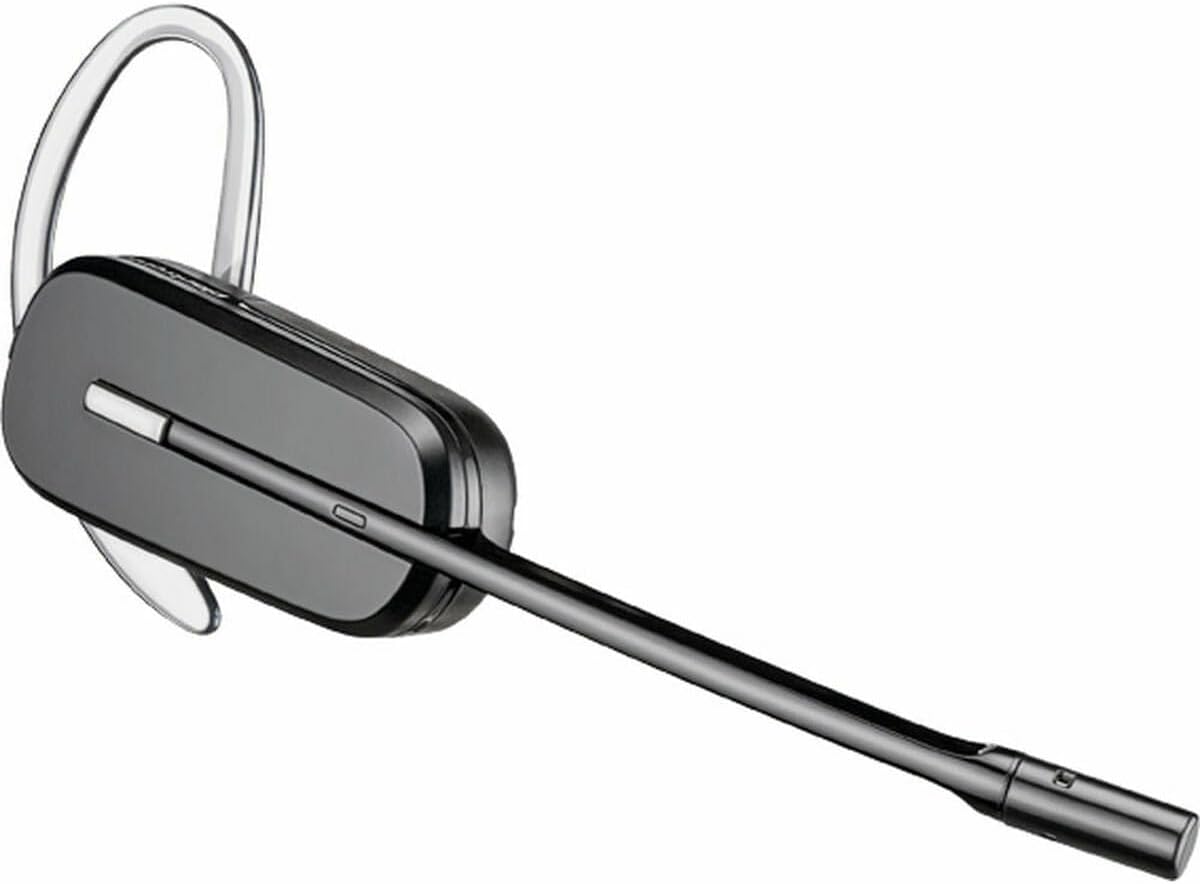
Image 2.1: The CS540/A headset configured with an ear hook.

Image 2.2: The CS540/A headset configured with a headband.
3. Uputstvo za upotrebu
3.1 Upućivanje i odgovaranje na pozive
- Da odgovorite na poziv: Pritisnite dugme za kontrolu poziva na slušalicama.
- Za završetak poziva: Press the Call Control button again.
- Za upućivanje poziva:
- Ensure the headset is powered on and connected to the base.
- Pritisnite dugme za kontrolu poziva na slušalicama.
- Dial the number on your desk phone.
3.2 Kontrola jačine zvuka
Use the volume rocker switch on the headset to adjust the listening volume.
- Pritisnite + side to increase volume.
- Pritisnite - side to decrease volume.
3.3 Funkcija isključivanja zvuka
To mute the microphone during a call, press the Mute button on the headset. Press it again to unmute.

Image 3.1: A user wearing the Plantronics CS540/A headset during a call.
4. Održavanje
4.1 Čišćenje slušalica
Regular cleaning helps maintain the headset's performance and hygiene.
- Obrišite slušalice i baznu stanicu mekom, suhom, antistatičkom krpom.
- Ne koristite jake kemikalije ili abrazivna sredstva za čišćenje.
- Izbjegavajte vlagu u otvorima.
4.2 Njega baterija
The headset uses a Lithium Polymer battery. To maximize battery life:
- U potpunosti napunite slušalice prije prve upotrebe.
- Izbjegavajte ekstremne temperature.
- If the headset will not be used for an extended period, charge it periodically.
- The battery is replaceable; contact support for replacement options if needed.
5. Otkrivanje problema
If you encounter issues with your CS540/A headset, try the following solutions:
5.1 No Dial Tone or Audio
- Ensure the headset is fully charged and powered on.
- Verify all cables are securely connected between the base station and the desk phone.
- Check the compatibility switch on the base station. Adjust it to different positions until a dial tone is heard.
- Confirm the desk phone's handset is properly seated or lifted (if not using an electronic hookswitch).
5.2 Loš kvalitet zvuka
- Adjust the listening volume on the headset.
- Provjerite je li mikrofon pravilno postavljen, otprilike za širinu dva prsta od vaših usta.
- Check for interference from other wireless devices. Move the base station away from other electronics.
- If using a desk phone, adjust the transmit and receive volume controls on the base station (if available).
5.3 Headset Not Pairing with Base
- Ensure both the headset and base are powered on.
- Place the headset in the charging cradle. The charge indicator should light up.
- If pairing is lost, refer to the full Plantronics CS540/A user guide for re-pairing instructions, which typically involves pressing a pairing button on the base and headset.
6. Specifikacije
| Feature | Detalj |
|---|---|
| Naziv modela | CS540A |
| Broj modela stavke | 84693-02 |
| Brand | POLY (formerly Plantronics) |
| Tehnologija povezivanja | Bežični (DECT) |
| Bežična komunikacijska tehnologija | DECT 6.0 (1920-1930 MHz) |
| Nošenje stila | Convertible (Ear Hook, Headband) |
| Trajanje baterije (vrijeme razgovora) | Do 6 sati |
| Vrijeme punjenja | Približno 3 sata |
| Mikrofon | Poništavanje buke |
| Tip kontrole | Call Control, Volume, Mute |
| Težina artikla | 0.7 Ounces (headset only) |
| Dimenzije proizvoda | 8.07 x 5.51 x 4.53 inches (packaging/base) |
| Materijal | Plastika |
| Izvor napajanja | AC Adapter (for base station) |
7. Garancija i podrška
7.1 Ograničena garancija
This product is covered by a limited warranty provided by POLY. The warranty typically covers manufacturing defects for a specified period from the date of purchase. Please retain your proof of purchase for warranty claims. For specific warranty terms and conditions, refer to the official POLY webweb-mjesto ili garantni list koji dolazi s vašim proizvodom.
7.2 Korisnička podrška
For further assistance, technical support, or to inquire about replacement parts, please visit the official POLY support website or contact their customer service. You can often find detailed FAQs, troubleshooting guides, and contact information on their website.
Official POLY Webstranica: www.poly.com


