BlackBerry BB 9900

BlackBerry BB 9900 Bold Touch Smartphone User Manual

Model: BB 9900

1. Uvod

This manual provides essential instructions for setting up, operating, and maintaining your BlackBerry BB 9900 Bold Touch smartphone. Please read this guide thoroughly to ensure proper use and to maximize the device's capabilities. The BlackBerry BB 9900 Bold Touch combines a capacitive touchscreen with a full QWERTY keyboard, running on BlackBerry OS 7.

2. Sadržaj paketa

Provjerite da li vaš paket sadrži sljedeće stavke:

3. Device Overview

Familiarize yourself with the physical features of your BlackBerry BB 9900 Bold Touch.

3.1 Prednji View

BlackBerry BB 9900 Bold Touch front view, showing the screen, QWERTY keyboard, and navigation buttons.

Slika: Front view of the BlackBerry BB 9900 Bold Touch, highlighting the 2.8-inch touchscreen and the physical QWERTY keyboard below it. The device also features a trackpad and call/end buttons.

  • Ekran osjetljiv na dodir: 2.8-inch capacitive display for interactive navigation.
  • QWERTY tastatura: Full physical keyboard for efficient typing.
  • Optical Trackpad: For precise navigation and selection.
  • Dugmad za poziv/prekid: Standard telephony controls.

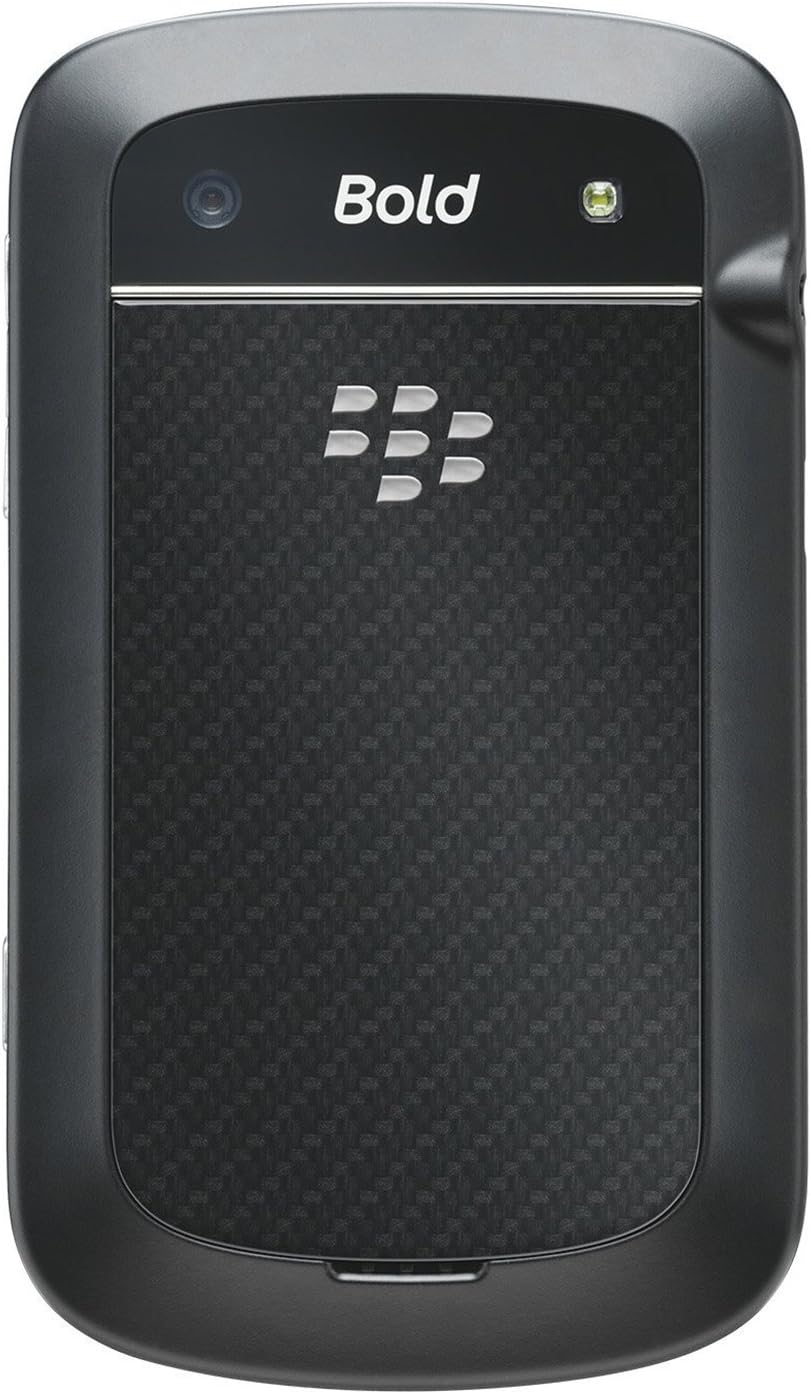
3.2 Pozadi View

BlackBerry BB 9900 Bold Touch rear view, showing the 5MP camera lens and LED flash.

Slika: Stražnja strana view of the BlackBerry BB 9900 Bold Touch, featuring the 5-megapixel camera lens, LED flash, and the BlackBerry logo.

  • 5MP kamera: Primary camera with autofocus and LED flash.
  • Poklopac baterije: Removable cover for battery and SIM card access.

3.3 Strana View

BlackBerry BB 9900 Bold Touch side view, showing volume buttons and convenience key.

Slika: Sa strane view of the BlackBerry BB 9900 Bold Touch, illustrating the placement of the volume control buttons and a customizable convenience key.

  • Dugmad za jačinu zvuka: Podesite nivoe zvuka.
  • Convenience Key: Prilagodljivo dugme prečice.

4. Podešavanje

4.1 Umetanje SIM kartice

  1. Uklonite poklopac baterije sa zadnje strane uređaja.
  2. Pronađite utor za SIM karticu.
  3. Umetnite SIM karticu sa zlatnim kontaktima okrenutim prema dolje i odrezanim uglom poravnatim sa utorom.
  4. Provjerite je li SIM kartica sigurno na svom mjestu.

4.2 Umetanje baterije

  1. After inserting the SIM card, align the battery's gold contacts with the contacts in the battery compartment.
  2. Lagano pritisnite bateriju na mjesto dok ne klikne.
  3. Vratite poklopac baterije.

4.3 Punjenje uređaja

  1. Connect the USB cable to the charging port on your device.
  2. Plug the other end of the USB cable into the wall charger, then into a power outlet.
  3. Prije prve upotrebe, ostavite uređaj da se potpuno napuni. Indikator baterije na ekranu će prikazivati ​​status punjenja.

4.4 Uključivanje/isključivanje

  • Za uključivanje: Press and hold the Power/Lock button (usually located on the top edge) until the BlackBerry logo appears.
  • Za isključivanje: Press and hold the Power/Lock button until the 'Power Off' option appears on the screen. Tap 'Power Off' to confirm.

5. Uputstvo za upotrebu

5.1 Navigacija putem ekrana osjetljivog na dodir

  • Dodirnite: Touch the screen briefly to open applications, select items, or activate buttons.
  • Prevucite: Drag your finger across the screen to scroll through lists or switch between home screen panels.
  • Zumiranje štipanjem: Use two fingers to zoom in or out on photos, web stranice ili mape.

5.2 Korištenje QWERTY tastature

The physical QWERTY keyboard allows for fast and accurate text entry. Each key corresponds to a letter, number, or symbol. Use the 'Alt' key for alternate characters and the 'Shift' key for capitalization.

5.3 Upućivanje poziva

  1. From the home screen, tap the Phone icon or press the green Call button.
  2. Enter the phone number using the keyboard.
  3. Press the green Call button to initiate the call.
  4. To end a call, press the red End Call button.

5.4 Slanje poruka

  1. Tap the Messages icon from the home screen.
  2. Select 'Compose New' or similar option.
  3. Unesite broj primaoca ili odaberite iz kontakata.
  4. Type your message using the QWERTY keyboard.
  5. Tap 'Send'.

5.5 Korištenje kamere

  1. Dodirnite ikonu kamere da biste otvorili aplikaciju kamere.
  2. Kadrirajte snimak koristeći ekran kao viewtragač.
  3. Tap the screen or press the convenience key (if configured) to take a photo.
  4. The 5MP camera features autofocus and an LED flash for improved image quality.

5.6 Povezivanje na Wi-Fi

  1. Go to 'Options' > 'Networks and Connections' > 'Wi-Fi'.
  2. Uključite Wi-Fi. Uređaj će skenirati dostupne mreže.
  3. Odaberite željenu mrežu i unesite lozinku ako se to od vas zatraži.
  4. Once connected, the Wi-Fi indicator will appear in the status bar.

5.7 Using NFC (Near Field Communication)

The BlackBerry BB 9900 Bold Touch supports NFC for short-range wireless communication. This allows for quick pairing with compatible accessories or sharing data with other NFC-enabled devices by tapping them together.

  1. Provjerite je li NFC omogućen u postavkama vašeg uređaja.
  2. Hold your device close to another NFC-enabled device or tag.
  3. Follow on-screen prompts to complete the desired action (e.g., pairing, data transfer).

6. Održavanje

6.1 Čišćenje uređaja

  • Use a soft, lint-free cloth to wipe the screen and body of the device.
  • Izbjegavajte upotrebu jakih hemikalija, abrazivnih sredstava za čišćenje ili aerosolnih sprejeva.
  • Ne izlažite uređaj prekomjernoj vlazi.

6.2 Njega baterija

  • Izbjegavajte ekstremne temperature, koje mogu smanjiti performanse baterije.
  • Koristite samo originalni ili odobreni punjač.
  • Ne probijajte niti oštećujte bateriju.

6.3 Ažuriranja softvera

Periodically check for software updates to ensure your device has the latest features and security enhancements. Updates can typically be found in the device's 'Options' or 'Settings' menu under 'Software Updates'.

7. Otkrivanje problema

7.1 Uređaj se ne uključuje

  • Uvjerite se da je baterija pravilno umetnuta i napunjena.
  • Connect the device to the charger and wait a few minutes before attempting to power on again.
  • If the issue persists, try removing and reinserting the battery.

7.2 Problemi s mrežnom vezom

  • Check if your SIM card is correctly inserted and activated with your carrier.
  • Verify that cellular data or Wi-Fi is enabled in your device settings.
  • Ponovo pokrenite uređaj.
  • If using Wi-Fi, ensure your router is working and you have entered the correct password.

7.3 Ekran osjetljiv na dodir ne reagira

  • Ponovo pokrenite uređaj.
  • Provjerite je li ekran čist i bez prljavštine ili vlage.
  • If the issue is intermittent, check for any recent software installations that might be causing conflicts.

8. Specifikacije

Feature Detalj
Naziv modela BB 9900
Operativni sistem BlackBerry OS 7
Display 2.8-inch Capacitive Touchscreen, 640 x 480 Resolution
Procesor Not specified (typically 1.2 GHz for this model)
RAM 768 MB
Interna pohrana 8 GB
Zadnja kamera 5 MP, Autofocus, LED Flash
Povezivanje Wi-Fi 802.11 b/g/n, NFC, Bluetooth, GPS
Mrežna podrška Quad-band GSM/GPRS/EDGE, Tri-band HSPA+
Dimenzije 4.53 x 2.6 x 0.41 inča (115 x 66 x 10.5 mm)
Težina 4.6 unce (130 grama)
Audio Jack 3.5 mm

9. Podrška i garancija

9.1 Korisnička podrška

For technical assistance, troubleshooting beyond this manual, or service inquiries, please visit the official BlackBerry support website or contact your local service provider. Refer to the packaging or official webstranicu za konkretne kontakt podatke.

9.2 Informacije o garanciji

Your BlackBerry BB 9900 Bold Touch is covered by a limited warranty. Please refer to the warranty card included in your product packaging or visit the official BlackBerry webPosjetite našu web stranicu za detaljne uslove i odredbe, uključujući garantni rok i detalje o pokrivenosti. Sačuvajte dokaz o kupovini za potrebe reklamacije.

Povezani dokumenti - BB 9900

Preview Korisnički priručnik za BlackBerry Q10 pametni telefon
Sveobuhvatan vodič za BlackBerry Q10 pametni telefon, koji pokriva funkcije poput BlackBerry Hub-a, tastature, BBM Video-a, kamere, dijeljenja medija i postavki uređaja. Naučite kako maksimizirati produktivnost i prilagoditi svoje iskustvo.
Preview Razvojno okruženje BlackBerry Java: Vodič za razvoj GPS-a i BlackBerry mapa
Ovaj vodič detaljno opisuje integraciju GPS i BlackBerry Maps funkcionalnosti unutar BlackBerry Java Development Environment-a, služeći kao tehnički resurs za programere koji grade aplikacije koje su svjesne lokacije.
Preview Korisnički vodič za BlackBerry Tasks za Android | Sigurno upravljanje zadacima
Službeni korisnički vodič za BlackBerry Tasks za Android (v3.17) pruža sveobuhvatne upute o instalaciji, aktivaciji, upravljanju zadacima, postavkama i rješavanju problema za BlackBerryjevu aplikaciju za sigurno upravljanje zadacima u preduzećima.
Preview Korisnički priručnik za BlackBerry Q5 pametni telefon: Podešavanje, funkcije i rad
Ovaj sveobuhvatni korisnički vodič pruža detaljne informacije i upute za korištenje pametnog telefona BlackBerry Q5. Obuhvata značajke i funkcionalnosti operativnog sistema BlackBerry 10, verzije 10.2.1, dizajniranog za poboljšanje produktivnosti i povezivosti.
Preview Руководство пользователя BlackBerry Z10: Полное руководство
Полное руководство пользователя для смартфона BlackBerry Z10, охватывающее новые функции BlackBerry 10 OS, настройку устройства, приложения, соединения и многое другое.
Preview Korisnički vodič za BlackBerry Z30 pametni telefon: Funkcije, podešavanje i rad
Otkrijte sveobuhvatni korisnički vodič za BlackBerry Z30 pametni telefon (verzija 10.3.2). Ovaj vodič pruža detaljne upute o postavljanju uređaja, navigaciji funkcijama, upravljanju komunikacijama, korištenju medijskih mogućnosti, prilagođavanju postavki i poboljšanju sigurnosti za optimalno korisničko iskustvo.