1. Uvod
Thank you for choosing the Coleman 12.0 MP Waterproof Digital Still and Video Camera. This camera is designed for capturing high-quality photos and videos in various environments, including underwater up to 33 feet (10 meters). Featuring a 12.0 Megapixel CMOS sensor, 1x optical zoom, and a 2.7-inch LCD screen, it is built to accompany you on your adventures.
To ensure optimal performance and longevity of your camera, please read this manual thoroughly before use and retain it for future reference.
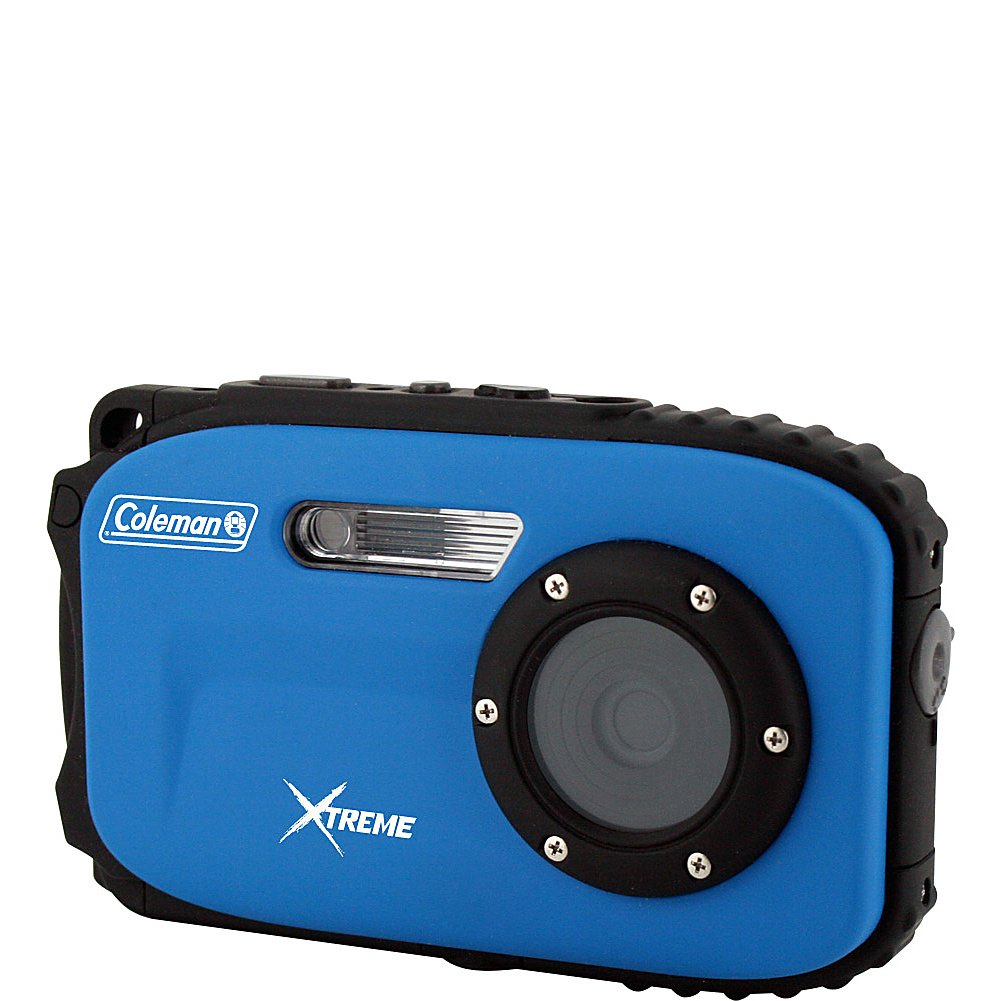
Slika 1.1: Prednja strana view of the Coleman 12.0 MP Waterproof Digital Camera.
2. Sigurnosne informacije
- Vodootporna brtva: Always ensure the battery/memory card compartment door is clean and securely latched before submerging the camera in water. Failure to do so will result in water damage and void the warranty.
- Sigurnost baterije: Use only the specified Li-ion battery. Do not expose batteries to excessive heat or dispose of them in fire.
- čišćenje: After use in saltwater, rinse the camera thoroughly with fresh water and dry it completely before opening any compartments.
- temperatura: Izbjegavajte korištenje ili skladištenje kamere na ekstremnim temperaturama.
- Uticaj: While durable, avoid dropping the camera or subjecting it to strong impacts.
3. Sadržaj paketa
Provjerite da li se u paketu s vašom kamerom nalaze sve stavke:
- Coleman 12.0 Megapixel Xtreme Waterproof Digital Camera (Blue)
- Li-ion baterija
- USB 2.0 kabel
- Softver za uređivanje slika (na CD-u ili link za preuzimanje)
- Korisnički priručnik (ovaj dokument)
4. Kamera gotovaview
Familiarize yourself with the camera's buttons and features:

Slika 4.1: Stražnja strana view of the camera with LCD screen and control buttons.
4.1 kontrolna dugmeta
- Dugme za napajanje: Uključuje ili isključuje kameru.
- Dugme okidača: Press halfway to focus, fully to take a picture or start/stop video recording.
- Dugmad za bežičnu komunikaciju: Control the digital zoom (Wide/Telephoto).
- Dugme za način rada: Prebacuje se između različitih načina snimanja (npr. fotografija, video, reprodukcija).
- Dugme za blic: Cycles through flash modes (e.g., Auto, Fill-in, Off).
- Dugme za brisanje: Deletes selected photos or videos in playback mode.
- Dugme menija: Pristupa meniju postavki kamere.
- Dugme OK: Confirms selections in the menu or playback.
- Navigacijski gumbi (gore/dolje/lijevo/desno): Used for menu navigation and quick access to certain functions.
5. Podešavanje
5.1 Ugradnja i punjenje baterije
- Open the battery compartment door on the side/bottom of the camera.
- Insert the provided Li-ion battery, ensuring correct polarity.
- Close the compartment door firmly until it clicks and the lock is engaged.
- Connect the camera to a power source using the USB cable to charge the battery. The charging indicator will illuminate.
- Prije prve upotrebe do kraja napunite bateriju.
5.2 Instalacija memorijske kartice
The camera supports Micro SD cards up to 8 GB. A memory card is required to store a significant number of photos and videos.
- Open the battery/memory card compartment door.
- Insert the Micro SD card into the designated slot with the contacts facing the correct direction until it clicks into place.
- Čvrsto zatvorite vrata odjeljka.
- It is recommended to format the memory card using the camera's menu before first use.
5.3 Početno uključivanje i postavke
- Pritisnite i držite dugme za napajanje da biste uključili kameru.
- If prompted, set the date and time using the navigation buttons and confirm with the OK button.
- Navigate through the menu to adjust basic settings such as language, resolution, and scene modes as desired.
6. Upravljanje kamerom
6.1 Fotografisanje
- Turn on the camera. Ensure it is in Photo mode (indicated on the LCD). If not, press the Mode button to switch.
- Kadrirajte snimak pomoću LCD ekrana od 2.7 inča.
- Koristite W / T buttons to adjust the digital zoom.
- Press the Shutter button halfway down to allow the camera to focus. The focus indicator will appear.
- Pritisnite okidač do kraja da biste snimili sliku.
Postavke fotografije:
- Režimi scene: The camera offers 10 scene modes (e.g., Landscape, Macro, Sports) to optimize settings for different shooting conditions. Access these via the Menu.
- Anti-Shake tehnologija: This feature helps reduce blur caused by camera movement. Ensure it is enabled in the settings for clearer images.
- blic: Press the Flash button to cycle through available flash options (Auto, Fill-in, Off). Note that the camera has no built-in flash, but uses digital flash modes.
- Self-Timer/Smile Shutter: These features can be activated through the menu for delayed shots or automatic capture when a smile is detected.
6.2 Snimanje video zapisa
- Uključite kameru i prebacite se u video način rada pomoću tipke Mode.
- Kadrirajte svoj subjekt na LCD ekranu.
- Press the Shutter button to start recording. A recording indicator will appear on the screen.
- Press the Shutter button again to stop recording. Videos are saved in MP4 format at 1280p resolution.
6.3 Režim reprodukcije
- Press the Mode button to enter Playback mode.
- Koristite navigacijske tipke za listanje fotografija i videozapisa.
- Pritisnite dugme OK da biste view video ili zumiranje fotografije.
- Za brisanje a file, select it and press the Delete button, then confirm.
7. Smjernice za upotrebu u vodootpornim uslovima
The Coleman C5WP-BL camera is waterproof up to 33 feet (10 meters). Follow these guidelines for safe underwater use:
- Before Submerging: Ensure the battery/memory card compartment door is completely clean, free of sand or debris, and securely latched. A small particle can compromise the seal.
- Ograničenje dubine: Ne prekoračujte maksimalnu dubinu vodootpornosti od 10 metara (33 stopa).
- temperatura: Avoid sudden temperature changes when moving the camera from a warm to a cold environment, as this can cause condensation.
- After Underwater Use: After using the camera in saltwater, rinse it thoroughly with fresh water while the compartment door remains closed. Dry the camera completely with a soft cloth before opening any compartments.
- Izbjegnite udar: Do not drop or hit the camera, especially when underwater, as this can damage the waterproof seals.
8. Održavanje
- Čišćenje sočiva i ekrana: Use a soft, lint-free cloth specifically designed for optical surfaces. Do not use abrasive cleaners.
- Čišćenje kućišta fotoaparata: Obrišite tijelo fotoaparata mekom,amp krpom. Za tvrdokornu prljavštinu koristite blagi rastvor sapuna, a zatim obrišite čistom krpom.amp krpom i dobro osušite.
- Održavanje baterije: Store the battery in a cool, dry place when not in use. If storing for extended periods, charge the battery periodically to maintain its life.
- Skladištenje: Store the camera in a dry, well-ventilated area away from direct sunlight and extreme temperatures.
9. Otkrivanje problema
| Problem | Rješenje |
|---|---|
| Kamera se ne uključuje. | Provjerite je li baterija potpuno napunjena i pravilno umetnuta. |
| Photos are blurry or out of focus. | Ensure the camera is held steady. Check if Anti-Shake Technology is enabled. For underwater shots, ensure the lens is clean and free of water droplets. Allow the camera to focus by pressing the shutter button halfway before fully pressing. |
| Greška memorijske kartice. | Ensure the Micro SD card is inserted correctly. Try formatting the card via the camera's menu (this will erase all data). Use a compatible Micro SD card (up to 8 GB). |
| Water leakage into battery compartment. | Immediately remove the battery and memory card. Dry the compartment thoroughly. This indicates the compartment door was not properly sealed or the seal is damaged. Refer to safety information. |
| Slow shutter speed. | This can occur in low light conditions. Ensure adequate lighting or adjust scene modes if available. |
10. Specifikacije
| Feature | Detalj |
|---|---|
| Broj modela | C5WP-BL |
| Efektivna rezolucija mirovanja | 12 MP |
| Tehnologija foto senzora | CMOS |
| Optički zum | 1x |
| Stabilizacija slike | Digitalni, optički |
| Veličina ekrana | 2.7 inča (LCD) |
| Nivo vodootpornosti | Vodootporno do 10 metra (33 stopa) |
| Video Rezolucija | 1280p |
| Format video snimanja | MP4 |
| Compatible Flash Memory | Micro SD (do 8 GB) |
| Vrsta baterije | Lithium Ion |
| Povezivanje | USB 2.0 |
| Težina artikla | 6.4 unce |
| Režimi snimanja | 10 scene modes (e.g., Landscape, Macro, Sports) |
| Posebne karakteristike | Self-timer, Smile Shutter |
11. Garancija i podrška
11.1 Informacije o garanciji
This Coleman camera is covered by a 1-godišnja garancija proizvođača from the date of purchase. This warranty covers defects in materials and workmanship under normal use. It does not cover damage caused by misuse, accident, unauthorized modification, or failure to follow the instructions in this manual, particularly regarding waterproof usage.
11.2 Korisnička podrška
For technical assistance, warranty claims, or product inquiries, please contact Coleman customer support. Refer to the contact information provided with your product packaging or visit the official Coleman webstranicu za najnovije detalje o podršci.


