1. Uvod
The Seco-Larm Enforcer SD-9263-KSVQ is an outdoor-rated, no-touch request-to-exit plate designed for controlled access systems. It utilizes infrared (IR) technology to detect hand waves, activating a door release without physical contact. This unit is ideal for environments requiring high hygiene standards. It also features a mechanical override for emergency or power failure situations.
2. Ključne karakteristike
- No-Touch Activation: Activates with a simple wave of the hand, minimizing contact.
- Adjustable Sensor Range: Detection range can be set from 2 to 7 inches (5 to 18 cm).
- Vizuelne povratne informacije: A ring illuminator changes color (red to green or green to red, selectable) upon activation.
- Mehaničko preklapanje: Includes a manual button for door operation, even during power outages.
- Izdržljiva konstrukcija: Made from stainless steel with an IP65 weatherproof rating for outdoor use.
- Jednostavno ožičenje: Features a quick-connect screwless terminal block for simplified installation.
- Adjustable Trigger Duration: Output relay trigger duration is adjustable from 0.5 to 20 seconds, or set to toggle mode.
3. Postavljanje i instalacija
Proper installation is crucial for the optimal performance and longevity of the Seco-Larm Enforcer No Touch Request-to-Exit Plate. This device is designed for door mount applications.
3.1 Sadržaj paketa
- Seco-Larm Enforcer No Touch Request-to-Exit Plate (SD-9263-KSVQ)
- Montažni hardver
- Keys for mechanical override
3.2 Montaža
- Select a suitable location on the door frame or wall adjacent to the door, ensuring it is within easy reach for users.
- Use the provided mounting hardware to securely attach the plate. Ensure the plate is level and firmly fixed to prevent movement.
- Route necessary wiring through the wall or door frame to the quick-connect terminal block on the back of the plate.
3.3 Ožičenje
Connect the plate to your access control system or door strike using the screwless terminal block. Refer to your access control system's manual for specific wiring diagrams. The plate includes a 1A relay output.
- Ulazna snaga: Connect to a stable power source (typically 12V DC).
- Relejni izlaz: Connect to the door strike or access control panel's input.
- tlo: Ensure proper grounding for safe operation.
Note: All wiring should be performed by a qualified technician in accordance with local electrical codes.
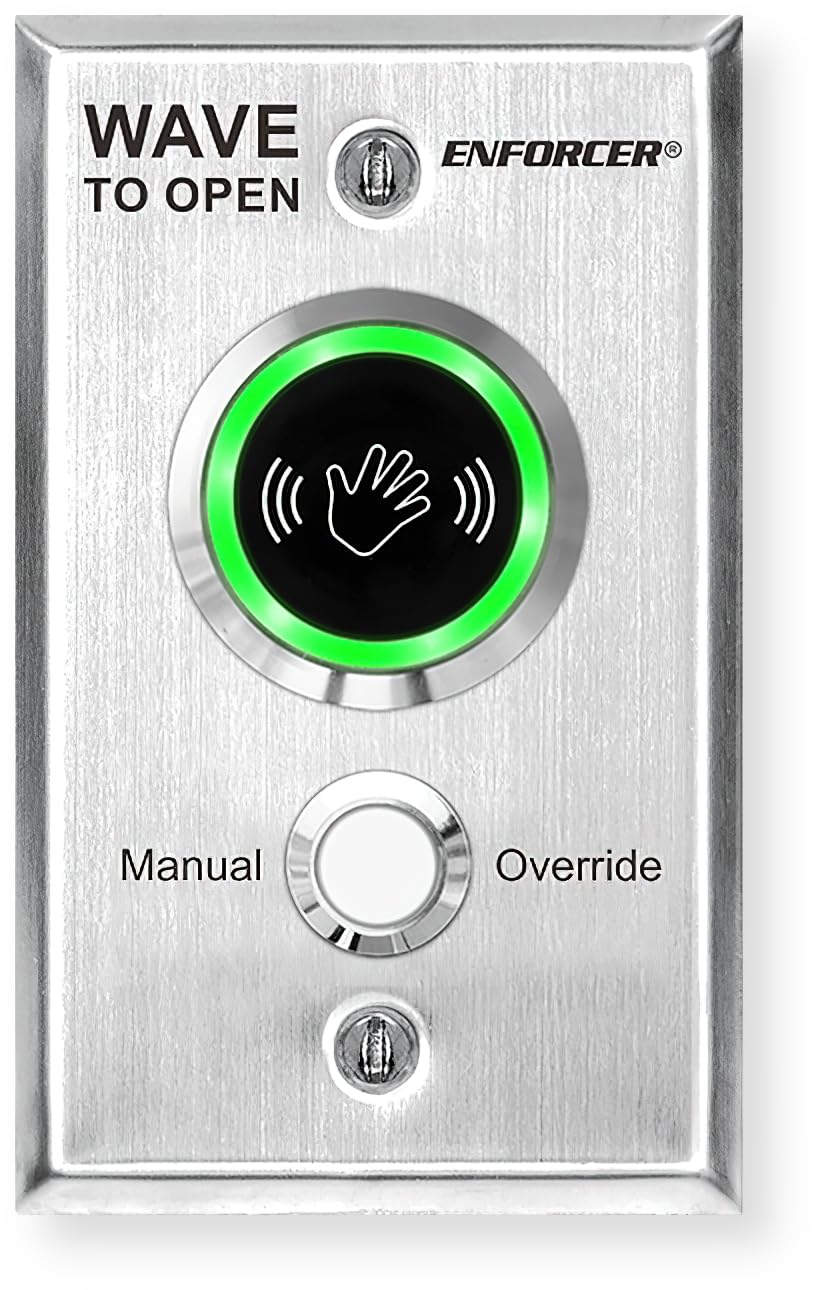
Slika 1: Front view of the Seco-Larm Enforcer No Touch Request-to-Exit Plate. It features a brushed stainless steel finish, an illuminated IR sensor with a hand icon, and a mechanical override button. Text on the plate indicates 'WAVE TO OPEN' and 'ENFORCER'.
4. Uputstvo za upotrebu
4.1 No-Touch Activation
- Approach the Seco-Larm Enforcer plate.
- Wave your hand within the adjustable sensor range (2 to 7 inches) of the IR sensor.
- The ring illuminator will change color (e.g., from red to green) to indicate successful activation.
- The door will unlock or open according to the configured trigger duration.
4.2 Mechanical Override
In the event of a power failure or if no-touch activation is not desired, the mechanical override can be used.
- Locate the manual override button on the plate.
- Press the button to activate the door release mechanism.
4.3 Adjusting Sensor Range and Trigger Duration
The sensor range and trigger duration can be adjusted via internal potentiometers or dip switches (refer to the detailed wiring diagram provided with the product for exact locations and procedures).
- Raspon senzora: Adjust to suit the environment, typically between 2 and 7 inches. Avoid setting it too sensitive in high-traffic areas to prevent false activations.
- Trajanje okidača: Set the time the relay remains active (0.5 to 20 seconds) or select toggle mode for continuous activation until a second wave.
5. Održavanje
The Seco-Larm Enforcer No Touch Request-to-Exit Plate requires minimal maintenance due to its durable stainless steel construction and IP65 rating.
- čišćenje: Povremeno obrišite površinu mekom,amp cloth to remove dust and grime. Avoid abrasive cleaners or solvents that could damage the finish or sensor.
- inspekcija: Regularly check for any signs of physical damage or loose connections. Ensure the mounting remains secure.
- Performanse senzora: Test the no-touch activation periodically to ensure the sensor is functioning correctly and its range is appropriate for the environment.
6. Otkrivanje problema
If you encounter issues with your Seco-Larm Enforcer No Touch Request-to-Exit Plate, refer to the following common problems and solutions:
| Problem | Mogući uzrok | Rješenje |
|---|---|---|
| No-touch activation not working |
|
|
| Illuminator not changing color |
|
|
| Door does not unlock after activation |
|
|
| Mechanical override not working |
|
|
7. Specifikacije
- Model: SD-9263-KSVQ
- Materijal: nerđajući čelik
- Dimenzije: 4.53 x 2.76 x 0.4 inča (115 x 70 x 10 mm)
- Težina artikla: 4.8 unce (136 grama)
- Tip senzora: infracrveni (IR)
- Raspon senzora: Adjustable 2 to 7 inches (5 to 18 cm)
- Relejni izlaz: 1A
- Trajanje okidača: Adjustable 0.5 to 20 seconds or Toggle
- Vodootporna ocjena: IP65
- Vrsta montaže: Door Mount
- Uključene komponente: Light (illuminator)
8. Garancija i podrška
8.1 Informacije o garanciji
This Seco-Larm Enforcer product is covered by a 1-godišnja ograničena garancija from the date of purchase. This warranty covers defects in materials and workmanship under normal use. It does not cover damage resulting from misuse, accident, unauthorized modification, or improper installation.
8.2 Tehnička podrška
For technical assistance, troubleshooting beyond this manual, or warranty claims, please contact Seco-Larm customer support. Have your product model number (SD-9263-KSVQ) and date of purchase ready when contacting support.
Please visit the official Seco-Larm webstranicu za najnovije kontakt informacije i resurse podrške.


