Uvod
This manual provides detailed instructions for the proper setup, operation, and maintenance of your Nortek NDVX 2503 DVD Player. Please read this manual thoroughly before using the device to ensure optimal performance and safety. Keep this manual for future reference.
Sigurnosne informacije
- Izvor napajanja: Connect the DVD player only to the specified power supply voltage.
- ventilacija: Osigurajte odgovarajuću ventilaciju oko uređaja. Ne blokirajte ventilacijske otvore.
- Voda i vlaga: Do not expose the unit to rain, moisture, or dripping/splashing liquids.
- toplina: Držite uređaj dalje od izvora topline kao što su radijatori, grijalice, peći ili drugi uređaji koji proizvode toplinu.
- čišćenje: Isključite uređaj iz zidne utičnice prije čišćenja. Za čišćenje koristite suhu krpu.
- servisiranje: Ne pokušavajte sami servisirati ovaj proizvod. Sve servise prepustite kvalificiranom servisnom osoblju.
Sadržaj paketa
Provjerite da li se u vašem paketu nalaze sve dolje navedene stavke:
- Nortek NDVX 2503 DVD Player
- Daljinski upravljač (sa baterijama)
- AV Cable (RCA type)
- Korisnički priručnik (ovaj dokument)
- Kabl za napajanje
Product Overview
Familiarize yourself with the components and controls of your DVD player.
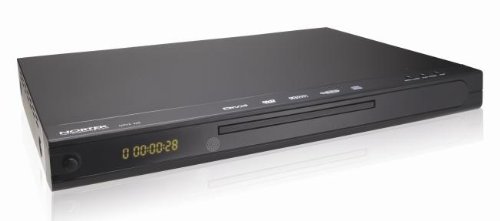
Slika 1: Front view of the Nortek NDVX 2503 DVD Player. This image shows the sleek black casing, the central disc tray, the digital display on the left, and control buttons on the right side of the front panel.
Kontrole na prednjoj ploči:
- Dugme za napajanje: Uključuje ili isključuje jedinicu.
- Uložak za disk: Insert your DVD or CD here.
- Prikaz: Shows playback time, track number, and other status indicators.
- Dugme za otvaranje/zatvaranje: Otvara i zatvara fioku za disk.
- Dugme za reprodukciju/pauzu: Pokreće ili pauzira reprodukciju diska.
- Dugme za zaustavljanje: Zaustavlja reprodukciju diska.
- Skip Buttons (Forward/Backward): Preskače na sljedeću ili prethodnu pjesmu/poglavlje.
Priključci na stražnjoj ploči:
(Note: Specific connections may vary. Common connections include:)
- Audio/Video Output (RCA): Red, White (audio) and Yellow (video) jacks for connecting to a TV or amplifier.
- Coaxial/Optical Digital Audio Output: For connecting to a home theater receiver for digital audio.
- Ulazna snaga: Povezuje kabl za napajanje.
Setup
1. Connecting to a Television:
- Ensure both the DVD player and your television are turned off and unplugged.
- Connect the yellow RCA video cable from the "Video Out" jack on the DVD player to the "Video In" jack on your television.
- Connect the red and white RCA audio cables from the "Audio Out" jacks (Red for Right, White for Left) on the DVD player to the corresponding "Audio In" jacks on your television or audio receiver.
- If using digital audio, connect a coaxial or optical cable from the DVD player's digital audio output to your receiver's digital audio input.
2. Priključak za napajanje:
- Plug the power cord into the power input on the rear of the DVD player.
- Uključite drugi kraj kabla za napajanje u zidnu utičnicu.
3. Početno uključivanje:
- Turn on your television and select the correct input source (e.g., AV1, Video 1) that corresponds to where you connected the DVD player.
- Press the Power button on the DVD player or its remote control to turn it on.
- The Nortek logo or a setup menu should appear on your TV screen.
Uputstvo za upotrebu
1. Disc Playback:
- Pritisnite OPEN/CLOSE dugme na prednjoj ploči ili daljinskom upravljaču da biste otvorili ladicu za disk.
- Place a DVD, DVD+R, or Video CD disc gently into the tray with the label side facing up.
- Pritisnite OPEN/CLOSE ponovo pritisnite dugme da biste zatvorili ležište.
- The player will automatically begin reading the disc. Playback should start shortly. If a menu appears, use the arrow keys on the remote to navigate and the ENTER dugme za odabir.
- Koristite PLAY/PAUSE, STOP, i SKIP dugmad na daljinskom upravljaču ili prednjoj ploči za kontrolu reprodukcije.
2. Navigacija menijem:
- Koristite STRELICA buttons on the remote control to move through menu options.
- Pritisnite ENTER or OK dugme za potvrdu odabira.
- The MENU button typically returns you to the disc's main menu.
Održavanje
Čišćenje jedinice:
- Unplug the DVD player from the power outlet before cleaning.
- Za brisanje vanjske strane uređaja koristite meku, suhu krpu. Ne koristite tekuća sredstva za čišćenje ili aerosolne sprejeve.
- Avoid getting dust or debris inside the disc tray mechanism.
Održavanje diskova:
- Diskove držite za rubove kako biste izbjegli otiske prstiju na površini za reprodukciju.
- Diskove čuvajte u njihovim kutijama kada ih ne koristite kako biste spriječili ogrebotine.
- Očistite prljave diskove mekom krpom koja ne ostavlja dlačice, brišući od centra prema van.
Rješavanje problema
| Problem | Mogući uzrok | Rješenje |
|---|---|---|
| Nema struje | Kabl za napajanje nije priključen; utičnica nije aktivna. | Provjerite je li kabel za napajanje sigurno priključen. Testirajte utičnicu s drugim uređajem. |
| Nema slike ili zvuka | AV cables not connected correctly; Incorrect TV input selected. | Check all AV cable connections. Select the correct input source on your TV (e.g., AV1, Video 1). |
| Disk se ne reprodukuje | Disc is dirty or scratched; Disc inserted incorrectly; Incompatible disc format. | Clean the disc. Ensure the disc is inserted label-side up. Verify the disc is a supported format (DVD, DVD+R, Video CD). |
| Daljinski upravljač ne radi | Baterije su prazne ili nepravilno umetnute; Prepreka između daljinskog upravljača i plejera. | Replace batteries. Ensure correct battery polarity. Remove any obstructions. Point remote directly at the player's sensor. |
Specifikacije
- Brand: Nortek
- Naziv modela: NDVX 2503
- Podržane vrste medija: DVD, DVD+R, Video CD
- ASIN: B0044AL0TM
- Proizvođač: Nortek
- Note: Other specifications such as dimensions, weight, and power consumption are not available in the provided data.
Garancija i podrška
For warranty information or technical support, please refer to the warranty card included with your product or visit the official Nortek webSačuvajte dokaz o kupovini za eventualne reklamacije.
For further assistance, you may contact Nortek customer service through their official channels.


