1. Uvod
This manual provides comprehensive instructions for the installation, operation, and maintenance of your Jensen AWM965 AM/FM|CD|DVD|MP3/USB Wallmount Stereo. The AWM965 is a versatile 12-volt unit designed for wall mounting, featuring an AM/FM electronic tuner, CD and DVD player, and a front USB input for MP3, WMA, and JPEG file playback. It also includes three stereo high-level speaker output zones and a remote control for convenient operation.

Slika 1.1: Prednja strana view of the Jensen AWM965 Wallmount Stereo, showing the display, control knobs, and various buttons.
2. Sigurnosne informacije
Please read all safety instructions carefully before operating the unit. Failure to follow these instructions may result in injury or damage to the unit. Keep this manual for future reference.
- Napajanje: This unit operates on a 12V DC negative ground power supply. Ensure correct voltage and polarity during installation.
- Instalacija: Professional installation is recommended. Ensure all wiring is secure and properly insulated to prevent short circuits.
- Vlaga: Ne izlažite uređaj kiši ili vlazi kako biste spriječili požar ili strujni udar.
- čišćenje: Za čišćenje koristite meku, suhu krpu. Izbjegavajte abrazivna sredstva za čišćenje ili rastvarače.
- servisiranje: Do not attempt to service this unit yourself. Refer all servicing to qualified personnel.
3. Lista pakovanja
Prije nego što nastavite s instalacijom, provjerite da li se u paketu nalaze svi artikli.
- Jensen AWM965 Wallmount Stereo Unit
- Daljinski upravljač sa baterijom
- 20-Pin Power/A/B Speaker Mating Pigtail
- Aux Audio/Video Cable
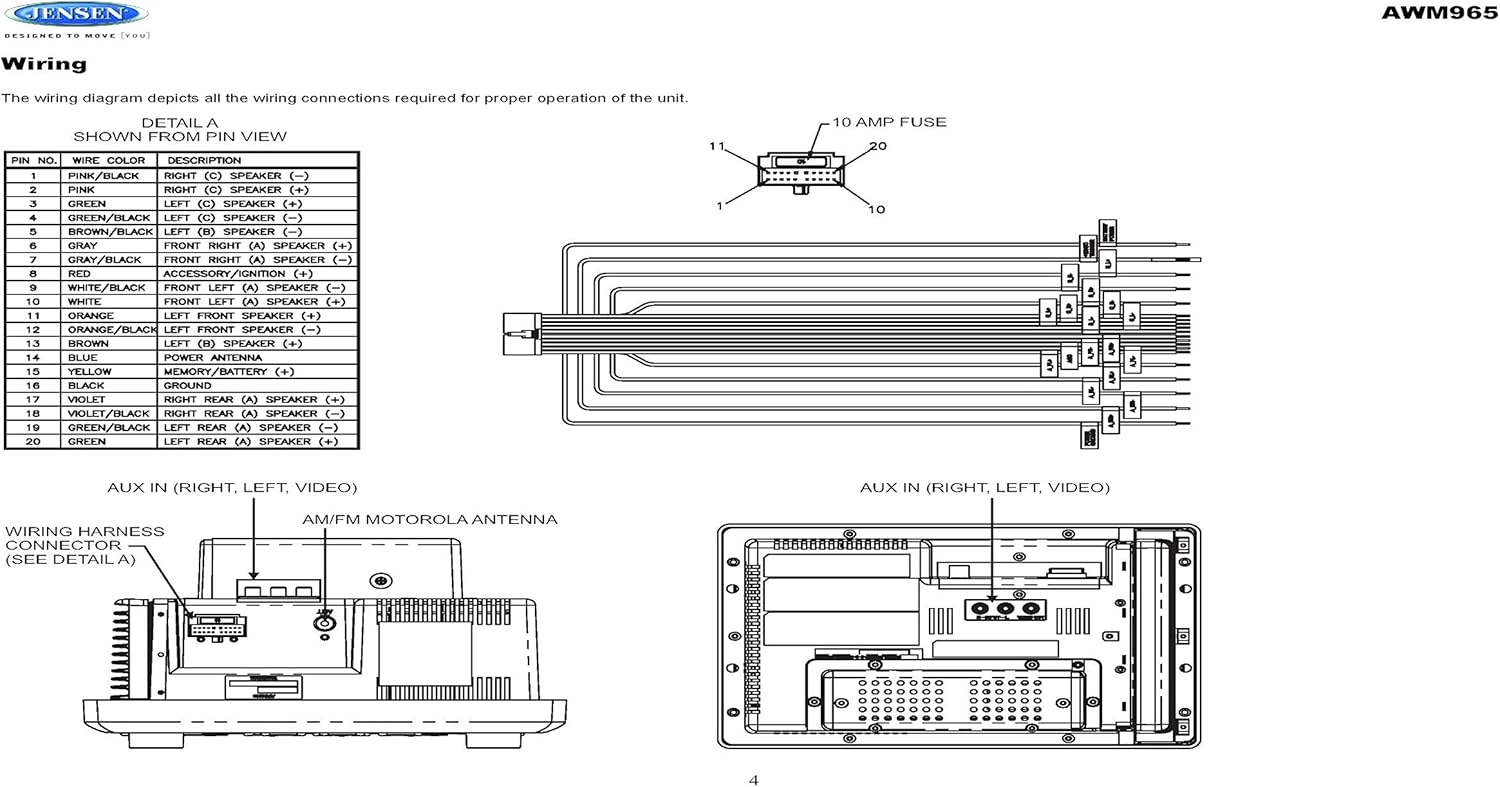
Figure 3.1: Diagram illustrating the components included in the Jensen AWM965 package, including the main unit, remote control, wiring harness, and auxiliary cables.

Figure 3.2: Image showing the included remote control, 20-pin wiring harness, and auxiliary audio/video cable.
4. Podešavanje
4.1 Odabir lokacije za montažu
It is important to select an appropriate mounting location for the AWM965 to ensure optimal performance and longevity. Consider the following:
- Avoid places exposed to heat-radiating appliances such as electric heaters.
- Do not mount adjacent to other equipment that radiates significant heat.
- Ensure the location is well-ventilated and not dusty.
- Izbjegavajte vlažne ili vlažne lokacije.
4.2 Preparing the Opening
Use the provided mounting hole diagram to measure and cut an opening in the mounting surface. After cutting, mount the unit using four M3x20mm screws.
4.3 Montaža radija
Route the power, speaker, and antenna cables through the hole. Connect them to the unit as outlined in the wiring diagram. After ensuring correct connections, perform a test operation.
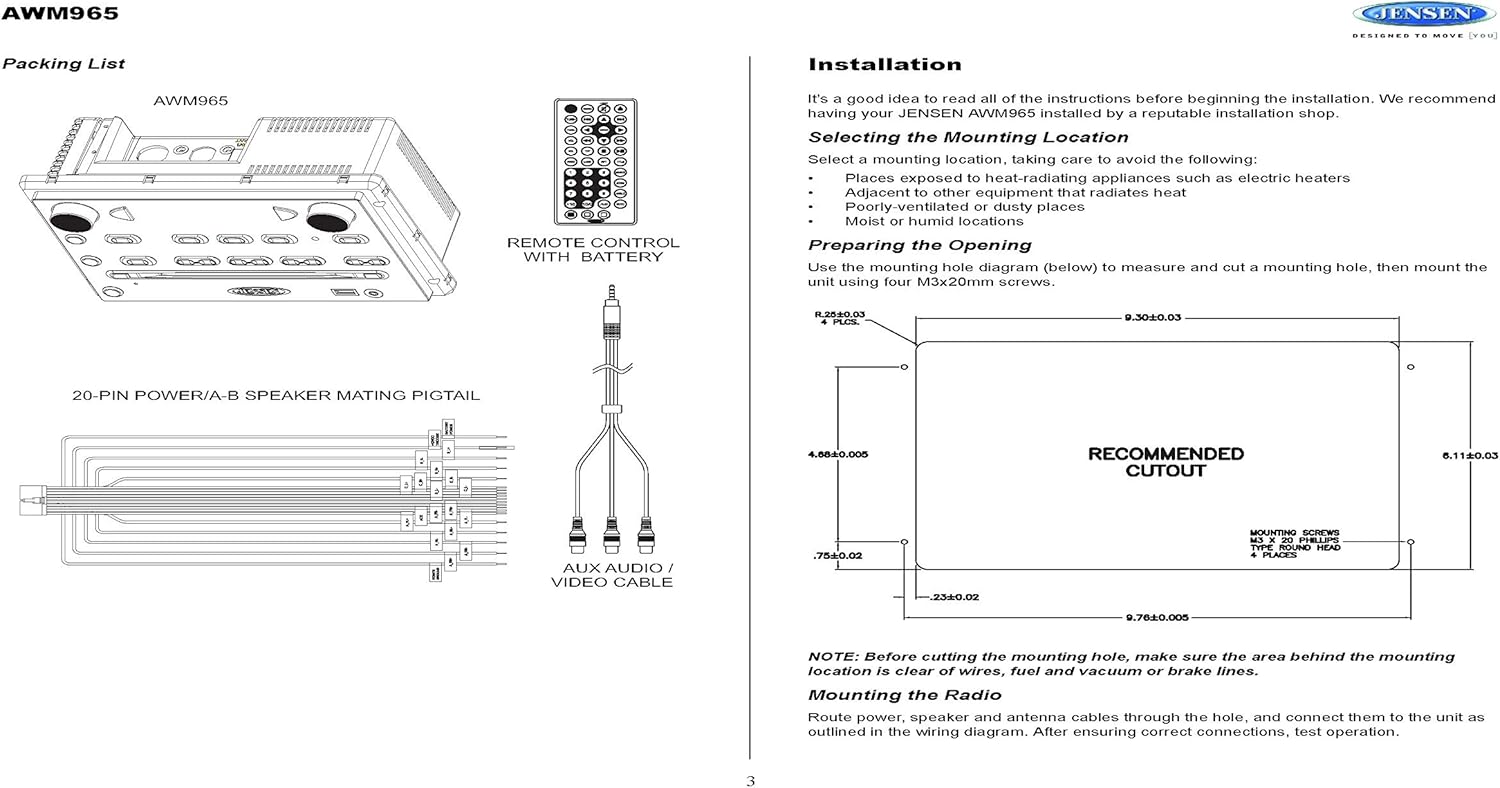
Figure 4.1: Detailed diagram showing the product dimensions (10.43"W x 7.01"H x 5"D) and the recommended cutout dimensions for installation (9.30"W x 6.11"H).
4.4 Ožičenje
The wiring diagram below depicts all the connections required for proper operation of the unit. Ensure all connections are secure and correctly matched to prevent damage.
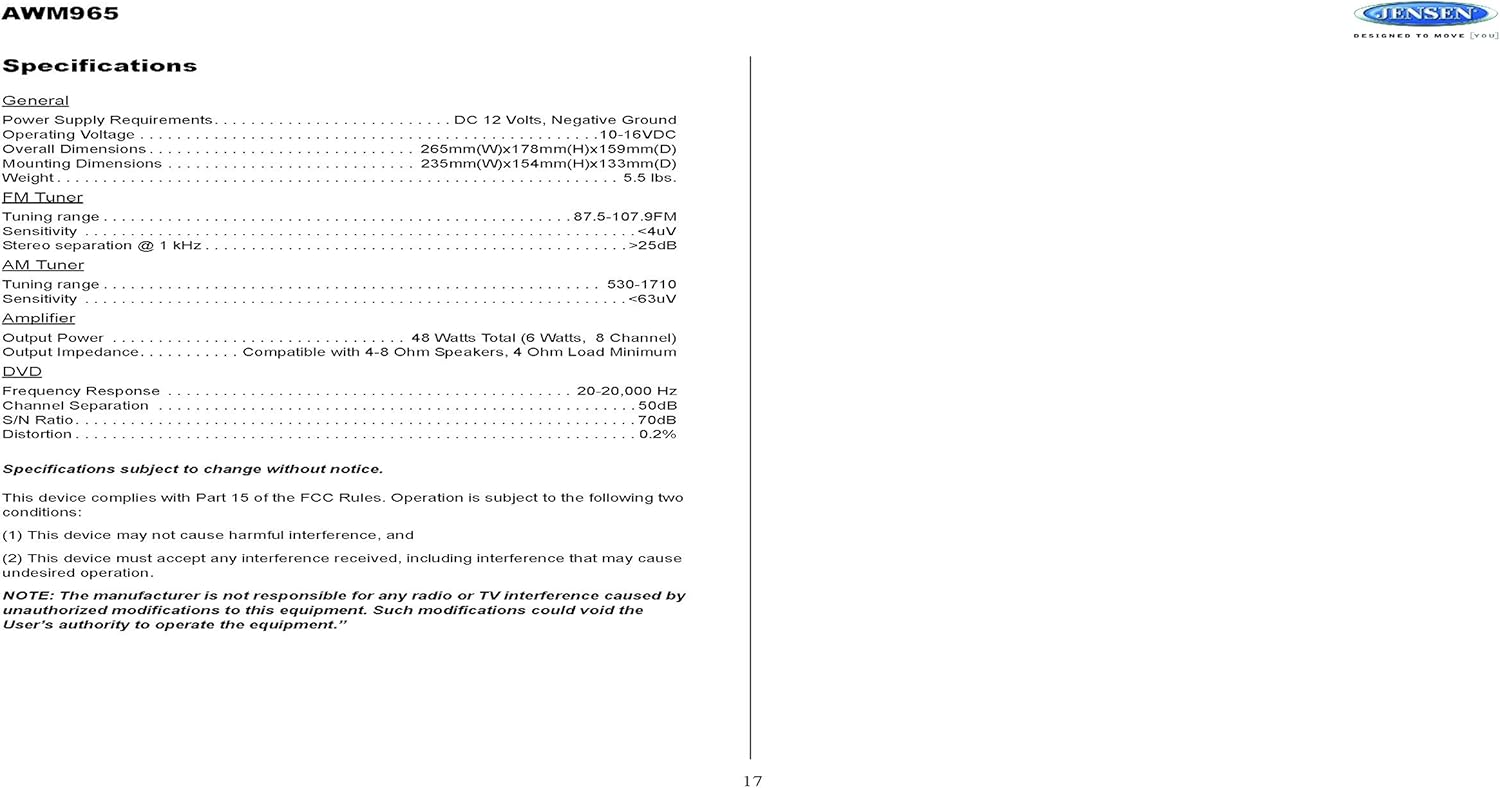
Figure 4.2: Detailed wiring diagram for the Jensen AWM965, showing the 20-pin connector pin assignments for power, ground, accessory, antenna, and speaker outputs (Right/Left, Front/Rear, A/B/C zones).
Wiring Harness Pin Details:
| Pin br. | Boja žice | Opis |
|---|---|---|
| 1 | ROZE / CRNI | DESNI (C) ZVUČNIK (-) |
| 2 | PINK | DESNI (C) ZVUČNIK (+) |
| 3 | ZELENI | LIJEVI (C) ZVUČNIK (+) |
| 4 | ZELENA / CRNA | LIJEVI (C) ZVUČNIK (-) |
| 5 | SMEĐA / CRNA | LIJEVI (B) ZVUČNIK (-) |
| 6 | BROWN | LIJEVI (B) ZVUČNIK (+) |
| 7 | SIVA / CRNA | PREDNJI DESNI (A) ZVUČNIK (-) |
| 8 | RED | ACCESSORY / IGNITION (+) |
| 9 | BIJELO / CRNO | PREDNJI LIJEVI (A) ZVUČNIK (-) |
| 10 | BIJELA | PREDNJI LIJEVI (A) ZVUČNIK (+) |
| 11 | ORANGE | LIJEVI PREDNJI ZVUČNIK (+) |
| 12 | NARANĐASTA / CRNA | LIJEVI PREDNJI ZVUČNIK (-) |
| 13 | BROWN | DESNI (B) ZVUČNIK (+) |
| 14 | PLAVA | POWER ANTENNA |
| 15 | YELLOW | MEMORY / BATTERY (+) |
| 16 | BLACK | GROUND |
| 17 | VIOLET | STRAŽNJI DESNI (A) ZVUČNIK (+) |
| 18 | VIOLET / BLACK | STRAŽNJI DESNI (A) ZVUČNIK (-) |
| 19 | ZELENA / CRNA | STRAŽNJI LIJEVI (A) ZVUČNIK (-) |
| 20 | ZELENI | STRAŽNJI LIJEVI (A) ZVUČNIK (+) |
5. Uputstvo za upotrebu
5.1 Kontrole na prednjoj ploči
Familiarize yourself with the controls on the front panel for easy operation.

Slika 5.1: Krupni plan view of the Jensen AWM965 front panel, highlighting the display, volume knob, power button, tuning/track buttons, and various function buttons for AUX, AS/PS, speaker zones, and media playback.
- Dugme za podešavanje jačine zvuka (VOL): Rotate to adjust volume. Push to access audio menu.
- Dugme POWER: Pritisnite da uključite ili isključite jedinicu.
- T/F CLOCK Button: Pritisnite za prikaz ili podešavanje sata.
- TUN/TRK (Tune/Track) Buttons: Use for tuning radio stations or navigating tracks on media.
- AUX dugme: Selects the auxiliary input source.
- AS/PS (Auto Store/Preset Scan) Button: Automatically stores strong radio stations or scans through presets.
- A, B, C (Speaker Zone) Buttons: Activates or deactivates speaker output zones.
- Dugme ENTER: Potvrđuje odabire.
- LOUD Button: Activates/deactivates loudness compensation.
- Dugme MUTE: Mutes/unmutes audio output.
- 1-6 Dugmad: Radio station presets, track functions (RPT, RDM, G.LANG).
- ALARM SET / ON/OFF Buttons: Sets and activates/deactivates the alarm clock.
- DVD MENU Button: Accesses the DVD menu.
- Disc Eject Button: Ejects a loaded disc.
- USB port: Povežite USB uređaje za reprodukciju medija i punjenje.
5.2 Osnovni rad
- Uključivanje/isključivanje: Pritisnite POWER dugme.
- Podešavanje jačine zvuka: Rotirajte VOL dugme.
- Izbor izvora: Pritisnite MODE button (if available, or cycle through sources using a dedicated button or menu).
5.3 Rad radija (AM/FM)
- tuning: Pritisnite TUN/TRK buttons to manually tune or hold to seek.
- Unaprijed postavljene stanice: Press and hold a numbered button (1-6) to store the current station. Press briefly to recall.
- Auto Store / Preset Scan: Koristite AS/PS button for automatic station management.
5.4 CD/DVD/MP3/USB Playback
- Učitavanje diskova: Insert a disc into the slot with the label side up. The unit will automatically begin playback.
- USB reprodukcija: Insert a compatible USB flash drive into the front USB port. The unit supports MP3, WMA, and JPEG formats.
- Kontrole reprodukcije: Koristite TUN/TRK buttons for track navigation (skip forward/backward). Use numbered buttons for repeat (RPT) or random (RDM) playback.
- DVD meni: Pritisnite DVD MENU button to access the disc's menu.
- USB punjenje: The front USB port supports charging of iPod and other USB-based devices.
5.5 Clock and Alarm Features
- Podešavanje sata: Pritisnite i držite T/F CLOCK button to enter clock setting mode. Use the TUN/TRK dugmad za podešavanje sati i minuta, i ENTER za potvrdu.
- Alarm: Koristite ALARM SET button to configure the alarm time and the ON/OFF button to activate or deactivate it.
- Tajmer za isključivanje: Refer to the full manual for detailed instructions on setting the sleep timer.
5.6 Pomoćni ulaz
Connect external audio/video devices to the front 3.5mm line-level input using the provided Aux Audio/Video Cable. Press the AUX dugme za odabir ovog izvora.
5.7 Daljinski upravljač
The included wireless remote control provides convenient access to most functions. Ensure the battery is correctly installed.
Figure 5.2: Image of the Jensen AWM965 remote control, showing buttons for power, menu, tune, volume, enter, source, program, language, repeat, title, zoom, angle, and numeric keypad.
6. Održavanje
6.1 Čišćenje jedinice
Wipe the front panel and cabinet with a soft, dry cloth. For stubborn stains, dampen the cloth lightly with water. Never use harsh chemicals, abrasive cleaners, or solvents as they may damage the finish.
6.2 Njega diska
Diskove držite za rubove kako biste izbjegli otiske prstiju. Diskove održavajte čistima i bez ogrebotina. Diskove čuvajte u kutijama kada ih ne koristite.
7. Otkrivanje problema
If you experience problems with your AWM965, consult the following common issues and solutions before contacting support.
- Nema napajanja: Check the 12V DC power connection and ensure the unit's fuse (10 AMP) is not blown. Verify proper grounding.
- Nema zvuka: Check speaker connections and ensure speaker zones (A, B, C) are activated. Verify volume level and mute status.
- Disc Error: Ensure the disc is clean, free of scratches, and inserted correctly. Try a different disc.
- Slab radio prijem: Check the antenna connection. Ensure the antenna is fully extended and positioned for best reception.
- USB uređaj nije prepoznat: Ensure the USB device is formatted correctly and contains compatible files (MP3, WMA, JPEG). Try a different USB device.
8. Specifikacije
Detailed technical specifications for the Jensen AWM965 unit.
| Kategorija | Specifikacija |
|---|---|
| Napajanje | 12V DC, negativno uzemljenje |
| Operating Voltage | 10-16VDC |
| Ukupne dimenzije | 265mm(W) x 178mm(H) x 159mm(D) / 10.4"W x 7"H x 5"D |
| Montažne dimenzije | 235mm(W) x 154mm(H) x 133mm(D) / 9.25"W x 6.06"H x 5.25"D |
| Težina | 0.9 lbs (približno) |
| FM Tuning domet | 87.5-107.9MHz |
| FM osjetljivost | <4uV |
| FM Stereo Separation @ 1 kHz | >25dB |
| AM opseg podešavanja | 530-1710kHz |
| AM Sensitivity | <63uV |
| AmpLifier Izlazna snaga | 48 Watts Total (8 Channel) |
| Izlazna impedansa | Compatible with 4-8 Ohm Speakers |
| DVD Frequency Response | 20-20,000 Hz |
| DVD Channel Separation | 50dB |
| DVD S/N Ratio | 70dB |
| DVD Distortion | 0.2% |
| Kompatibilni formati diskova | CD, CD-R, CD-RW, MP3, DVD, DVD+/-RW |
| Posebne karakteristike | Adjustable LCD Dimmer, Front USB (MP3/WMA/JPEG, Charging), Front 3.5mm Line-Level Video/Audio Input, 1 Composite Video Out, 1 Stereo Audio Input |
Specifikacije su podložne promjenama bez prethodne najave.
8.1 Usklađenost sa FCC-om
Ovaj uređaj je u skladu sa dijelom 15 FCC pravila. Rad je podložan sljedeća dva uslova:
- Ovaj uređaj možda neće uzrokovati štetne smetnje.
- Ovaj uređaj mora prihvatiti sve primljene smetnje, uključujući smetnje koje mogu uzrokovati neželjeni rad.
NOTE: The manufacturer is not responsible for any radio or TV interference caused by unauthorized modifications to this equipment. Such modifications could void the user's authority to operate the equipment.
9. Informacije o garanciji
Jensen products are designed and manufactured to the highest quality standards. This product is covered by a limited warranty against defects in materials and workmanship. The specific terms and duration of the warranty are typically provided with the product packaging or can be found on the manufacturer's official webMolimo sačuvajte dokaz o kupovini za potrebe reklamacije.
10. Podrška
If you require further assistance or encounter issues not covered in this manual, please contact Jensen customer support. You can typically find contact information (phone number, email, or support portal) on the official Jensen websajtu ili u pakovanju proizvoda.
When contacting support, please have your product model number (AWM965) and a detailed description of the issue ready.


