Uvod
This manual provides comprehensive instructions for the installation, operation, and maintenance of your Aiphone 2-Call DA Series Door Station, model DA-2DS. Please read this manual thoroughly before attempting to install or operate the unit to ensure correct usage and to prevent damage.
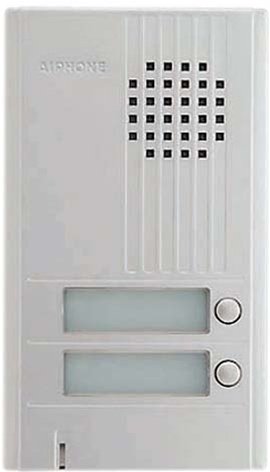
Slika: Front view of the Aiphone DA-2DS 2-Call Door Station. This silver unit features two call buttons for multi-tenant or multi-location communication.
Sigurnosne informacije
Pridržavajte se sljedećih sigurnosnih mjera opreza kako biste spriječili ozljede i oštećenje opreme:
- Uvijek isključite napajanje prije izvođenja bilo kakvog ožičenja ili održavanja.
- Osigurajte da su sve instalacije u skladu s lokalnim električnim propisima i propisima.
- Do not expose the unit to excessive moisture or extreme temperatures.
- Use only specified power supplies and accessories.
- Instalaciju treba izvesti kvalificirano osoblje.
Sadržaj paketa
Provjerite da li su sve stavke prisutne u paketu:
- Aiphone DA-2DS Door Station Unit
- Montažni vijci i ankeri
- Uputstvo za upotrebu (ovaj dokument)
Setup
Montaža
Select a suitable mounting location, typically near the entrance, at a height that allows easy access for all users. Ensure the surface is flat and secure. Use the provided mounting screws and anchors to firmly attach the door station to the wall.
Ožičenje
Connect the door station to the indoor master station using appropriate wiring. The DA-2DS requires a 2-wire connection for each call button to the corresponding indoor station. Refer to the wiring diagram provided with your indoor master station for specific connection points. Ensure all connections are secure and insulated.
Početno napajanje
After all wiring is complete and verified, apply power to the system. Test each call button to ensure proper communication with the indoor stations.
Uputstvo za upotrebu
Upućivanje poziva
To initiate a call from the door station, press the desired call button. This will activate the corresponding indoor master station, which will then ring to alert the occupant.
Odgovaranje na poziv
When a call is initiated from the door station, the indoor master station will ring. The occupant can answer the call by pressing the talk button on the indoor station. Two-way communication will then be established.
Održavanje
Čišćenje
Clean the exterior of the door station periodically with a soft, damp cloth. Do not use abrasive cleaners, solvents, or strong chemicals, as these can damage the finish and internal components.
Redovne provjere
Periodically check the mounting screws for tightness and ensure all wiring connections remain secure. Test the call buttons and communication functionality regularly to ensure proper operation.
Rješavanje problema
| Problem | Mogući uzrok | Rješenje |
|---|---|---|
| No sound from door station | Loose wiring connection; faulty speaker/microphone | Check wiring connections at both door and master stations. If problem persists, contact support. |
| Call button does not activate indoor station | Incorrect wiring; faulty button | Verify wiring connections for the specific call button. Test button functionality. |
| Smetnje ili loš kvalitet zvuka | Improper wiring; electrical interference | Ensure wiring is correctly installed and shielded if necessary. Check for nearby sources of electrical interference. |
Specifikacije
- Model: DA-2DS
- Proizvođač: Aiphone
- Broj dijela: DA-2DS
- Težina artikla: 3 funte
- Boja: Srebro
- Stavka Količina pakovanja: 1
- Baterije uključene: br
- Datum prve dostupnosti: 8. maja 2008
Informacije o garanciji
Aiphone products are designed for reliability and performance. This product is covered by a limited warranty against defects in materials and workmanship. For specific warranty terms and conditions, please refer to the warranty card included with your purchase or visit the official Aiphone webSačuvajte dokaz o kupovini za slučaj reklamacije.
Podrška
For technical assistance, troubleshooting, or service inquiries, please contact Aiphone customer support. You can find contact information, including phone numbers and online resources, on the official Aiphone website. When contacting support, please have your model number (DA-2DS) and a description of the issue ready.