1. Uvod
This manual provides essential information for the safe and effective use of your Leica D-Lux 4 Safari Special Edition Digital Camera. Please read it thoroughly before using your camera and keep it for future reference. The Leica D-Lux 4 Safari is a limited edition digital camera featuring a distinctive Safari Green color and a special case, designed for high-quality digital photography.
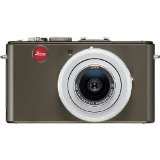
Figure 1: Leica D-Lux 4 Safari Special Edition Digital Camera. This image displays the compact digital camera with its distinctive green finish and lens.
2. Podešavanje
2.1. Instalacija baterije
- Uvjerite se da je kamera isključena.
- Pronađite poklopac pretinca za bateriju na dnu kamere.
- Pomaknite zasun da biste otvorili poklopac.
- Insert the provided battery, ensuring the correct orientation as indicated inside the compartment.
- Čvrsto zatvorite poklopac pretinca za baterije dok ne klikne na svoje mjesto.
2.2. Umetanje memorijske kartice
The camera supports SD and SDXC memory cards for storing photos and videos.
- Dok je fotoaparat isključen, otvorite poklopac pretinca za bateriju/memorijsku karticu.
- Insert the memory card into the designated slot with the label facing the correct direction (usually towards the front of the camera). Push until it clicks into place.
- Zatvorite poklopac odjeljka.
2.3. Početno uključivanje
Press the power button to turn on the camera. Follow any on-screen prompts to set the date, time, and language.
3. Uputstvo za upotrebu
3.1. Basic Photography (Point & Shoot)
- Uključeno: Pritisnite dugme za napajanje.
- Odaberite način rada: Use the mode dial to select "Automatic" for general use.
- Fokus: Point the camera at your subject. The camera will automatically focus using contrast detection.
- Snimiti: Press the shutter button halfway to focus, then press fully to take a picture.
3.2. Video snimanje
- Odaberite način rada: Turn the mode dial to "Movie" mode.
- Pokreni/Zaustavi snimanje: Press the dedicated video record button to start and stop recording. The camera records in 1080p at 30 frames per second.
- Digitalna stabilizacija slike: The camera features digital image stabilization to reduce blur during video recording.
3.3. Funkcionalnost zumiranja
The camera features 2.5x optical zoom. Use the zoom lever (typically around the shutter button) to zoom in or out. Digital zoom is also available up to 16x.
3.4. Napredni načini snimanja
Explore various modes via the mode dial:
- Pejzažni način rada: Optimized for wide scenic shots.
- Ručna kontrola ekspozicije: For experienced users to manually adjust aperture and shutter speed.
- Postavke balansa bijele: Customize white balance for accurate color reproduction under different lighting conditions.
3.5. Povezivanje
- Wi-Fi: Connect your camera to a Wi-Fi network for wireless transfer of images and remote control via a compatible smartphone app. Refer to the camera's on-screen menu for Wi-Fi setup.
4. Održavanje
4.1. Čišćenje kamere
- Tijelo kamere: Koristite meku, suhu krpu za brisanje kućišta fotoaparata. Za tvrdokornu prljavštinu, laganoampNapržite krpu vodom. Izbjegavajte jake hemikalije.
- Objektiv: Koristite četkicu za objektive da uklonite prašinu, a zatim nježno obrišite krpom od mikrovlakana za objektive. Za mrlje koristite specijaliziranu otopinu za čišćenje objektiva.
- ekran: Wipe the LCD screen with a soft, dry microfiber cloth.
4.2. Održavanje baterije
- Always use the original Leica charger and battery.
- Izbjegavajte izlaganje baterije ekstremnim temperaturama.
- Čuvajte bateriju na hladnom i suvom mestu kada nije u upotrebi.
5. Otkrivanje problema
5.1. Kamera se ne uključuje
- Provjerite je li baterija potpuno napunjena i pravilno umetnuta.
- Pokušajte koristiti drugu, potpuno napunjenu bateriju ako je dostupna.
5.2. Loš kvalitet slike
- Provjerite je li objektiv čist i bez mrlja ili prašine.
- Ensure adequate lighting for your shot.
- Adjust shooting modes or exposure settings if necessary.
5.3. Problemi s Wi-Fi povezivošću
- Verify that Wi-Fi is enabled on the camera and your smartphone.
- Ensure the camera is within range of the Wi-Fi network.
- Ponovo pokrenite i kameru i pametni telefon.
6. Specifikacije
| Feature | Detalj |
|---|---|
| Brand | Leica |
| Naziv modela | D Lux4 Safari |
| Totalna rezolucija mirovanja | 12 MP |
| Tehnologija foto senzora | CMOS |
| Optički zum | 2.5x |
| Digitalni zum | 16x |
| Maksimalni otvor blende | 2.8 milimetara |
| Stabilizacija slike | Digital |
| Podržano File Format | JPEG, RAW |
| Video Rezolucija | 1080p |
| Frame Rate | 30 FPS |
| Veličina ekrana | 3 inča |
| Bežična tehnologija | Wi-Fi |
| Materijal kućišta | Metal |
| Boja | Zeleno |
| Baterije uključene | Da |
7. Jamstvo i podrška
7.1. Informacije o garanciji
The Leica D-Lux 4 Safari Special Edition Digital Camera comes with a 3-godišnja garancija proizvođačaOva garancija pokriva nedostatke u materijalu i izradi pri normalnoj upotrebi. Molimo sačuvajte dokaz o kupovini za potrebe reklamacije.
7.2. Korisnička podrška
For technical assistance, troubleshooting, or service inquiries, please visit the official Leica website or contact their customer support. You can find detailed contact information on the Leica website or in the documentation included with your camera.


