Uvod
This manual provides detailed instructions for the setup, operation, maintenance, and troubleshooting of your Kanto iPair 5 iPod/iPhone Speaker System. Please read this manual thoroughly before using the product to ensure proper functionality and to maximize your listening experience.
Sadržaj paketa
Prije nego što nastavite s postavljanjem, provjerite da li su sve komponente prisutne u paketu:
- Kanto iPair 5 Powered Speakers (Left and Right)
- Daljinski upravljač
- Power Cable
- 3.5 mm pomoćni audio kabel
- RCA audio kabel
- Various iPod/iPhone Dock Adapters
Setup
1. Postavljanje zvučnika
Place the Kanto iPair 5 speakers on a stable, flat surface, such as a table or shelf. Ensure there is adequate space around each speaker for proper ventilation and sound dispersion. Position the speakers to create an optimal stereo sound field for your listening area.
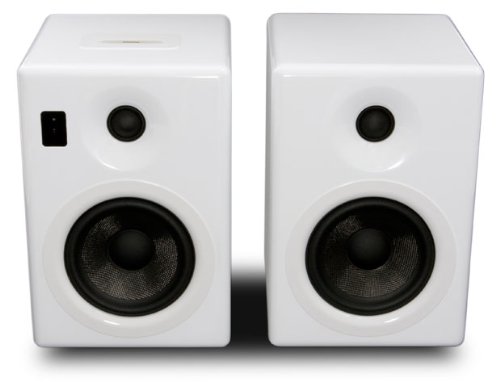
Image: The Kanto iPair 5 speaker system, featuring two white, glossy speakers. The left speaker includes the iPod/iPhone docking station on top and control buttons on the front panel. Both speakers have a tweeter and a larger woofer/subwoofer driver.
2. Povezivanje na napajanje
Connect the provided power cable to the power input on the back of the main (left) speaker. Plug the other end of the power cable into a standard electrical outlet.
3. Audio veze
The iPair 5 offers multiple audio input options:
- iPod/iPhone Dock: Select the appropriate dock adapter for your iPod or iPhone model and insert it into the docking station on top of the main speaker. Carefully place your device onto the dock connector.
- Auxiliary Input (3.5mm Jack): Use the 3.5mm auxiliary audio cable to connect devices such as MP3 players, laptops, or tablets to the 3.5mm AUX input on the back of the main speaker.
- RCA ulaz: Use the RCA audio cable to connect devices with RCA outputs, such as CD players or older audio equipment, to the RCA input jacks on the back of the main speaker.
- Bluetooth: For wireless audio streaming, ensure your device's Bluetooth is enabled and follow the pairing instructions in the 'Operating' section.
Operating
1. Uključivanje / isključivanje napajanja
Press the power button located on the front panel of the main speaker or on the remote control to turn the system on or off. An indicator light will illuminate when the system is powered on.
2. Odabir izvora
Use the 'Source' button on the remote control or the main speaker to cycle through the available audio inputs: iPod/iPhone Dock, Auxiliary (3.5mm), RCA, and Bluetooth. The selected source will typically be indicated by an LED or display.
3. Kontrola jačine zvuka
Adjust the volume using the 'Volume Up' and 'Volume Down' buttons on the remote control or the volume knob/buttons on the main speaker. Start with a low volume and gradually increase it to a comfortable listening level.
4. iPod/iPhone Playback
Once your iPod or iPhone is docked and the 'iPod' source is selected, you can control playback (play, pause, skip tracks) using the remote control or directly on your device. The iPair 5 will also charge your docked device.
5. Bluetooth uparivanje
- Select the 'Bluetooth' source on the iPair 5. The Bluetooth indicator light will typically flash, indicating it is in pairing mode.
- Na uređaju koji podržava Bluetooth (pametni telefon, tablet, laptop) idite na postavke Bluetootha i potražite dostupne uređaje.
- Select 'Kanto iPair 5' from the list of devices.
- Once paired, the Bluetooth indicator light on the iPair 5 will become solid, and you can begin streaming audio wirelessly.
Održavanje
Čišćenje
Za čišćenje kućišta zvučnika koristite meku, suhu krpu. Za tvrdokorne mrlje, laganoamp cloth can be used, followed by a dry cloth. Avoid using abrasive cleaners, solvents, or chemical sprays, as these can damage the finish. Do not apply liquids directly to the speaker drivers.
Opća njega
Keep the speakers away from direct sunlight, heat sources, and excessive moisture. Ensure proper ventilation to prevent overheating. Do not block the speaker grilles or vents.
Rješavanje problema
If you encounter any issues with your Kanto iPair 5 system, please refer to the following common problems and solutions:
| Problem | Mogući uzrok | Rješenje |
|---|---|---|
| Nema zvuka iz zvučnika | Power not connected; incorrect source selected; volume too low; audio cable loose/faulty. | Ensure power cable is securely plugged in. Select the correct input source. Increase volume. Check audio cable connections. |
| iPod/iPhone not charging or playing | Incorrect dock adapter; device not seated properly; 'iPod' source not selected. | Use the correct dock adapter. Re-seat the device firmly. Select the 'iPod' source. |
| Greška Bluetooth uparivanja | Zvučnici nisu u načinu uparivanja; uređaj je previše udaljen; smetnje. | Ensure 'Bluetooth' source is selected and indicator is flashing. Move device closer. Turn off other Bluetooth devices. |
| Daljinski upravljač ne radi | Prazne baterije; prepreka; daljinski upravljač izvan dometa. | Replace batteries. Remove any obstructions between remote and speakers. Ensure remote is within operating range. |
Specifikacije
| Feature | Detalj |
|---|---|
| Naziv modela | iPair5 |
| Broj modela | iPair5W |
| Brand | Kanto |
| Boja | Bijelo |
| Vrsta zvučnika | Powered Speaker System with Integrated Subwoofers |
| Tehnologija povezivanja | Pomoćni, Bluetooth |
| Izlazna snaga | 2 x 20W (Main Speakers) + 2 x 20W (Integrated Subwoofers) |
| Kontrolni metod | Daljinski upravljač |
| Posebne karakteristike | Apple Docking Station |
| Dimenzije (D x Š x V) | 20 x 19 x 27.2 cm (7.87 x 7.48 x 10.7 inča) |
| Težina | 10.5 kilograma (23.15 lbs) |
| Izvor napajanja | Električni kabel |
| Kompatibilni uređaji | Smartphone, Laptop, Tablet, MP3 Player, iPod, iPhone |
| Uključene komponente | Daljinski upravljač |
| Konfiguracija kanala surround zvuka | 2.0 |
Garancija
The Kanto iPair 5 Speaker System comes with a limited warranty. Please refer to the warranty card included with your product or visit the official Kanto webweb stranicu za specifične uslove i odredbe u vezi s pokrićem i trajanjem.
Podrška
For further assistance, technical support, or service inquiries, please contact Kanto customer support. Contact information can typically be found on the official Kanto websajtu ili u pakovanju proizvoda.