1. Uvod
This manual provides detailed instructions for the setup, operation, and maintenance of your Lomography Diana F+ Medium Format Camera with Flash Kit. The Diana F+ is a reproduction of the classic Diana camera, featuring a plastic lens, two shutter settings (daylight and 'B' for bulb), three aperture settings, and manual focus. It also includes a removable lens for pinhole images, two image formats (12 or 16 square shots on 120 film), an endless panorama feature, and a standard tripod thread with shutter lock for long exposures. The included electronic flash provides additional lighting options.
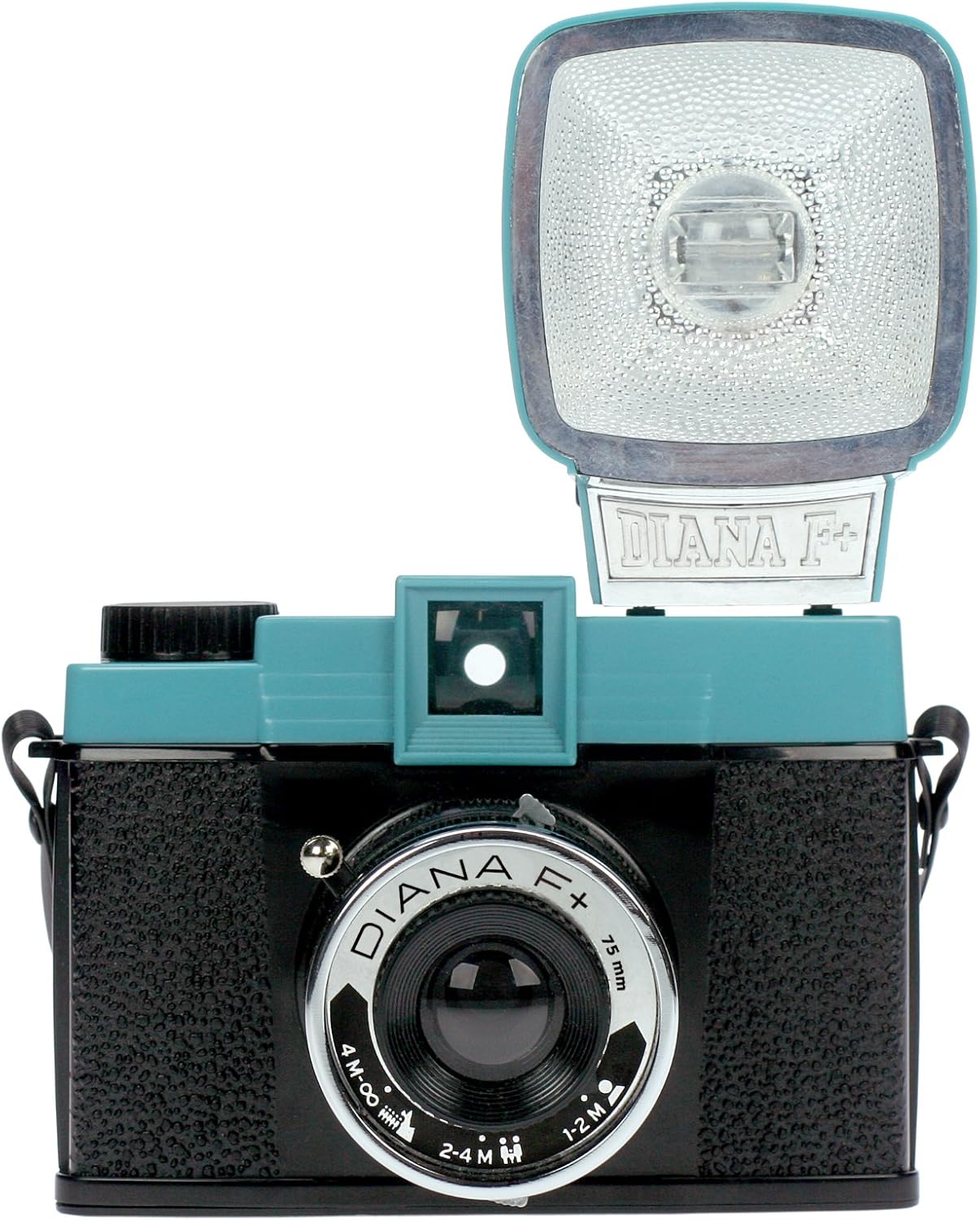
Slika 1.1: Prednja strana view of the Lomography Diana F+ Medium Format Camera with the electronic flash attached.
2. Podešavanje
2.1 Raspakivanje i komponente
Your Diana F+ package includes the following items:
- Diana F+ Camera Body
- Diana F+ Electronic Flash
- Poklopac objektiva
- Remen za vrat
- Uputstvo za upotrebu (ovaj dokument)
- Adapters for flash compatibility
2.2 Battery Installation for Flash
The Diana F+ Electronic Flash requires one AA battery for operation. To install the battery:
- Pronađite odjeljak za bateriju na blicu.
- Otvorite poklopac odjeljka.
- Umetnite jednu AA bateriju, pazeći na ispravan polaritet (+/-).
- Čvrsto zatvorite poklopac odeljka za baterije.
2.3 Učitavanje filma
The Diana F+ uses 120 medium format film. Proper film loading is crucial for successful photography. Refer to the video below for a visual guide.
Video 2.1: This video demonstrates the process of loading and shooting medium format film with the Diana F+ camera. It shows how to open the camera back, insert the film spool, thread the film leader onto the take-up spool, and close the camera, followed by advancing the film to the first frame.
General steps for film loading:
- Otvorite stražnju stranu kamere povlačenjem zasuna.
- Insert a fresh roll of 120 film into the supply chamber.
- Povucite vođicu filma preko kalema za namotavanje i pričvrstite ga.
- Ensure the film is taut and aligned.
- Čvrsto zatvorite kameru nazad dok se ne zaključa.
- Advance the film using the winding knob until the first frame number appears in the red window on the camera back.
3. Upravljanje kamerom
3.1 Shutter Settings
The Diana F+ offers two shutter speed settings:
- N (Normal/Daylight): For standard daytime photography.
- B (Bulb): Keeps the shutter open for as long as the shutter button is pressed, ideal for long exposures in low light or for creative light painting.
3.2 Postavke otvora blende
Adjust the aperture using the lever around the lens. The Diana F+ typically has three aperture settings:
- Cloudy (f/8): For overcast conditions or slightly brighter scenes.
- Partly Cloudy (f/11): For general outdoor use with some sun.
- Sunny (f/16): For bright, sunny conditions.
3.3 Ručno fokusiranje
The lens features manual zone focusing. Rotate the lens barrel to select the appropriate distance setting:
- 1-2M (1 to 2 meters): For close-up subjects.
- 2-4M (2 to 4 meters): For subjects at medium distance.
- 4M-∞ (4 meters to infinity): For landscapes and distant subjects.
3.4 Using the Electronic Flash
The Diana F+ Flash connects directly to the camera body via a two-pronged plug adapter. It can provide a burst of white or colored light. Color filters may be included for creative effects.

Slika 3.1: Bočna strana view of the Lomography Diana F+ showing the electronic flash attached to the camera body.
3.5 Napredne funkcije
- Pinhole Photography: The lens is removable, allowing for pinhole photography by exposing the film directly through a small aperture.
- Višestruke ekspozicije: The Diana F+ allows for multiple exposures on a single frame by simply not advancing the film after taking a shot.
- Endless Panorama: By carefully aligning multiple shots, you can create seamless panoramic images.
- Formati slika: The camera supports both 12 (5.2x5.2cm) and 16 (4.2x4.2cm) square shots on a standard 120 roll, depending on the frame mask used inside the camera.
4. Održavanje
4.1 Čišćenje
- Koristite meku krpu koja ne ostavlja dlačice da nježno obrišete kućište fotoaparata.
- For the lens, use a specialized lens cleaning cloth and solution. Avoid harsh chemicals.
- Održavajte odjeljak za film bez prašine i ostataka.
4.2 Skladištenje
Store the camera in a cool, dry place away from direct sunlight and extreme temperatures. If storing for an extended period, remove the battery from the flash unit to prevent leakage.
5. Otkrivanje problema
- Film se ne pomiče: Ensure the film is correctly loaded and threaded onto the take-up spool. Do not force the winding knob, as this can damage the mechanism. If the film jams, open the camera in a darkroom or changing bag, remove the film, and re-spool it carefully.
- Curenje svjetlosti: The Diana F+ is known for its characteristic light leaks, which are often considered part of its charm. Ensure the camera back is securely closed. If excessive, check for any cracks or gaps in the camera body.
- Blic se ne aktivira: Check if the AA battery in the flash unit is correctly inserted and has sufficient charge. Ensure the flash is properly connected to the camera.
- Mutne slike: Verify that the focus distance on the lens is set appropriately for your subject. For sharpest results, ensure adequate lighting for the chosen aperture and shutter speed.
- No Image on Film: Confirm that the film was loaded correctly and advanced after each shot. Ensure the shutter is functioning and not stuck.
6. Specifikacije
| Feature | Specifikacija |
|---|---|
| Dimenzije proizvoda | 7 x 3.25 x 5 inča |
| Težina artikla | 7.8 unci (220 grama) |
| Broj modela | HP700 |
| Brand | Lomography |
| Posebna karakteristika | Built-In Flash (Electronic Flash) |
| Tip formata filma | 120 |
| Maksimalna brzina zatvarača | B seconds (Bulb) |
| Uključene komponente | Diana F+ Camera, Diana F+ Flash |
7. Garancija i podrška
For warranty information, technical support, or further inquiries regarding your Lomography Diana F+ camera, please visit the official Lomography webweb-mjesto ili direktno kontaktirajte njihovu korisničku službu. Sačuvajte račun kao dokaz o kupovini.
Lomography Official Webstranica: www.lomography.com


