1. Uvod i krajview
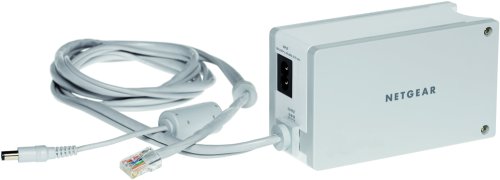
The NETGEAR XEPS103 Powerline Network Extender is designed to extend secure network connections to any electrical outlet within your home. This device utilizes your existing electrical wiring to transmit network data, offering a convenient way to expand your network coverage without running new Ethernet cables.
The XEPS103 supports data transfer rates of up to 85 Mbps and is compatible with HomePlug 1.0 Powerline devices. Its space-saving 2-in-1 design allows it to function as both a network extender and a power supply for many NETGEAR routers, reducing clutter and optimizing power outlet usage. Installation is straightforward, requiring a simple plug-and-play process.
2. Sadržaj paketa
Molimo Vas da provjerite da li Vaš paket sadrži sljedeće stavke:
- One (1) NETGEAR XEPS103 Powerline Network Extender
- Jedan (1) Ethernet kabel
- Ovo uputstvo za upotrebu
3. Postavljanje i instalacija
The NETGEAR XEPS103 is designed for true plug-and-play simplicity. Follow these steps to set up your Powerline Network Extender:
- Povežite se sa svojim ruterom: Take the provided Ethernet cable and connect one end to an available Ethernet port on your existing router.
- Povežite se s produživačem signala: Connect the other end of the Ethernet cable to the Ethernet port on the NETGEAR XEPS103 Powerline Network Extender.
- Uključite u utičnicu: Plug the NETGEAR XEPS103 directly into a wall electrical outlet. Avoid using power strips or surge protectors, as these can interfere with Powerline communication.
- Uključeno: Ensure the electrical outlet has power. The extender should power on automatically.
- Potvrdite vezu: Once powered on, the extender will establish a connection over your home's electrical wiring. The status indicator lights on the device will confirm a successful connection. Refer to the device's LED indicators for specific status information (e.g., Power, Powerline, Ethernet activity).
The XEPS103's 2-in-1 design allows it to also power many NETGEAR routers directly when plugged into the wall, further simplifying your setup and reducing cable clutter.
4. Uputstvo za upotrebu
Once the NETGEAR XEPS103 Powerline Network Extender is successfully set up and connected to your router, it will begin extending your network through your home's electrical system.
- Povežite uređaje: To connect a device (e.g., computer, gaming console, smart TV) to the extended network, simply plug an Ethernet cable from your device into the Ethernet port on the XEPS103 extender.
- Pristup mreži: Your connected device should automatically obtain an IP address and gain access to the network and internet, provided your router is functioning correctly.
- Performanse: The XEPS103 delivers wired speeds of up to 85 Mbps. Actual performance may vary depending on the quality of your electrical wiring, distance, and electrical interference.
5. Održavanje
To ensure optimal performance and longevity of your NETGEAR XEPS103 Powerline Network Extender, consider the following maintenance guidelines:
- čišćenje: Uređaj održavajte čistim i bez prašine. Za čišćenje koristite meku, suhu krpu. Ne koristite tekuća ili aerosolna sredstva za čišćenje.
- ventilacija: Osigurajte da uređaj ima odgovarajuću ventilaciju. Ne blokirajte ventilacijske otvore.
- Okruženje: Operate the device within its specified temperature and humidity ranges. Avoid exposing it to extreme heat, cold, or moisture.
- Utičnice: Periodically check the electrical outlets for secure connections.
6. Otkrivanje problema
If you encounter issues with your NETGEAR XEPS103 Powerline Network Extender, try the following troubleshooting steps:
- Nema napajanja: Ensure the extender is securely plugged into a working electrical outlet. Check if the power outlet itself is functional by plugging in another device.
- Nema mrežne veze:
- Verify that the Ethernet cable is securely connected between the extender and your router, and between the extender and your end device.
- Ensure your router is powered on and providing internet access.
- Check the Powerline LED on the extender. If it is off or blinking unusually, there might be an issue with the Powerline connection. Try plugging the extender into a different wall outlet.
- Avoid plugging the extender into power strips, surge protectors, or extension cords, as these can degrade Powerline performance or prevent connection.
- Spora brzina:
- Powerline performance can be affected by electrical interference from other appliances. Try plugging the extender into a different wall outlet, ideally on the same electrical circuit as the other Powerline device.
- Ensure there are no high-power consuming devices (e.g., washing machines, refrigerators) on the same circuit that might cause interference.
- Kompatibilnost: The XEPS103 is compatible with HomePlug 1.0 Powerline devices. Ensure any other Powerline adapters you are using are also HomePlug 1.0 compatible.
7. Specifikacije
| Feature | Specifikacija |
|---|---|
| Broj modela | XEPS103 |
| Dimenzije proizvoda (ŠxVxD) | 2.76 x 1.81 x 4.92 inča |
| Težina artikla | 1 funta |
| Hardversko sučelje | Ethernet |
| Kompatibilni uređaji | Desktop, Laptop, Smart TV, Smartphone, Tablet |
| Data Link Protocol | Ethernet, Fast Ethernet, HomePlug 1.0 |
| Brzina prijenosa podataka | 85 megabita u sekundi |
| Proizvođač | Netgear |
| Datum prve dostupnosti | 7. jul 2004 |
8. Garancija i podrška
NETGEAR products are backed by a manufacturer's warranty. For specific warranty terms and conditions applicable to your XEPS103 Powerline Network Extender, please refer to the warranty information provided with your product packaging or visit the official NETGEAR website.
Za tehničku podršku, registraciju proizvoda i dodatne resurse, posjetite službenu NETGEAR stranicu za podršku webTamo možete pronaći često postavljana pitanja, vodiče za rješavanje problema i kontakt informacije za korisničku podršku.
Online podrška: www.netgear.com/support


