Product Overview
The Intermatic EH10 Electric Water Heater Time Switch provides automatic control for electric water heaters. It offers precise programming and time-keeping capabilities, allowing for efficient management of hot water usage. This device supports various scheduling options, including daily, 5-day working week, weekend, or individual day scheduling, with up to 42 ON/OFF operations weekly. It features a convenient external override switch and an LED load indicator for user convenience.
Ključne karakteristike:
- 42 ON/OFF Events Per Week: Efficiently manage your electric water heater with the ability to program up to 42 ON/OFF events per week, ensuring optimal control and energy savings.
- 7-dnevni raspored: Enjoy versatile scheduling options, including 7-day programming, for tailored control based on your specific water heating needs.
- To-the-Minute Programming and Accuracy: Achieve precision in programming and time-keeping accuracy down to the minute, providing reliable performance for your water heating requirements.
- External Override Switch: The convenient external override switch allows for immediate manual control adjustments, offering flexibility in scheduling hot water as needed.
- LED Load Indicator: Stay informed about your water heater's status with the LED load indicator, providing a visual cue for ease in monitoring and managing hot water demands.
Postavljanje i instalacija
Installation of the Intermatic EH10 should be performed by a qualified electrician in accordance with all local and national electrical codes. The unit is designed for wall mounting and operates at 120 VAC at 50/60 Hz.
Internal Components and Wiring:
The image below displays the internal layout of the Intermatic EH10, showing the control panel, battery compartment, and wiring terminals. Proper connection to Neutral, Line 1, and Load 1 terminals is crucial for safe and effective operation. Always ensure power is disconnected before performing any wiring.
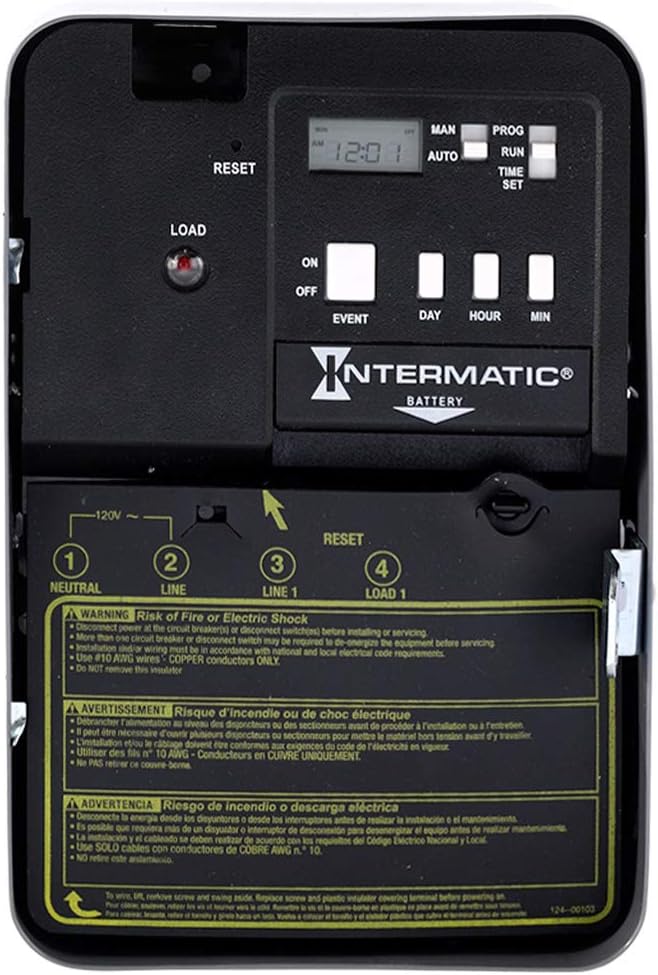
Slika 1: Interni view of the EH10 Time Switch, highlighting the control panel and wiring terminals.
Visualizing the Installation:
The Intermatic EH10 is typically installed on a wall near the electric water heater. Its compact design allows for discreet placement while providing easy access to controls.

Slika 2: Prample installation of the EH10 Time Switch adjacent to an electric water heater.
Setup and Programming Video Guide:
For a comprehensive visual guide on setting up and programming your EH10 time switch, please refer to the official video below. This video covers initial setup, setting the current time, and programming schedules.
Video: How to Set up and Program the EH Series Water Heater Timer by Intermatic.
Uputstvo za upotrebu
The EH10 features an intuitive control panel for easy operation. The front panel includes a digital display, selector switches, and push buttons for setting time and programming events.
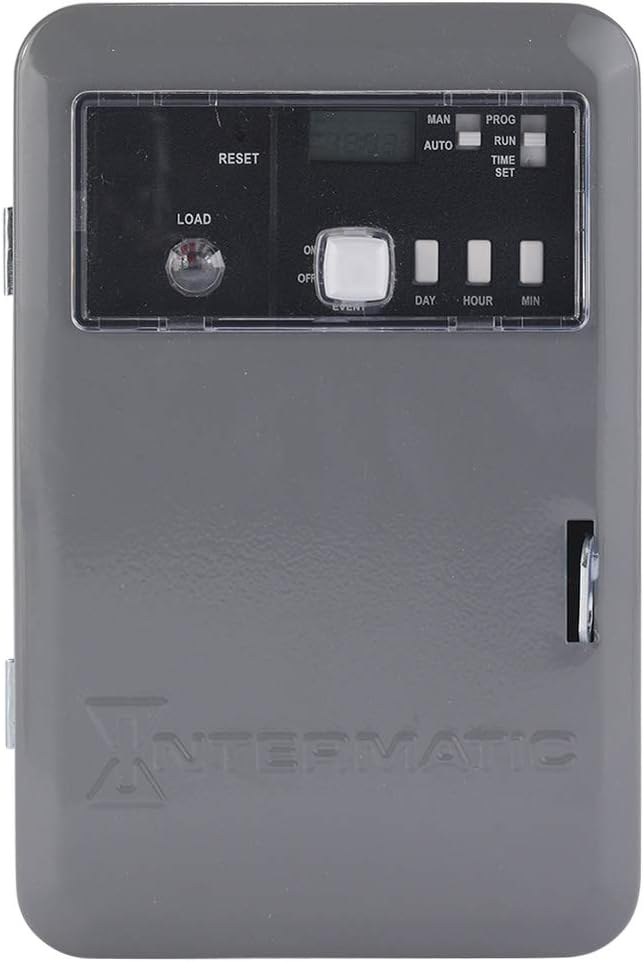
Figure 3: Front control panel of the EH10 Time Switch.
Postavljanje trenutnog vremena:
- Move the right selector switch to the TIME SET pozicija.
- Pritisnite DAN button to advance to the current day.
- Podesite sat pomoću HOUR button, being mindful of AM/PM settings.
- Podesite minute pomoću MIN button. You can hold the button down to advance more quickly.
Programiranje rasporeda:
- Move the right selector switch to the PROG position. The display will show "On" and "1", indicating you are setting the ON time for the first program.
- Pritisnite DAN button to select the day or combination of days for the ON event.
- Set the ON hour and minute using the HOUR i MIN dugmad.
- To set the OFF time for the first program, press the ON/OFF EVENT button. The display will show "Off" and "1".
- Pritisnite DAN button to select the day or combination of days for the OFF event.
- Set the OFF hour and minute using the HOUR i MIN dugmad.
- Repeat steps 2-6 for additional ON/OFF events (up to 42 per week).
Running the Programmed Schedule:
After programming, move the right selector switch to the RUN position. Ensure the left selector switch is in the AUTO position for automatic operation based on your set schedule.
Ručno poništavanje:
To temporarily override the programmed schedule, move the left selector switch to the MAN (Manual) position. You can then manually turn the timer ON or OFF using the ON/OFF EVENT button. To resume the programmed schedule, return the left selector switch to AUTO and the right selector switch to RUN, zatim pritisnite ON/OFF EVENT dugme jednom.
LED Load Indicator:
The red LED load indicator light on the control panel provides a visual cue of the water heater's status. When the light is on, the load is active (water heater is receiving power). This indicator is visible even when the enclosure door is closed.
Održavanje
Zamjena baterije:
The EH10 time switch includes an "AA" alkaline battery for time-keeping and program information carryover during power outages. This battery typically protects data for a minimum of 3 years. If the display is blank or programming is lost after a power interruption, the battery may need replacement. Refer to the internal diagram for battery compartment location.
čišćenje:
Periodically clean the exterior of the time switch with a soft, dry cloth. Do not use abrasive cleaners or solvents, as they may damage the unit's finish or internal components.
Rješavanje problema
| Problem | Mogući uzrok | Rješenje |
|---|---|---|
| Timer display is blank or unit does not respond. | No power supply or dead backup battery. | Check power connection to the unit. Replace the "AA" alkaline backup battery. |
| Programmed schedule is not running. | Selector switches are not in the correct position (RUN/AUTO). | Ensure the right selector switch is in the RUN position and the left selector switch is in the AUTO pozicija. |
| Water heater is not turning ON/OFF at programmed times. | Incorrect programming or manual override is active. | Review your programmed ON/OFF events. Ensure the left selector switch is in AUTO. |
| Unit gets warm or emits a slight odor. | Normal operation for electrical components, or potential overload/fault. | A slight warmth and new plastic smell can be normal initially. If excessive heat or a burning smell persists, disconnect power immediately and consult a qualified electrician. |
Specifikacije
- Proizvođač: Intermatic
- Broj dijela: EH10
- Težina artikla: 2.3 funte
- Dimenzije proizvoda: 5.3 x 3.3 x 8 inča
- Broj modela stavke: EH10
- Boja: Color (as per product data, typically gray)
- Stil: 120V 3,600 Watts
- Materijal: Čelik
- debljina: 1 inča
- Voltage: 120 Volts
- Stavka Količina pakovanja: 1
- Vrsta montaže: Zidni nosač
- Stil prebacivanja: Slajd
- Baterije uključene?: No (refers to initial packaging, but unit uses an "AA" battery for backup)
- Potrebne su baterije?: No (refers to primary operation, but "AA" battery is needed for memory backup)
- Datum prve dostupnosti: 27. juna 2006
Garancija i podrška
Informacije o garanciji:
The Intermatic EH10 Electric Water Heater Time Switch comes with a 1-godišnja garancija. This warranty covers replacement of the unit but does not include labor costs.
tehnička podrška:
For any questions, assistance with setup, programming, or troubleshooting, please contact Intermatic Technical Support:
- Telefon: (815) 675-7000
- Sati: Monday - Friday, 8:00 AM - 4:30 PM CST
- Email: TechSupport@Intermatic.com