Uvod
The Sharper Image Wireless RF Electronic Locator is designed to help you quickly find commonly misplaced items such as keys, remote controls, or other small objects. This system utilizes radio frequency (RF) technology to locate tagged items within a range of approximately 30 feet. By attaching small receiver discs to your valuables and using the portable base unit, you can easily track down lost items through an audible alert.
Sadržaj paketa
Molimo Vas da provjerite sadržaj paketa kako biste bili sigurni da su svi artikli prisutni:
- 1 x Portable Base Unit (Transmitter)
- 4 x RF Receiver Discs (Beepers)
- 4 x Keyrings for Receiver Discs
- Double-sided adhesive pads (for attaching discs to flat surfaces)
- Korisnički priručnik (ovaj dokument)

Image: Sharper Image Wireless RF Electronic Locator components, showing the portable base unit and four color-coded receiver discs with keyrings.
Product Overview
The system consists of two main parts:
- Portable Base Unit: This is the main transmitter. It features multiple color-coded buttons, each corresponding to a specific receiver disc. When a button is pressed, it sends an RF signal to the paired disc.
- RF Receiver Discs: These small, lightweight discs are attached to your items. Each disc is paired with a specific button on the base unit. When it receives a signal from its paired button, it emits an audible beep to indicate its location.
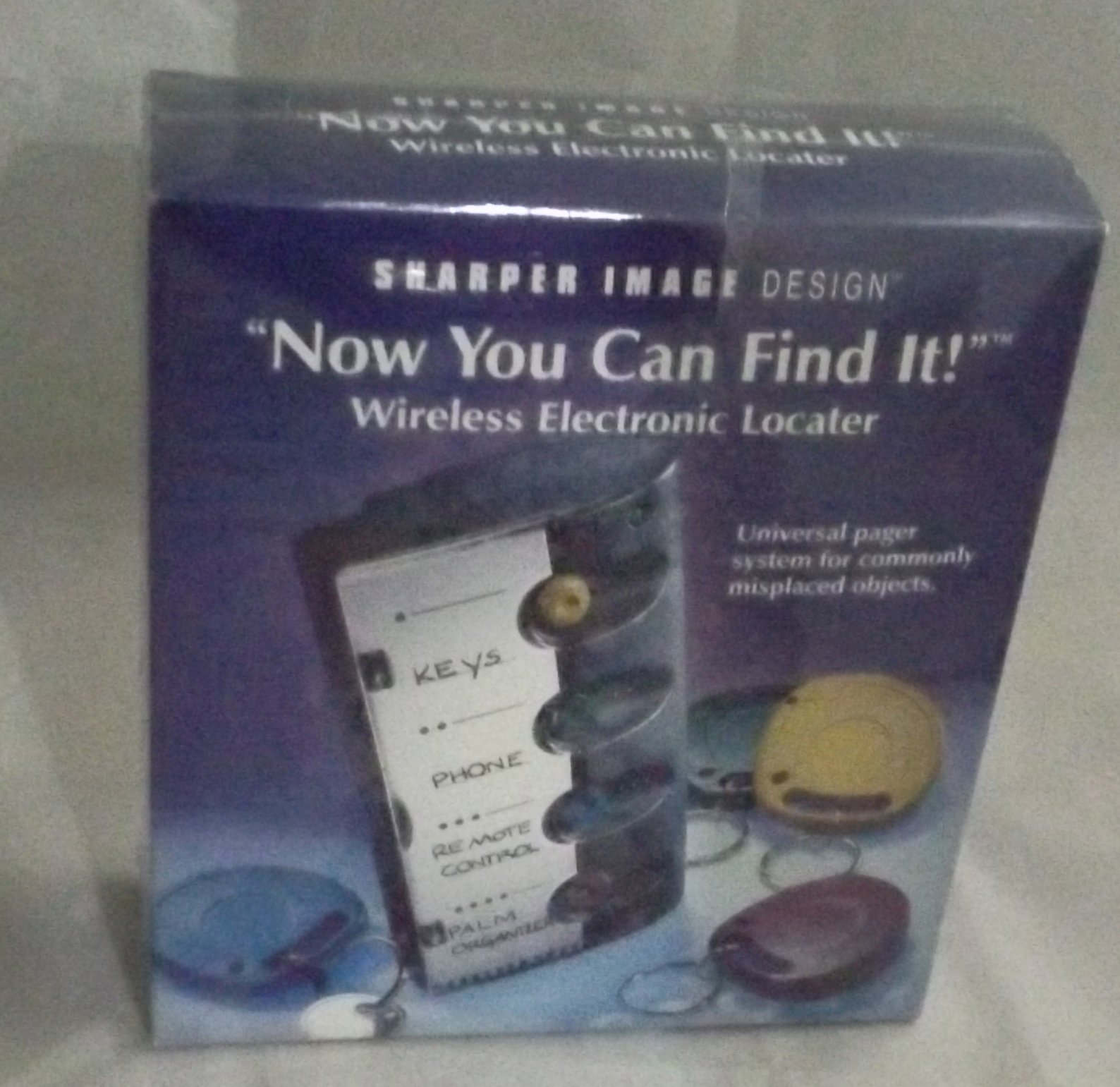
Image: The product packaging, illustrating the portable base unit with labeled buttons and a blue receiver disc attached to a key.
Setup
- Instalirajte baterije:
The portable base unit requires 2 AAA batteries (not included). Open the battery compartment on the back of the base unit, insert the batteries according to the polarity indicators (+/-), and close the compartment securely.
- Attach Receiver Discs:
Each receiver disc can be attached to an item using one of two methods:
- Keyrings: Use the provided keyrings to attach the discs to keychains, zippers, or other loops.
- Adhesive Pads: For flat surfaces like remote controls or the inside of a wallet, use the double-sided adhesive pads. Ensure the surface is clean and dry before applying.
- Labeling (Optional but Recommended):
For easy identification, write the name of the item (e.g., "KEYS", "PHONE", "REMOTE CONTROL", "PALM ORGANIZER") next to its corresponding color-coded button on the portable base unit. This helps in quickly identifying which button to press for a specific lost item.
Uputstvo za upotrebu
Follow these steps to locate a lost item:
- Identify the Lost Item: Determine which item you are trying to find.
- Press Corresponding Button: On the portable base unit, press the color-coded button that corresponds to the receiver disc attached to your lost item.
- Listen for Beeps: The receiver disc will emit an audible beeping sound.
- Search and Locate: Carry the base unit with you and move from room to room. The beeping sound will become louder and more frequent as you get closer to the lost item. The system has an effective range of approximately 30 feet.
- Preuzmi stavku: Once the beeping leads you to the item, retrieve it.
Održavanje
- Zamjena baterije: Replace the AAA batteries in the portable base unit when the signal strength weakens or the unit fails to activate receiver discs.
- čišćenje: Wipe the base unit and receiver discs with a soft, dry cloth. Do not use abrasive cleaners or immerse the units in water.
- Skladištenje: Store the unit and discs in a cool, dry place when not in use for extended periods.
Rješavanje problema
| Problem | Mogući uzrok | Rješenje |
|---|---|---|
| Receiver disc does not beep. |
|
|
| Beeping sound is too low. |
|
|
| Base unit does not power on. |
|
|
Specifikacije
- Broj modela: SI667GRY
- Brand: Oštrija slika
- Tehnologija povezivanja: Radio frekvencija (RF)
- Power Source (Base Unit): 2 x AAA baterije (nisu uključene)
- Efektivni raspon: Approximately 30 feet (line of sight, may vary with obstructions)
- Dimenzije proizvoda: 7.8 x 2.5 x 7.1 inches (packaging dimensions, actual product dimensions may vary)
- Težina artikla: 15.2 ounces (packaging weight, actual product weight may vary)
Garancija i podrška
For warranty information or technical support, please refer to the product packaging or contact Sharper Image customer service directly. Keep your purchase receipt as proof of purchase.


