Uvod
This manual provides essential instructions for the safe and efficient operation of your Sharper Image SO226 Compact CD Stereo with AM/FM Digital Tuner. Please read this manual thoroughly before using the unit and retain it for future reference.
Važna sigurnosna uputstva
- Pročitajte sve upute prije rukovanja uređajem.
- Sačuvajte ovaj priručnik za buduću upotrebu.
- Nemojte koristiti ovaj aparat u blizini vode.
- Čistite samo suhom krpom.
- Ne blokirajte ventilacijske otvore. Instalirajte u skladu s uputama proizvođača.
- Ne postavljajte u blizini izvora toplote kao što su radijatori, grejni registri, peći ili drugi uređaji (uključujući ampLifiers) koji proizvode toplotu.
- Zaštitite kabl za napajanje od gaženja ili priklještenja, posebno na utikačima, utičnicama i na mjestu gdje izlaze iz uređaja.
- Koristite samo dodatke/pribor koje je naveo proizvođač.
- Sve servise prepustite kvalificiranom servisnom osoblju. Servisiranje je potrebno ako je aparat na bilo koji način oštećen.
Sadržaj paketa
Prilikom raspakivanja provjerite da li su svi artikli prisutni:
- Sharper Image SO226 Compact CD Stereo Unit
- AC Power Adapter (if applicable, check packaging)
- Korisnički priručnik (ovaj dokument)
Product Overview
Familiarize yourself with the components and controls of your SO226 unit.
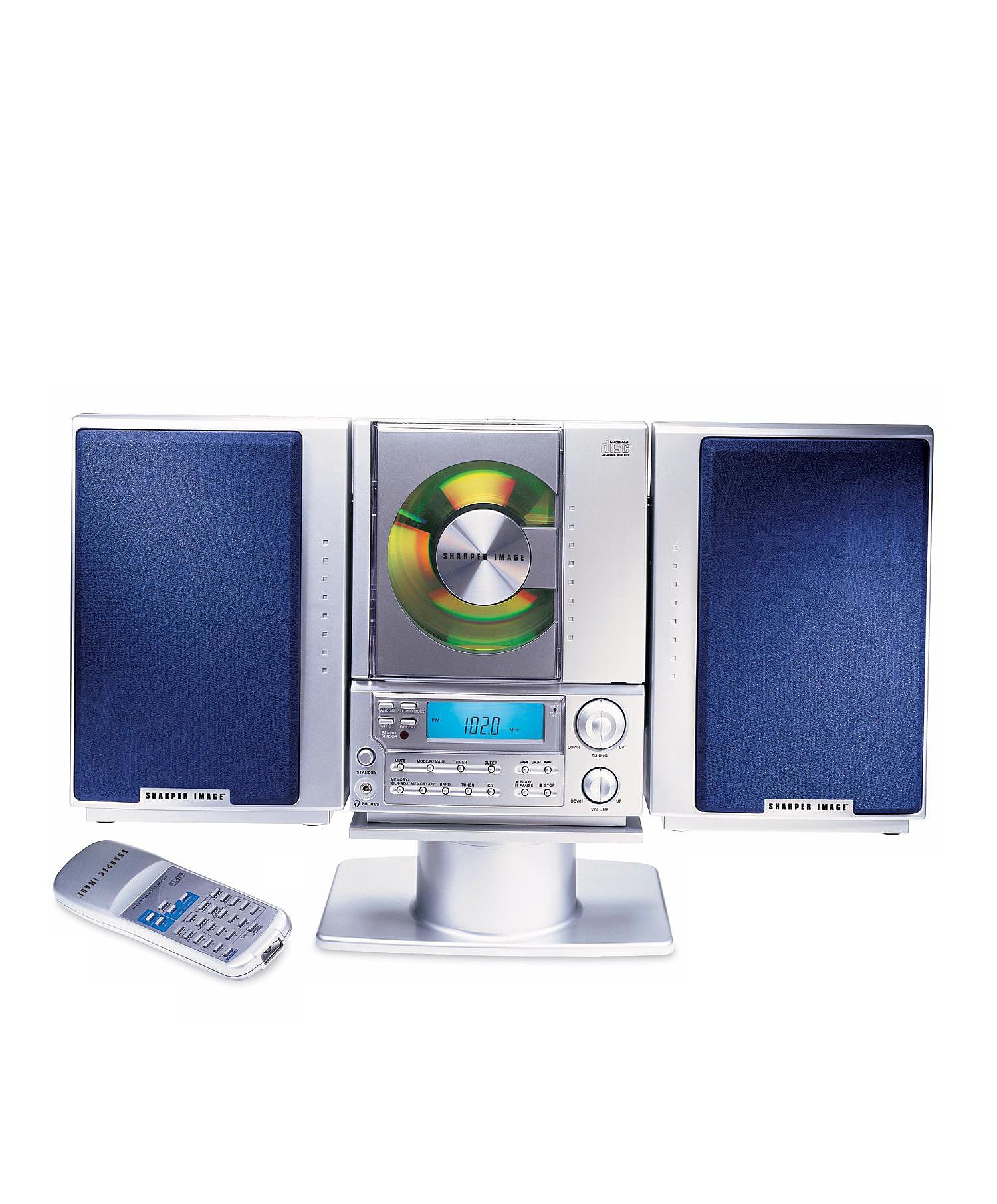
This image displays the front panel of the Sharper Image SO226 Compact CD Stereo. Visible features include the top-loading CD compartment, the digital display for radio frequencies and CD track information, and various control buttons for power, volume, CD playback, and radio tuning.
Control Panel (Typical Layout)
- Dugme POWER: Uključuje ili isključuje jedinicu.
- Dugme FUNKCIJA/REŽIM: Switches between CD, AM, and FM modes.
- Dugmad +/- za JAČINU JAČINE: Podešava nivo audio izlaza.
- Dugme PLAY/PAUSE: Pokreće ili pauzira reprodukciju CD-a.
- Dugme STOP: Zaustavlja reprodukciju CD-a.
- SKIP/SEARCH Buttons (◀◀ / ▶▶): Preskače pjesme na CD-u ili podešava radio frekvencije.
- Dugme PROGRAM: Used for programming CD tracks.
- Dugme SLEEP: Aktivira funkciju tajmera za spavanje.
- Dugmad za PODEŠAVANJE +/-: Fino podešava radio frekvencije.
- PRESET Buttons: Pohranjuje i poziva omiljene radio stanice.
- LCD ekran: Shows current mode, track number, frequency, and time.
Setup
Power Connection
- Osigurajte da je uređaj postavljen na stabilnu, ravnu površinu.
- If using batteries (not included), open the battery compartment on the bottom or back of the unit and insert the required batteries, observing correct polarity.
- Alternatively, connect the AC power adapter (if supplied) to the DC IN jack on the unit and then plug the adapter into a standard wall outlet.
Postavljanje antene
- For FM reception, extend the telescopic antenna fully. Adjust its position for optimal reception.
- For AM reception, the unit has a built-in ferrite bar antenna. Rotate the entire unit for best AM reception.
Uputstvo za upotrebu
Rad CD plejera
- Pritisnite POWER tipka za uključivanje jedinice.
- Pritisnite FUNCTION/MODE pritiskajte dugme dok se na ekranu ne pojavi 'CD'.
- Otvorite poklopac pretinca za CD.
- Stavite CD u pretinac sa stranom s etiketom okrenutom prema gore.
- Close the CD compartment cover. The unit will read the CD, and the total number of tracks will be displayed.
- Pritisnite PLAY/PAUSE dugme za početak reprodukcije.
- Za pauziranje pritisnite PLAY/PAUSE ponovo. Pritisnite ga još jednom za nastavak.
- Za zaustavljanje reprodukcije pritisnite STOP dugme.
- Da biste prešli na sledeću numeru, pritisnite SKIP/SEARCH ▶▶ dugme.
- To go back to the beginning of the current track or to the previous track, press the SKIP/SEARCH ◀◀ dugme.
- To fast forward or rewind within a track, press and hold the SKIP/SEARCH ▶▶ or ◀◀ dugme tokom reprodukcije.
AM/FM radio operacija
- Pritisnite POWER tipka za uključivanje jedinice.
- Pritisnite FUNCTION/MODE pritiskajte dugme dok se na ekranu ne pojavi 'AM' ili 'FM'.
- Ručno podešavanje: Pritisnite TUNING +/- dugmad za podešavanje frekvencije korak po korak.
- Automatsko skeniranje: Pritisnite i držite TUNING +/- buttons for a few seconds. The tuner will scan and stop at the next strong station.
- Pohranjivanje pretpostavki: Podesite željenu stanicu. Pritisnite PROGRAM dugme. Broj prethodno podešene lokacije će treptati. Koristite SKIP / TRAŽI tipke za odabir unaprijed postavljenog broja, a zatim pritisnite PROGRAM ponovo za potvrdu.
- Podsjećajući na unaprijed zadane postavke: U radio modu pritisnite PRESET buttons to cycle through your stored stations.
Funkcija tajmera mirovanja
The unit features a convenient sleep timer that automatically turns off the sound after a set period.
- While the unit is playing (CD or Radio), press the SLEEP dugme.
- Svakim pritiskom na SLEEP button will cycle through available sleep times (e.g., 10, 20, 30, 60, 90 minutes, or OFF).
- Select your desired sleep duration. The unit will automatically power off after the selected time has elapsed.
Održavanje
- Čišćenje jedinice: Obrišite vanjski dio uređaja mekom, suhom krpom. Ne koristite abrazivna sredstva za čišćenje ili rastvarače.
- CD njega: Handle CDs by their edges. Keep them clean and free of scratches. If a CD is dirty, wipe it gently with a soft, lint-free cloth from the center outwards.
- Skladištenje: When not in use for extended periods, disconnect the power adapter and remove batteries. Store the unit in a cool, dry place.
Rješavanje problema
Ako naiđete na probleme, pogledajte sljedeće uobičajene probleme i rješenja:
- Nema napajanja:
- Ensure the AC power adapter is securely plugged into both the unit and a working wall outlet.
- If using batteries, check if they are inserted correctly and are not depleted. - Nema zvuka:
- Check the volume level and increase it if necessary.
- Ensure the correct function mode (CD/AM/FM) is selected. - CD Not Playing / Skipping:
- Ensure the CD is inserted correctly with the label side up.
- Clean the CD for any dirt or scratches.
- Try a different CD to rule out a faulty disc.
- Ensure the CD compartment cover is fully closed. - Slab radio prijem:
- For FM, fully extend and adjust the telescopic antenna.
- For AM, rotate the entire unit for better signal.
- Move the unit away from other electronic devices that may cause interference. - Dugmad ne reagiraju:
- Try turning the unit off and on again.
- Disconnect power for a few minutes, then reconnect.
Specifikacije
| Broj modela | SO226 |
| Dimenzije proizvoda (D x Š x V) | 1.3 x 19 x 5.5 inča (3.3 x 48.3 x 14 cm) |
| Težina artikla | 5 funte (2.27 kg) |
| Vrsta zvučnika | Stereo |
| Izvor napajanja | Battery Powered (AC adapter typically included or sold separately) |
| Color (as per specific variant) | Plava |
Garancija i podrška
For warranty information and customer support, please refer to the documentation included with your purchase or visit the official Sharper Image webSačuvajte dokaz o kupovini za slučaj reklamacije.


